TROUBLESHOOTING
If your AiMesh router cannot find any AiMesh node nearby or synchronization
fails, please check followings and try again.
a
Move your AiMesh node closer to the AiMesh router ideally. Ensure it is within 1-3
meters.
b
Your AiMesh node is powered on.
c
Your AiMesh node is upgraded to AiMesh supported firmware.
i
Download AiMesh - supported fireware at: https://www.asus.com/AiMesh/
ii
Power on your AiMesh node and connect it to your PC via a network cable.
iii
Launch a web GUI. You will be redirected to the ASUS Setup Wizard. If not,
navigate to http://router.asus.com
iv
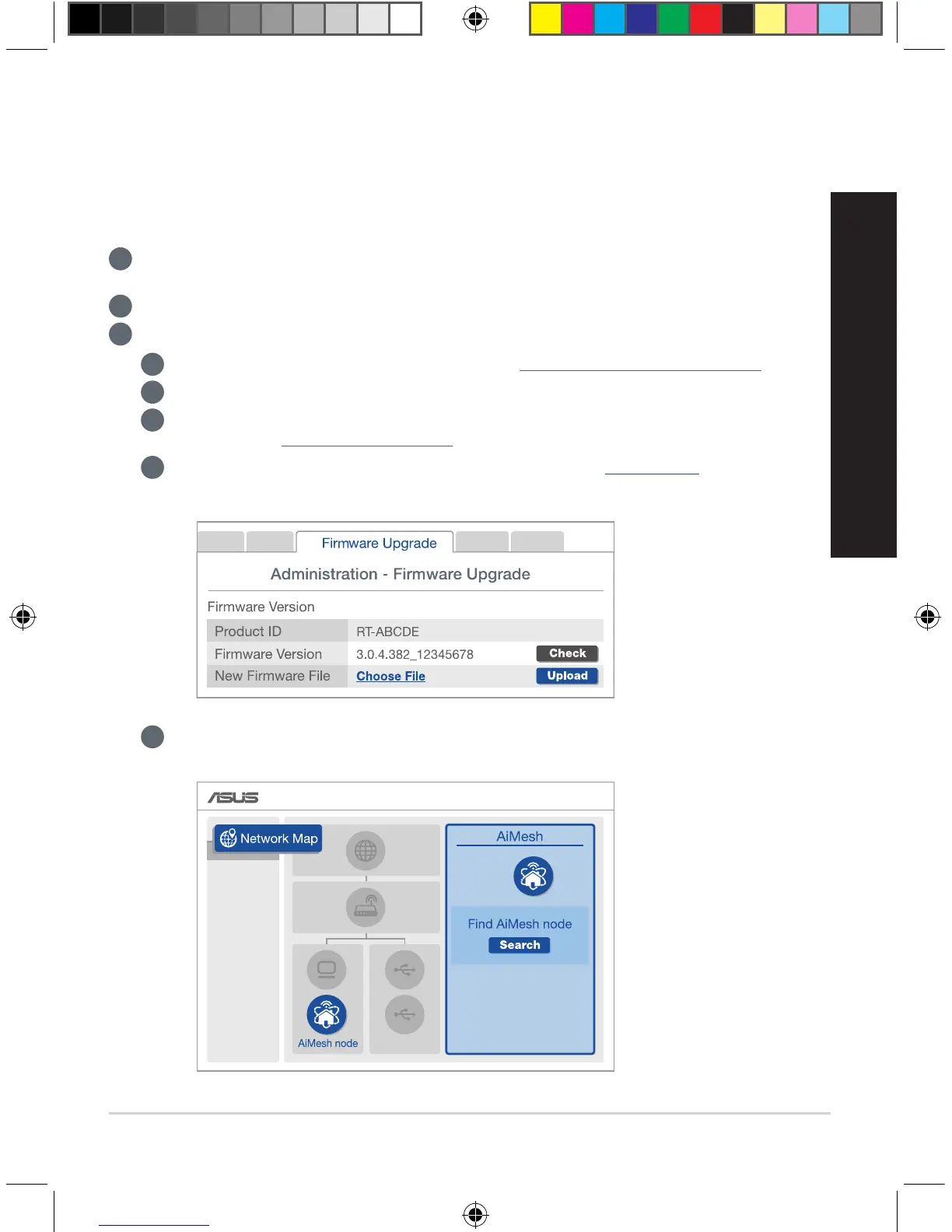
Go to Administration > Firmware Upgrade. Click on Choose File, and upload
the AiMesh-supported firmware.
v
After firmware uploaded, please go to Network Map page to confirm whether
AiMesh icon showed up.
U13939-2_RT-AC1900U_AiMesh_QSG.indb 11 2018/3/29 14:24:20



 To Next Page