Installing your router
IMPORTANT:Beforeinstallingtherouter,ensurethatInternetconnec-
tionisavailable.
1. Position your wireless router.
Fortheoptimalwirelesstransmissionbetweenthewirelessrouterandconnect-
edwirelessdevices,ensurethatyou:
• Placethewirelessrouterinacentralizedareaforamaximumwirelesscoverage
forthenetworkdevices.
• Keepthewirelessrouterawayfrommetalobstructionsandawayfromdirect
sunlight.
• Keepthewirelessrouterawayfrom802.11gor20MHzonlyWi-Fidevices,
2.4GHzcomputerperipherals,Bluetoothdevices,cordlessphones,transformers,
heavy-dutymotors,uorescentlights,microwaveovens,refrigerators,andother
industrialequipmenttopreventsignalinterferenceorloss.
• Alwaysupdatetothelatestrmware.VisittheASUSwebsiteat
http://www.asus.comtogetthelatestrmwareupdates.
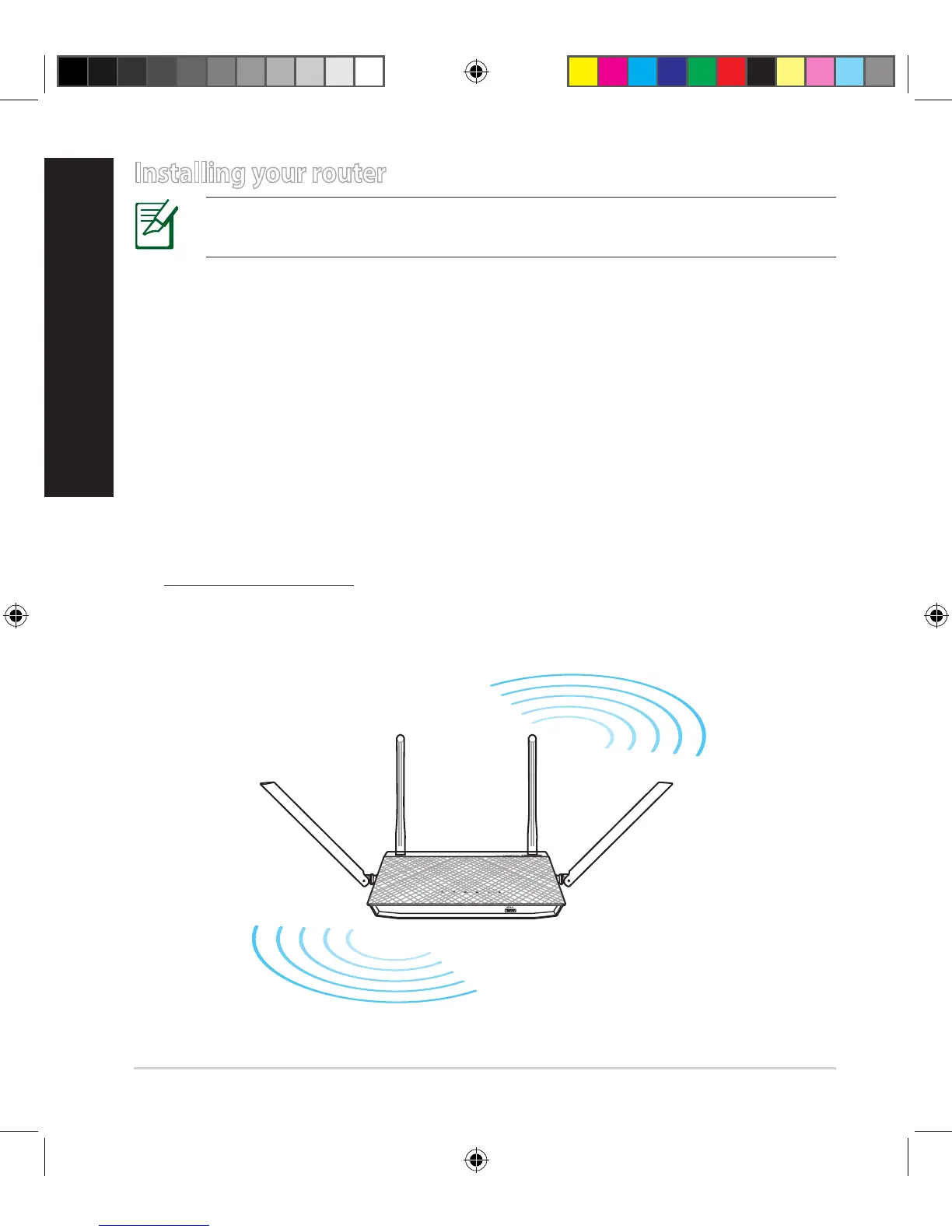
• Toensurethebestwirelesssignal,orientthefourantennasasshowninthe
drawingbelow.
45
°
45
°
NA11652-RT-AC58U_QSG_V2.indb 4 2016-06-28 15:11:02



 To Next Page