80
You forgot the SSID (network name) or network password
• SetupanewSSIDandencryptionkeyviaawiredconnection
(Ethernet cable). Launch the web GUI, go to Network Map,
click the router icon, enter a new SSID and encryption key, and
then click Apply.
• Resetyourroutertothedefaultsettings.LaunchthewebGUI,
go to Administration > Restore/Save/Upload Setting, and
click Restore. The default login account and password are both
“admin”.
Firmware upgrade failed.
Launch the rescue mode and run the Firmware Restoration utility.
Refer to section 5.2 Firmware Restoration on how to use the
Firmware Restoration utility.
Cannot access Web GUI
Before configuring your wireless router, do the steps described in
this section for your host computer and network clients.
A. Disable the proxy server, if enabled.
NOTE: The screenshots provided are for Windows® 7 only. The steps and
options may be different for Windows® 8 and Windows® 8.1.
Windows
®
7/8
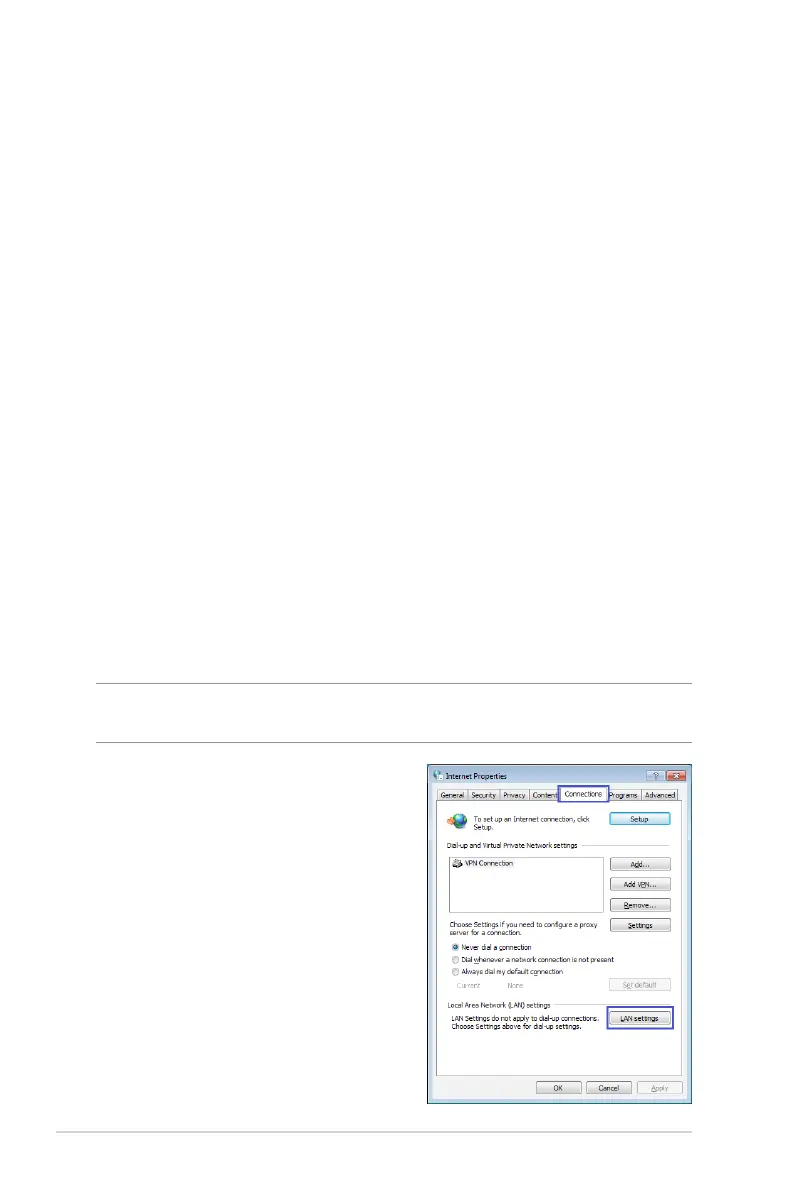
1. Click Start > Internet Explorer
to launch the browser.
2. Click Tools > Internet options
> Connections tab > LAN
settings.



 To Next Page