EasyManua.ls Logo

Asus Strix Raid DLX - User Manual

Asus Strix Raid DLX
27 pages
Print Icon
To Next Page IconTo Next Page
Loading...
STRIX Sound Card Series
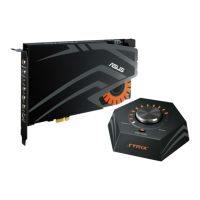
Strix Raid DLX
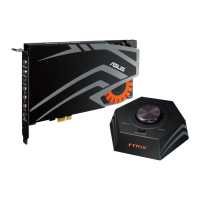
Strix Raid PRO
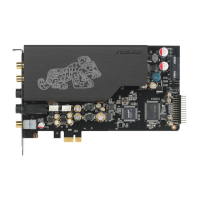
Strix Soar
User Manual
Question and Answer IconNeed help?

Do you have a question about the Asus Strix Raid DLX and is the answer not in the manual?

Summary

Introduction

Package Contents

Lists items included in the sound card package.

System Requirements

Details the hardware and software needed for installation.

General Specification

Details technical specifications for the sound card.

Hardware Overview

Sound Card Ports

Describes the physical connectors on the sound card.

Control Box

Details the ports and controls on the external Strix control box.

Driver Installation

Installing the Driver

Step-by-step guide to installing the sound card driver.

Uninstalling or Reinstalling the Driver

Instructions for removing and re-installing the driver.

Connecting Speakers and Peripherals

Connecting to Strix Control Box

Guides connection of the control box to the sound card.

Connecting Control Box External Devices

Details connecting mic and headphones to the control box.

Connecting Digital Audio Input

Details how to connect digital audio sources via S/PDIF.

Connecting Microphone and Line-In

Explains how to connect microphones and line-level audio sources.

Connecting Stereo Headphones

Guides connection of stereo headphones to the sound card.

Connecting 2-Channel Speakers

Details connecting stereo speakers to the sound card.

Connecting 4-Channel Speakers;Amplifier

Details connecting 4-channel speakers or amplifiers.

Connecting 5.1 Channel Speakers

Details connecting 5.1 channel speakers.

Connecting 7.1 Channel Speakers

Details connecting 7.1 channel speakers.

Software Utilities

Sonic Studio Overview

Introduces the Sonic Studio software and its features.

Sonic Radar Overview

Explains the Sonic Radar visualization tool for gaming.

Troubleshooting

Cannot Install Audio Driver

Solutions for driver installation issues.

Audio Center Not Found

Steps to resolve issues finding the audio center utility.

No Sound from Analog Speakers

Troubleshoots no sound from analog speakers.

No Sound from S;PDIF Output

Troubleshoots no sound from S/PDIF output.

Audio Input Issues

Solves issues with audio input not being heard.

S;PDIF PCM Output Channels

Explains PCM output limitations for S/PDIF.

Overview

This document is a user manual for the ASUS STRIX Sound Card Series, encompassing the Strix Raid DLX, Strix Raid PRO, and Strix Soar models. It provides comprehensive instructions for installation, connection of peripherals, and software utility usage, alongside troubleshooting tips.

Function Description

The ASUS STRIX Sound Card Series is designed to enhance the audio experience for PC users, particularly for gaming and entertainment. These sound cards provide high-fidelity audio output and input capabilities, supporting various speaker configurations and headphones. They integrate advanced sound processing algorithms and virtual surround effects to deliver immersive audio. The series includes models with a dedicated control box (Strix Raid DLX/PRO) for convenient on-the-fly adjustments, offering a more interactive user experience. The sound cards process audio signals, converting digital audio to analog for speakers and headphones, and analog input to digital for recording or processing. They support multiple audio channels, from stereo to 7.1 surround sound, catering to diverse audio setups.

Usage Features

The STRIX sound cards offer a range of features for versatile audio usage:

  • Output Select / Volume Control (Control Box): This knob allows users to switch the audio output source between headphones and speakers with a simple tab. A long press mutes the selected output. Turning the knob clockwise or anti-clockwise adjusts the volume level. In "Custom Mode," this knob can be used to turn on/off a selected effect and adjust its intensity.
  • STRIX RAID Mode (Control Box): This is a programmable key that enables users to customize and lock a special effect from the Sonic Studio software. This allows for spontaneous control and adjustment of effects during gameplay. Pressing the key enables or disables "Custom Mode," indicated by an orange LED. Users can configure this key in Sonic Studio to control specific audio effects.
  • Headphone Output Port: The sound card and control box (for DLX/PRO models) feature a dedicated headphone output port with a built-in high-quality amplifier, designed to drive various headphones directly.
  • Microphone Input Port: A 3.5mm jack is provided for connecting an external PC microphone, facilitating voice communication, recording, or karaoke. The sound card includes a high-quality microphone pre-amplifier.
  • Line In Port: This 3.5mm port allows connection of analog devices such as MP3 players, CD players, or music synthesizers for audio recording or processing.
  • Analog Speaker System Connections: The sound card supports various analog speaker configurations, including 2-channel, 4-channel, 5.1-channel, and 7.1-channel systems, through dedicated 3.5mm output jacks for Front, Rear, Center/Subwoofer, and Side Surround channels.
  • Digital S/PDIF Output: An optical digital output jack supports connection to external digital decoders, digital speaker systems, home theater systems, or AV receivers. It outputs digital audio formats including PCM, Dolby Digital, DTS, and WMA-Pro.
  • TOSLINK and COAXIAL SPDIF Input Connection: The manual illustrates connecting to an AVR (Audio/Video Receiver) via S/PDIF, suggesting the card can receive digital audio from external sources like CD/DVD players or other PCs/notebooks with S/PDIF output.
  • Software Utilities (Sonic Studio & Sonic Radar):
    • Sonic Studio: This utility provides advanced sound algorithms and virtual surround effects to enhance gaming and entertainment. Users can adjust various audio settings, including equalization, bass boost, voice clarity, compression, virtual surround, reverb, noise gate, and perfect voice. It offers profiles for different audio scenarios and allows for detailed customization of playback and input devices.
    • Sonic Radar: This visualization overlay helps gamers visually identify audio elements in games, such as threats that are heard but not immediately visible. Users can customize sensitivity and graphics settings to suit different gaming scenarios.
  • LED Indicators (Control Box): LEDs display the intensity level of volume or effects and indicate the selected output device. The output source LED turns red when the device is muted.

Maintenance Features

The manual provides guidance on driver installation and uninstallation, which are crucial for maintaining optimal device performance:

  • Driver Installation: The sound card requires a device driver to function correctly with the Windows operating system. The installation process involves inserting the support CD, running the setup.exe, and following on-screen instructions. Users are prompted to read and accept the End User License Agreement. A computer restart may be required after installation.
  • Driver Uninstallation/Reinstallation: Instructions are provided for uninstalling the driver through the Windows Control Panel ("Add/Remove Programs"). For reinstallation, it is recommended to uninstall the existing software first before proceeding with a fresh installation. This ensures a clean and stable driver environment.
  • Troubleshooting: A dedicated section addresses common issues such as inability to install the driver, the STRIX Sound Card Series Audio Center not being found, no sound from analog speakers, and no sound from S/PDIF output. This section guides users through checking physical connections, verifying driver installation, checking Windows audio settings, and ensuring correct software configurations (e.g., muting, default playback device, S/PDIF output enablement, decoder settings). It also clarifies limitations of PCM output over S/PDIF.
  • KensingtonĀ® Security Slot (Control Box): The control box includes a Kensington security slot, allowing users to physically secure the device to prevent theft.

Overall, the ASUS STRIX Sound Card Series is designed for users seeking advanced audio performance and customization, with a focus on gaming and multimedia. The inclusion of a control box for some models enhances usability by providing quick access to key audio adjustments. Regular driver maintenance and adherence to troubleshooting steps ensure a smooth and high-quality audio experience.

Asus Strix Raid DLX Specifications

General IconGeneral
InternalYes
Audio quality24 bit
Frequency range10 - 48000 Hz
Audio output channels7.1 channels
Digital-to-Analog Conversion (DAC)24-bit/192kHz
Line-in Signal-to-Noise Ratio (SNR)124 dB
Line-out Signal-to-Noise Ratio (SNR)117 dB
Line-in Total Harmonic Distortion (THD)0.000316 %
Line-out Total Harmonic Distortion (THD)0.0009 %
Headphone outputs1
Windows operating systems supportedWindows 7 Enterprise, Windows 7 Enterprise x64, Windows 7 Home Basic, Windows 7 Home Basic x64, Windows 7 Home Premium, Windows 7 Home Premium x64, Windows 7 Professional, Windows 7 Professional x64, Windows 7 Starter, Windows 7 Starter x64, Windows 7 Ultimate, Windows 7 Ultimate x64, Windows 8, Windows 8 Enterprise, Windows 8 Enterprise x64, Windows 8 Pro, Windows 8 Pro x64, Windows 8 x64, Windows 8.1, Windows 8.1 Enterprise, Windows 8.1 Enterprise x64, Windows 8.1 Pro, Windows 8.1 Pro x64, Windows 8.1 x64
Volume controlRotary
Processor modelHigh-Definition Sound
Full-Scale voltage5.65 V
Analog audio output5
Minimum storage drive space60 MB
Minimum RAM256 MB
ChipsetC-Media 6632AX
Weight and Dimensions IconWeight and Dimensions
Depth190 mm
Width130 mm
Height22 mm

Related product manuals