11
ASUS Xonar D1
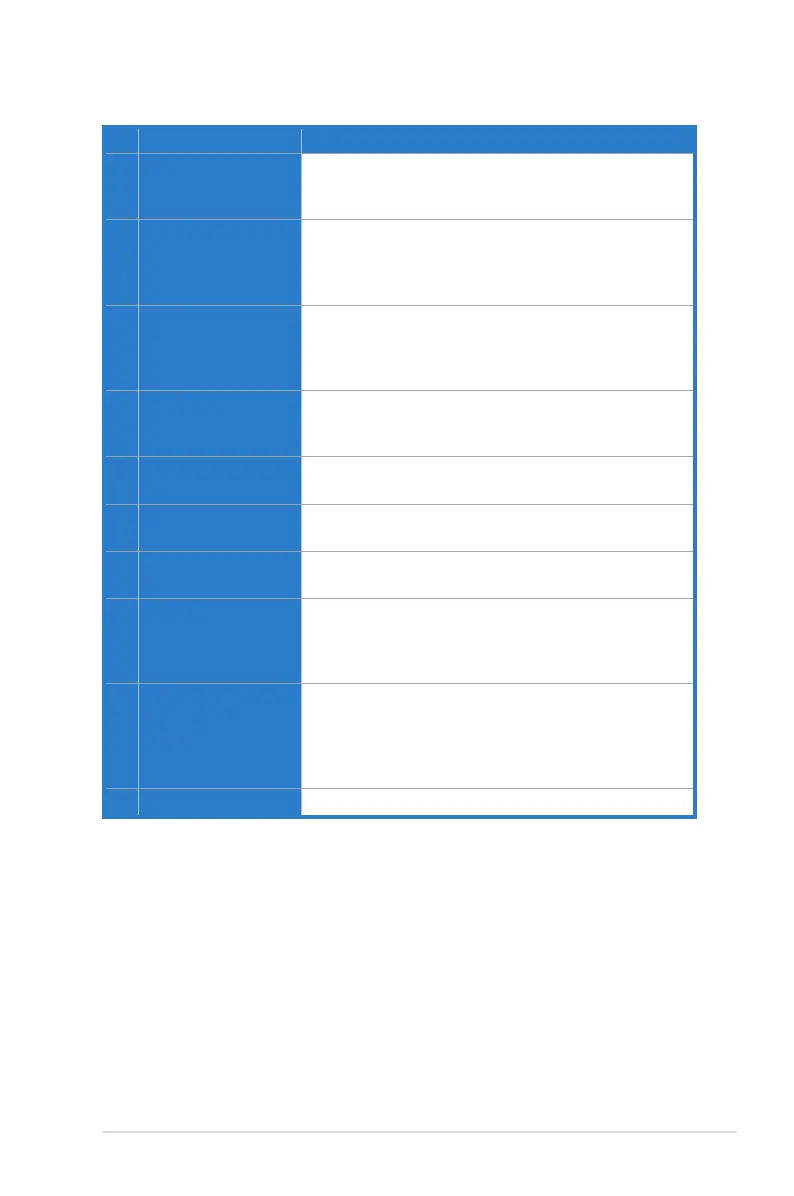
No Item Description
1 Microphone jack
Connect your external PC microphone to this 3.5mm jack
for voice input. Built-in high-quality Microphone pre-
amplifier.
1 Line Input jack
Connect analog devices like MP3 players, CD players,
music synthesizers and other line-level sound sources
to this 3.5mm jack for audio recording or processing.
(Through Ultra-high fidelity 115dB SNR A-D converter)
1 S/PDIF Output jack
Optical S/PDIF output jack. Connects to an external
digital decoder or digital speaker systems, Home Theater
systems, AV receivers for outputting digital audio including
PCM, Dolby Digital, DTS, WMA-Pro, etc.
2 Headphone/Front
Output jack
Connect your headphones or 2/2.1 channel speakers to
this jack. For multi-channel speaker systems, connects to
the front left/right input on the powered speakers.
3 Side Surround Output
jack
Connects to the surround channel input on
4/4.1/5.1/6.1/7.1 powered analog speakers.
4 Center/Subwoofer
Output jack
Connects to the front center/subwoofer input on 5.1/6.1/7.1
powered analog speakers.
5 Rear/back Surround
Output Jack
Connects to the Back Surround input on 6.1/7.1 powered
analog speakers.
6 Front panel audio
header
Connect one end of the front panel audio cable to the front
panel audio header on the D1 card, the other end to the
chassis-mounted front panel audio I/O module on your
motherboard.
7 Aux Input Header
4-pin header. Usually connects to the Analog Audio output
of TV tuner card or other sound source inside your PC
system. (To monitor your TV tuner card’s audio from this
Aux-In, you must enable the “monitor” function for Aux-In in
the Xonar Audio Center software’s recording mixer.)
8 S/PDIF Out Header
Connects to the graphics card with HDMI support.



 To Next Page