25
ASUS Xonar D1
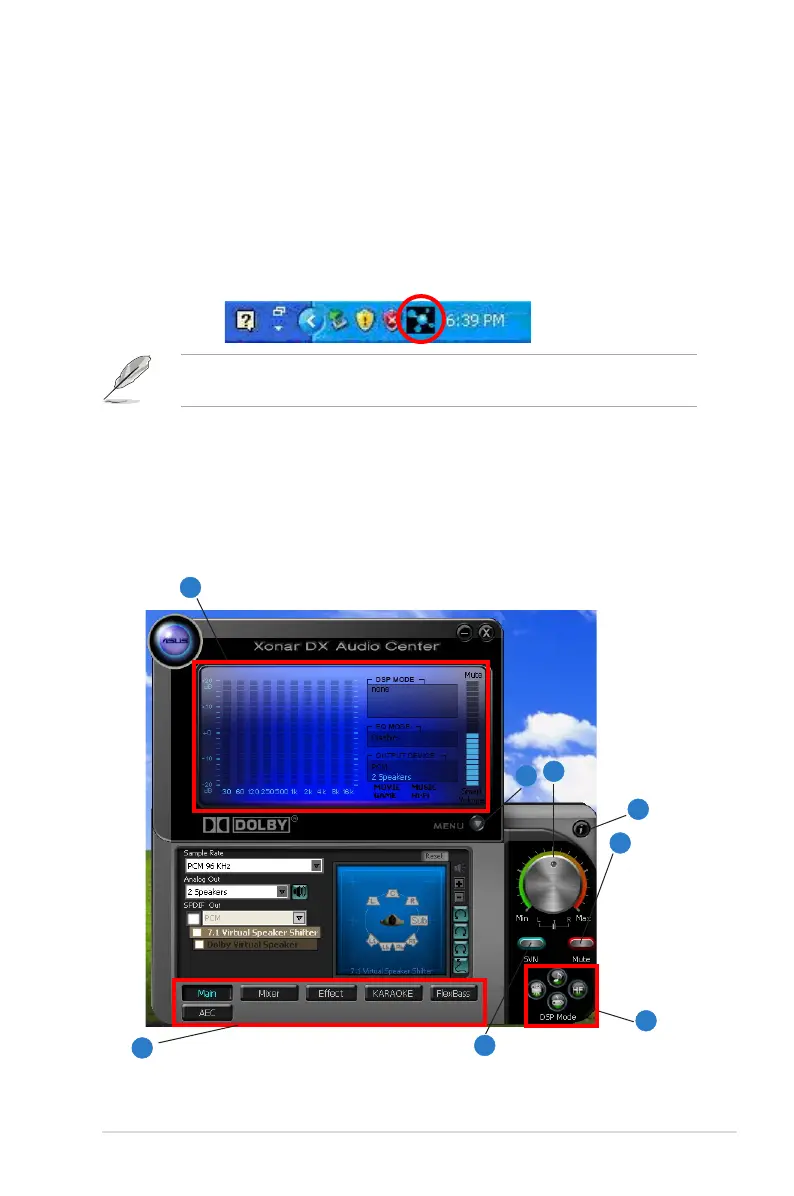
6. Xonar D1 Driver Guide
6.1 Introduction to the Xonar D1 Audio Center GUI
1. After the driver installation is complete and your computer has been
rebooted, you will find the Xonar D1 Audio Center’s icon in the system tray on
the bottom right-hand corner of the screen. Double click this icon to open the
Xonar Audio Center utility.
If the icon could not be found in the system tray, go to the Windows Control
Panel and double click the “Xonar D1 Audio Center” icon.
2. The Xonar D1 Audio Center is the Graphic User Interface (GUI) for the Xonar
D1 driver. You can control the functions and features of the Xonar D1 driver
on the Audio Center. The following picture shows a basic overview of the
Xonar D1 Audio Center. The following sections of this manual will describe its
functions in more detail.
1
2
3
8
5
6
4
7



 To Next Page