21ASUS Xonar DGX
6. Xonar Audio Center
6.1 Xonar Audio Center GUI
1. After the driver installation is complete and
your computer has been rebooted, you will
system tray on the bottom right-hand corner of the screen. Double click this
icon to open the Xonar Audio Center utility.
If the icon could not be found in the system tray, launch the Xonar Audio Center
from the Windows desktop by clicking Start > All Programs > ASUS Xonar
DGX Audio > Xonar DGX Audio Center.
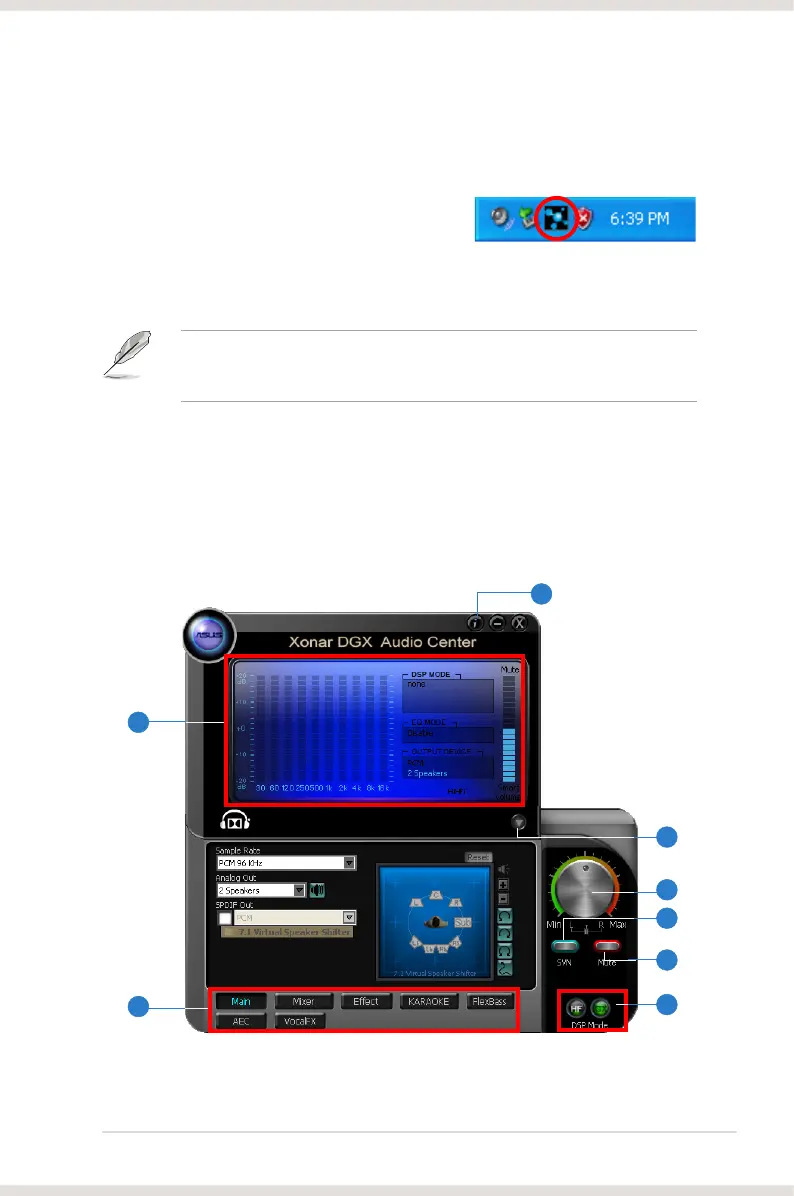
2. The Xonar Audio Center is the Graphic User Interface (GUI) for the Xonar
DGX driver. You can control the functions and features of the Xonar DGX
driver on the Xonar Audio Center. The following picture shows a basic
overview of the Xonar Audio Center. The following sections of this manual will
describe its functions in more detail.
1
8
3
4
5
6
7
2


 To Next Page