ASUS Z170-E Series
1-25
2. Intel
®
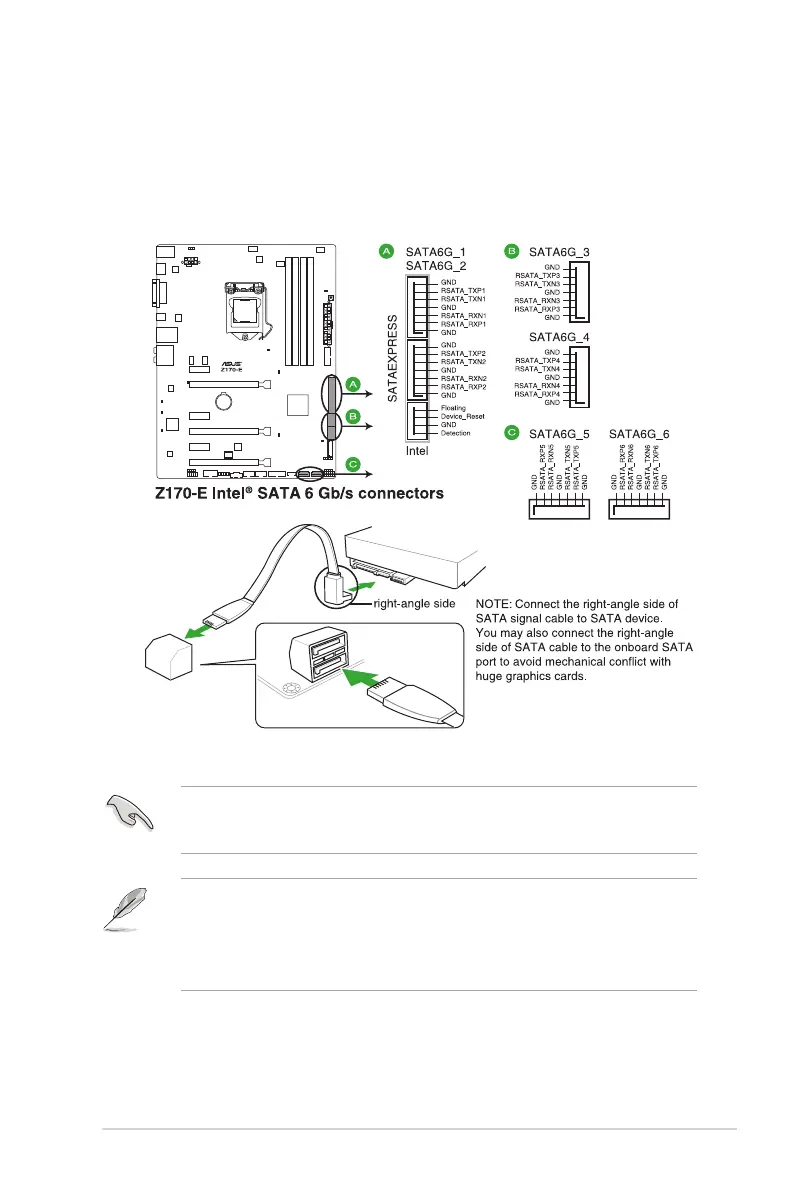
Z170 Serial ATA 6.0 Gb/s connectors (7-pin SATA6G_12, SATA6G_34,
SATA6G_56, SATA Express)
These connectors connect to Serial ATA 6 Gb/s hard disk drives via Serial ATA 6 Gb/s
signal cables. If you installed Serial ATA hard disk drives, you can create a RAID 0, 1,
5, and 10 conguration with the Intel
®
Rapid Storage Technology through the onboard
Intel
®
Z170 chipset.
These connectors are set to [AHCI Mode] by default. If you intend to create a Serial ATA
RAID set using these connectors, set the SATA Mode item in the BIOS to [RAID Mode].
Refer to section 2.6.5 PCH Storage Configuration for details.
• The M.2 socket shares SATA ports with SATA Express. Only one SATA device could
be activated. To use an M.2 SATA device, refer to section 2.6.8 Onboard Devices
Configuration regarding the BIOS switch.
• The SATA EXPRESS connector can support one SATA Express device or two SATA
devices.






 To Next Page