1-26
Chapter 1: Product Introduction
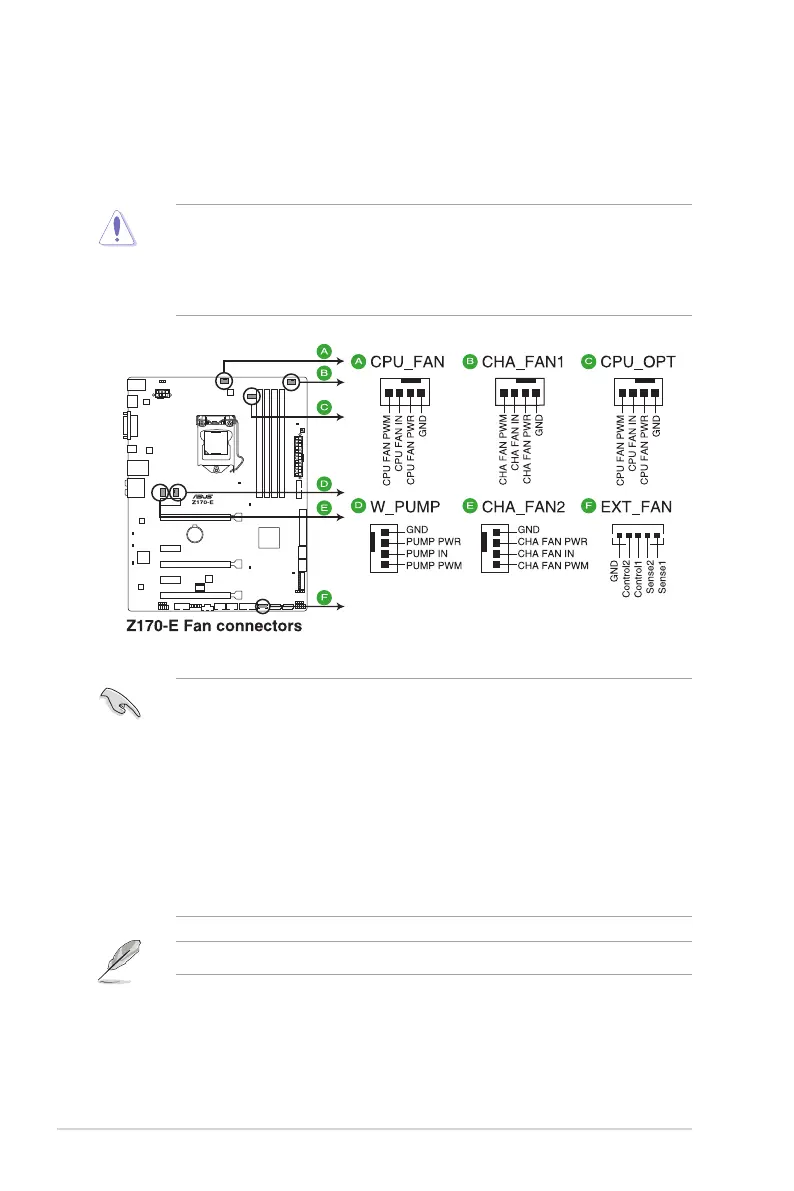
3. CPU, water pump, CPU optional, extension, and chassis fan connectors (4-pin
CPU_FAN; 4-pin W_PUMP; 4-pin CPU_OPT; 5-pin EXT_FAN; 4-pin CHA_FAN1-2)
Connect the fan cables to the fan connectors on the motherboard, ensuring that the
black wire of each cable matches the ground pin of the connector.
• DO NOT forget to connect the fan cables to the fan connectors. Insufcient air ow
inside the system may damage the motherboard components. These are not jumpers!
Do not place jumper caps on the fan connectors! The CPU_FAN connector supports a
CPU fan of maximum 1A (12W) fan power.
• Ensure that the CPU fan cable is securely installed to the CPU fan connector.
• The CPU_FAN connector supports the CPU fan of maximum 1A (12W) fan power.
• W_PUMP function support depends on water cooling device.
• The CPU_FAN connector and CHA_FAN connectors support the ASUS FAN Xpert 3
feature.
• The CPU fan connector detects the type of CPU fan installed and automatically
switches the control modes. To congure the CPU fan’s control mode, go to
Advanced Mode > Monitor > CPU Q-Fan Control item in BIOS.
• The chassis fan connectors support DC and PWM modes. To set these fans to DC or
PWM, go to Advanced Mode > Monitor > Chassis Fan 1-2 Q-Fan Control items in
BIOS.
The FAN EXTENSION CARD is purchased separately.





 To Next Page