Chapter 2: BIOS information
2-5
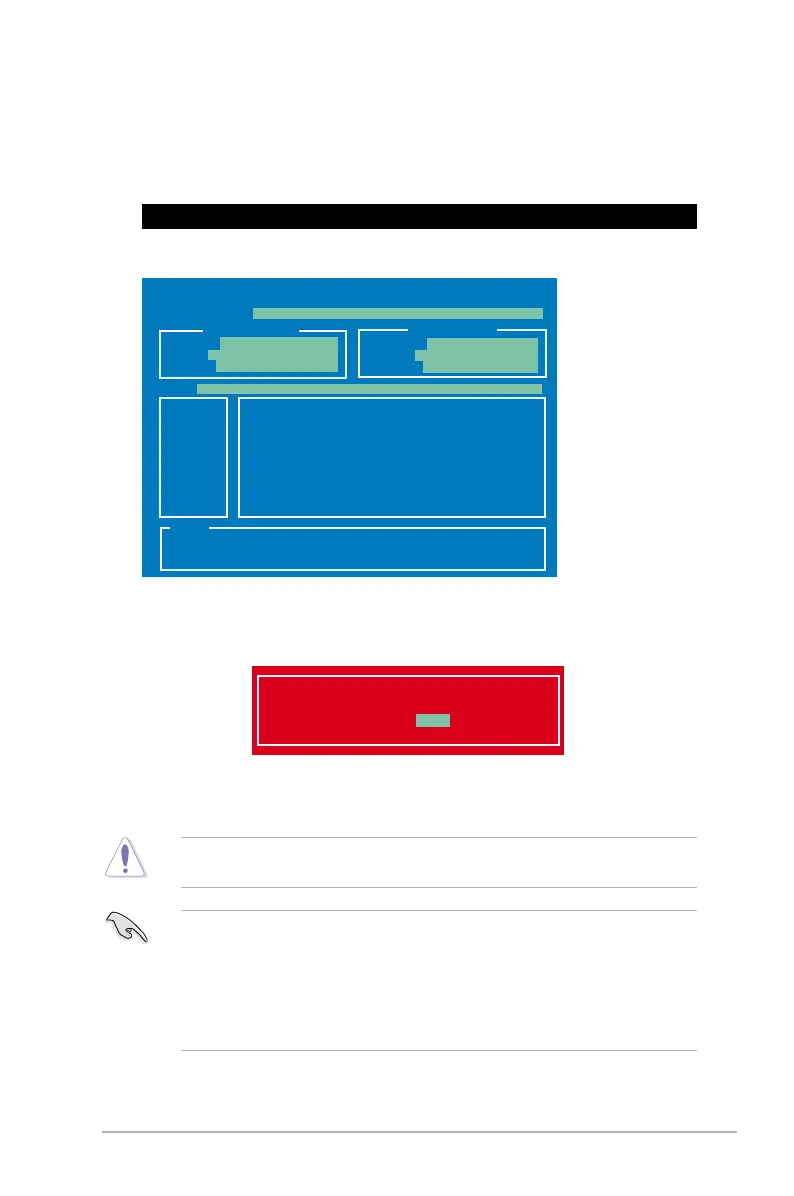
2. The BIOS Updater screen appears as below.
Updating the BIOS le
1. At the FreeDOS prompt, type bupdater /pc /g and press <Enter>.
D:\>bupdater /pc /g
4. Select Yes and press <Enter>. When BIOS update is done, press <ESC> to exit BIOS
Updater. Restart your computer.
DO NOT shut down or reset the system while updating the BIOS to prevent system boot
failure!
• For BIOS Updater version 1.30 or later, the utility automatically exits to the DOS
prompt after updating BIOS.
• Ensure to load the BIOS default settings to ensure system compatibility and stability.
Select the Load Optimized Defaults item under the Exit BIOS menu.
disconnected them.
Are you sure to update BIOS?
Yes No
ASUSTek BIOS Updater for DOS V1.30 [2013/02/22]
Current ROM
Update ROM
A:
Note
[Enter] Select or Load [Tab] Switch [V] Drive Info
[Up/Down/Home/End] Move [B] Backup [Esc] Exit
Z87A.CAP 2097152 2013-02-22 17:30:48
PATH:
BOARD:
VER:
DATE:
FLASH TYPE:
MX1C 25L1065A
BOARD:
VER:
DATE:
A:\
Z87-A
0204
01/01/2013
UNKNOWN
UNKNOWN
UNKNOWN


 To Next Page