Connect the Power Adaptor
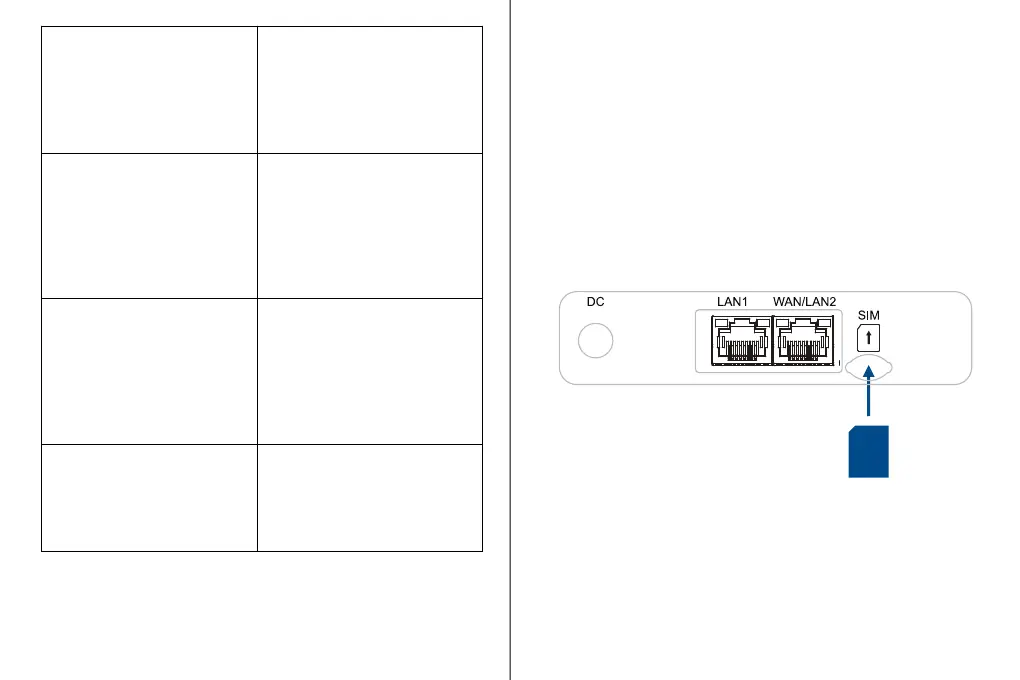
1. Install the SIM card as directed by the image above
the spring-loaded SIM slot.
2. To remove a SIM, press the edge of the SIM inward
and the SIM will pop outward from the SIM slot.
NOTE: Use Nano SIM (4FF) Card Size
Setting up your WB550 5G
FWA Router
LEDs
Indicates device status
with an individual LED.
Refer to the LED
descriptions table on
page 5 for more details.
Use this port to connect
the Power adapter for
power supply.
Use this port to connect
your wired device over
Ethernet.
Use this port to connect
your wired device over
Ethernet or connect to WAN
when the port is configured
in WAN mode.
The U-SIM card must
be inserted into the 4FF
SIM Slot (see image).
Press this button for 5
seconds to activate the
WPS feature. This helps
connect wireless devices
without entering the WiFi
Password.
Use a pin to push and
hold this button for about
5 seconds for factory
reset.
Provides basic information
about the device (e.g.
Model name, IMEI, WiFi
Details etc).
1. Connect your Power adaptor to wall outlets.
2. Connect the Power Adaptor output with the DC Port
(12V) of the WB550 FWA Router. If power is working,
will find the Power LED is turned On.
Install a 4FF SIM
4FF
SIM



 To Next Page