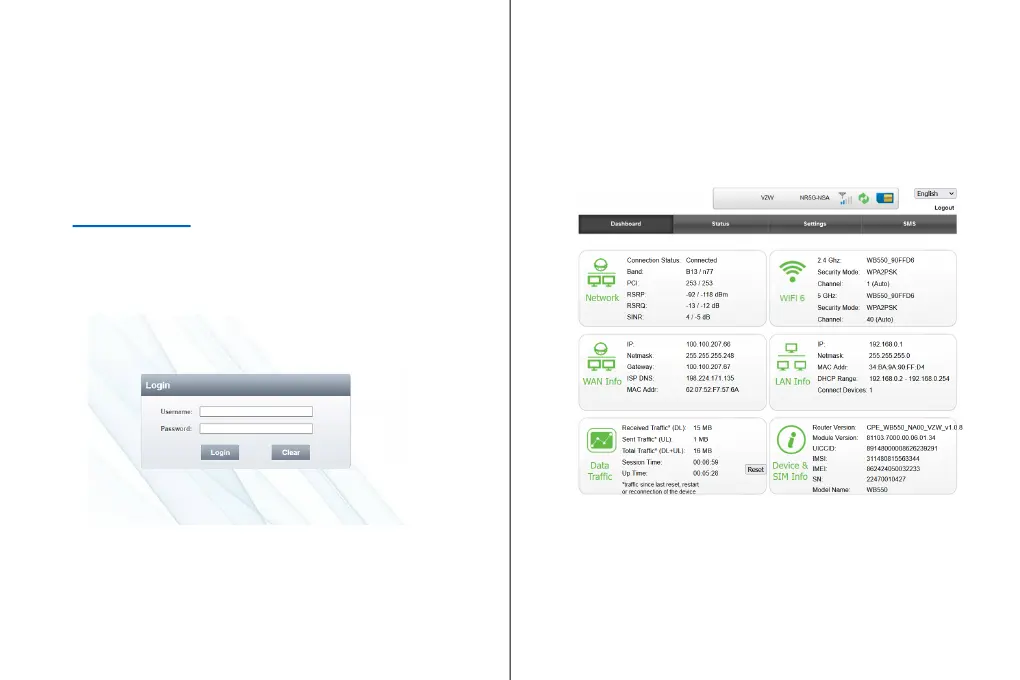
WebGUI Online Device Management Portal
You can access your WB550 5G Indoor Fixed Wireless
Access Router Online Portal to view device status, change
your device settings, and perform manual software
upgrades.
1. While you are connected with WB550 5G FWA Router
over WiFi or LAN. Use any web browser and enter
http://192.168.0.1 in the URL address bar.
2. The login username is “admin” and password can be
found on the device label. Click on the “Login” button
to login.
3. From the HOME menu, you can view device information
and network status, such as, Signal Quality, Network
Name.
4. If network status is showing Connected and you can see
IP addresses in Internet status, that indicates that the
WB550 is connected with the network and ready to use.
5. For WiFi related settings (i.e. SSID Name and Password),
go to SETTINGS > Wi-Fi Settings.
For more details, please refer to the User Manual. ATEL’s
remote management platform, ATRACS, is available for the
WB550. Please refer to the ATRACS User Manual for details.



 To Next Page