It’s worth noting that if you use your ATEM on a network, then you’re also increasing the
complexity of the connection between your control panel and the switcher, so there is possibly
a greater chance of something going wrong. However, ATEM can be used when plugged into a
switch, and even via most VPNs and over the internet.
The ATEM switcher always needs a fixed IP address so control panels have a stable location
to connect to. This means you need to find a free fixed IP address in the range of your network
that you can use. For the devices to communicate, they must share the same IP address subnet,
which typically means the first 3 fields in the IP address need to be the same. Each device must
also use a unique IP address.
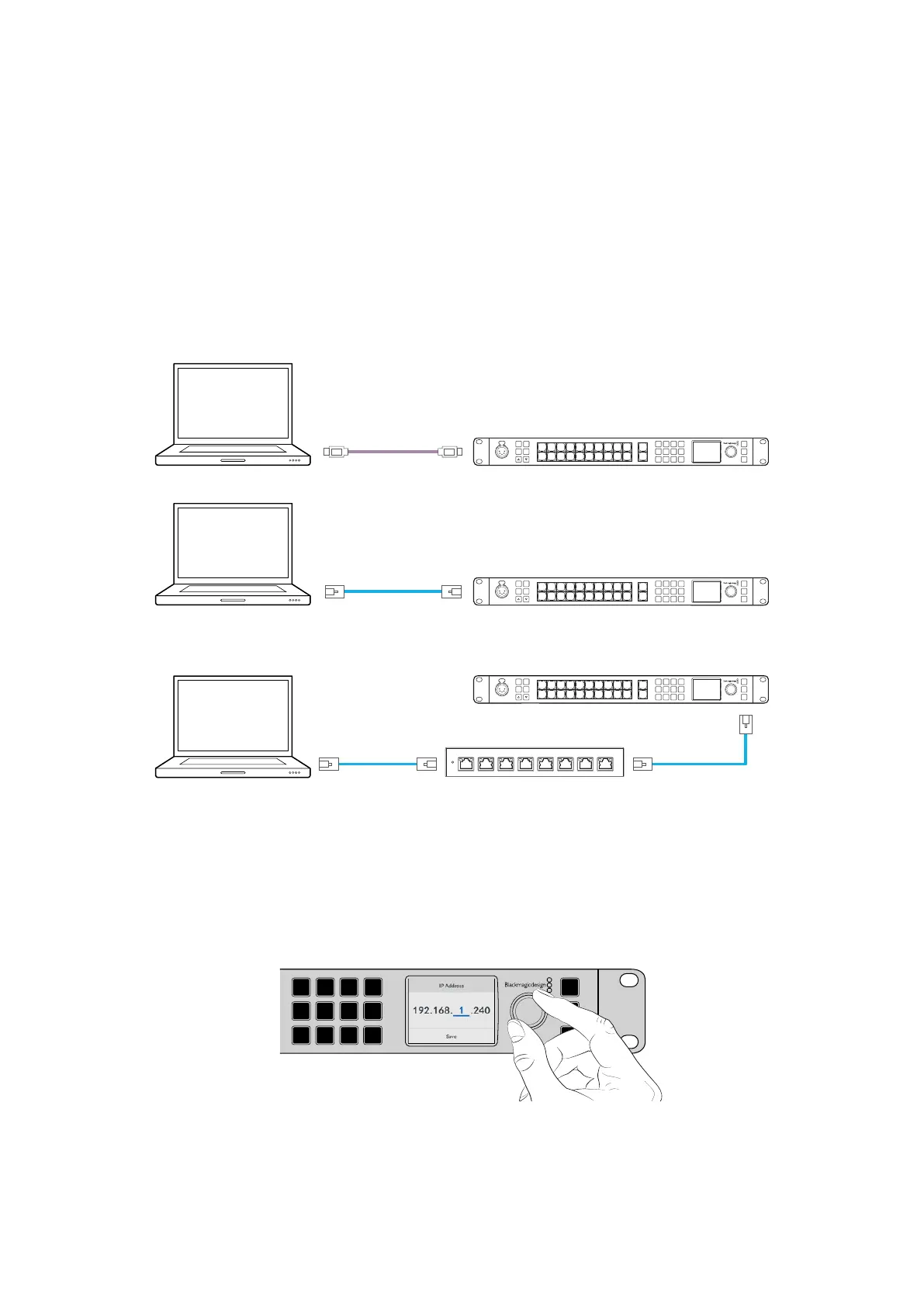
Connecting Directly
Computer ATEM 2M/E Constellation HD
6 7 8 9 CUT
16 17 18 19
10
20 AUTO
1 2 3 4 5
11 12 13 14 15
LOCK
MENU
SET
KEY 1
MIX
DSK 1
MIX
BARS
MIX
BLACK
WIPE
DSK2
MIX
FTB
MP 1
DIP
MP 2
DVE
PROD
TALK
ENG
TALK
CALL
PGM
MIX
5
Amphenol
4 2
1
3
PUSH
USB-C
Ethernet
Computer ATEM 2M/E Constellation HD
6 7 8 9 CUT
16 17 18 19
10
20 AUTO
1 2 3 4 5
11 12 13 14 15
LOCK
MENU
SET
KEY 1
MIX
DSK 1
MIX
BARS
MIX
BLACK
WIPE
DSK2
MIX
FTB
MP 1
DIP
MP 2
DVE
PROD
TALK
ENG
TALK
CALL
PGM
MIX
5
Amphenol
4 2
1
3
PUSH
Connecting via a Network
Ethernet
Network
Ethernet
Computer
ATEM 2M/E Constellation HD
6 7 8 9 CUT
16 17 18 19
10
20 AUTO
1 2 3 4 5
11 12 13 14 15
LOCK
MENU
SET
KEY 1
MIX
DSK 1
MIX
BARS
MIX
BLACK
WIPE
DSK2
MIX
FTB
MP 1
DIP
MP 2
DVE
PROD
TALK
ENG
TALK
CALL
PGM
MIX
5
Amphenol
4 2
1
3
PUSH
To set the IP address via the front panel:
1 Press the ‘menu’ button and using the know scroll to the ‘settings’ menu. Press ‘set’.
2 Turn the knob to scroll to the network section and highlight ‘ip address’. Press ‘set’.
3 Press ‘set’ to select the underlined values and use the knob to adjust. Press ‘set’ to confirm
before adjusting the next set of values. Highlight the save icon and press ‘set’ to save.
4 Now you can adjust your gateway address and subnet address the same way.
LOCK
MENU
SET
KEY 1
MIX
DSK 1
MIX
BARS
MIX
BLACK
WIPE
DSK2
MIX
FTB
MP 1
DIP
MP 2
DVE
6 7 8 9 CUT
16 17 18 19
10
20 AUTO
1 2 3 4 5
11 12 13 14 15
PROD
TALK
ENG
TALK
CALL
PGM
MIX
Adjust the IP address using
the rotary knob
For some production workflows, you may want to use external hardware panels such as an
ATEM Advanced Panel. Your ATEM ships from the factory with settings to allow hardware
control panels to simply be connected directly with an Ethernet cable. However if you are
18ATEM Software Control


 To Next Page
 Loading...
