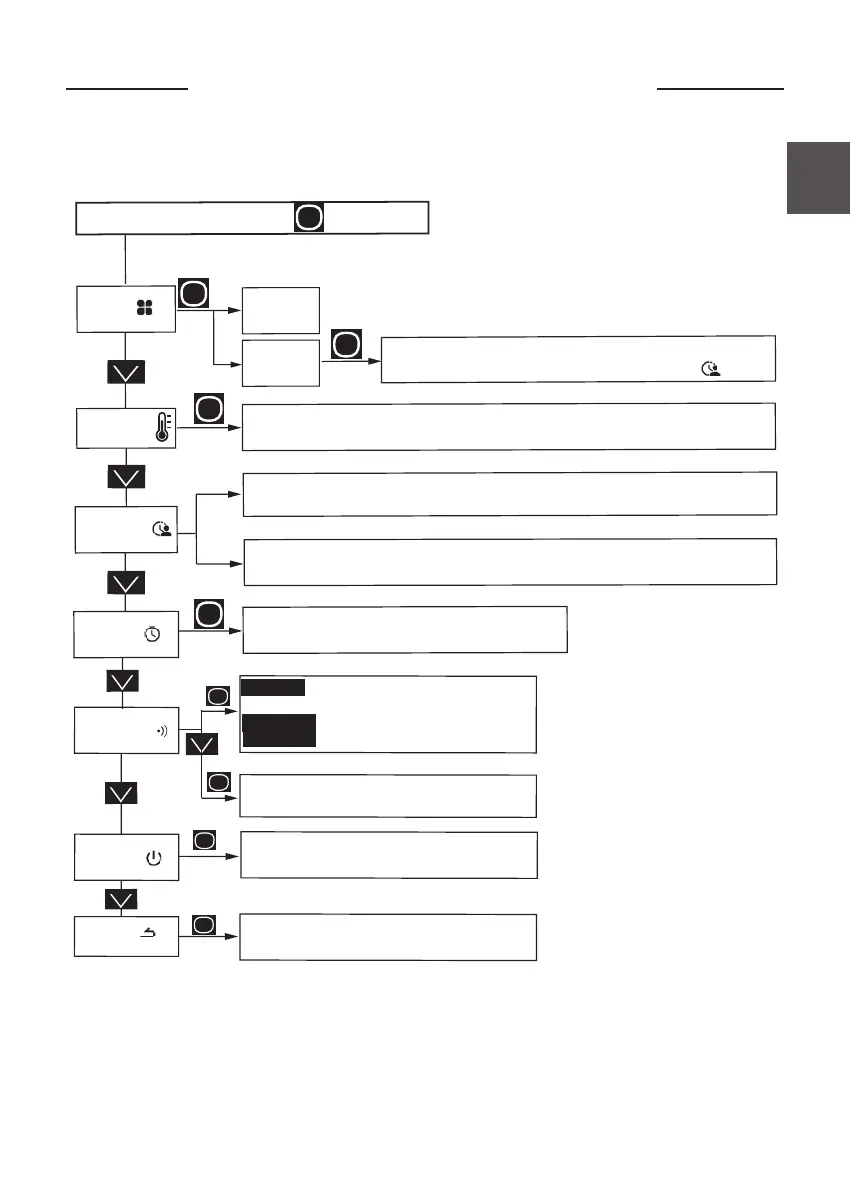
Mode
Manuel
PROG
Program
Access the MENU by pressing
To return to the main screen. An internal program has already
been defined. You may modify it by going to Program
To adjust the Comfort temperature ranges over a day of the week (3 ranges possible)
then copy these ranges to other days.
To set the date, the time
Clock
To copy the Comfort ranges to the other days of the week
Temp. ECO
To set the temperature when you are away (from 6°C to 19°C)
Return
To return to the home screen
Switch off
To switch off the appliance
Choose Reset to return to factory settings.
Connection :
To connect your device to the Cozytouch range
pilot it remotely, via a smartphone or tablet.
Deconnection :
To turn off the wifi
Reconnection :
To reconnect the wifi.
Connectivity



 To Next Page