TOUCH SCREENS
|
59
Zone Controls
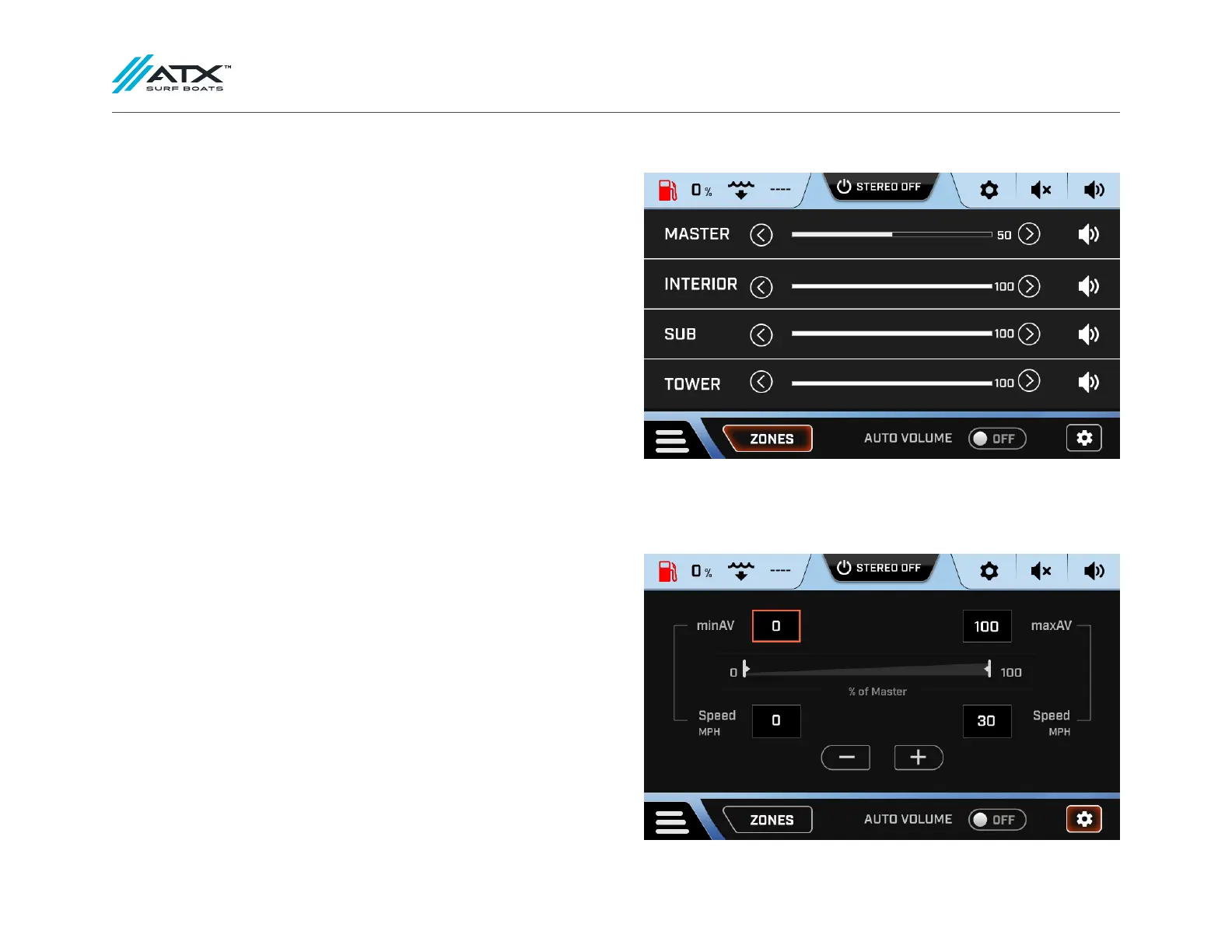
There are 3 possible stereo zones on your ATX sound system: Interior, Sub and
Tower (if equipped). Each zone’s volume can be controlled individually. To do this,
select zones at the bottom of the stereo screen.
The volume of each zone can be adjusted using the sliders. You are also able to
mute each zone individually by pressing the mute/unmute button to the right of
each zone slider.
There is also a master volume slider that works as a multiplier for the zones. For
example, if your interior volume is at 50%, and your master volume is at 50%,
your interior speakers are at 25% of their possible output. For maximum volume,
ensure all sliders are set to 100%.
Auto Volume
A useful feature for using the stereo while enjoying watersports is Auto Volume.
Auto Volume allows the stereo to be at a low volume while the boat is moving at
a slow speed, and a higher volume while the boat is moving at a faster speed.
To adjust the set volumes and speeds, press the settings button in the bottom
right hand corner of the stereo screen. In this menu, you can choose your max-
imum and minimum speeds, as well as maximum and minimum volumes. Once
you have adjusted your settings, toggle Auto Volume to on. The volume will now
automatically adjust according to your speed.



 To Next Page