IMEO2 - User manual010
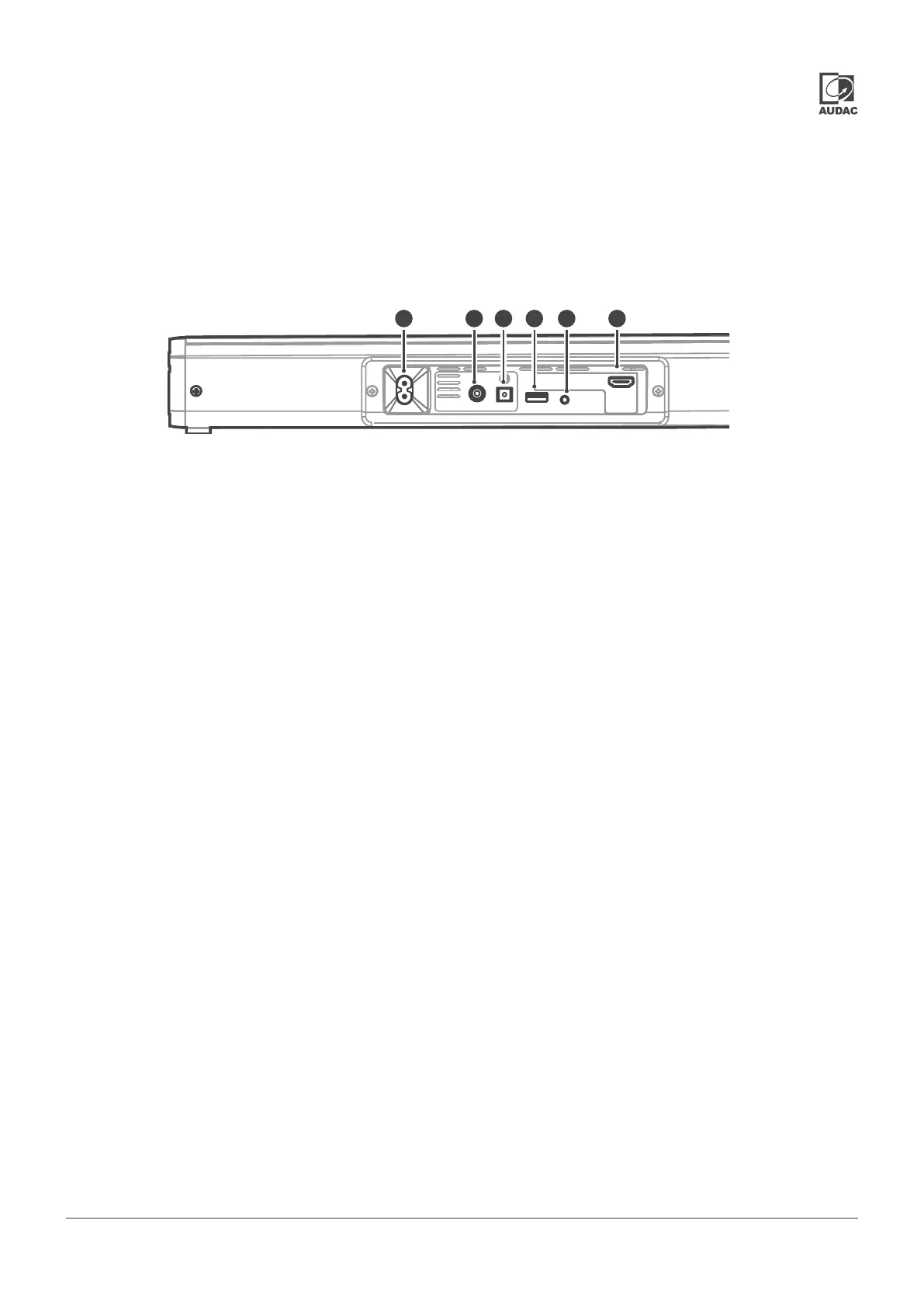
Overview IMEO2: Rear
5) AC Power inlet connection:
The mains power supply (100-240V AC - 50/60 Hz) has to
be applied to this AC power inlet. The connection is made by
an IEC C8 power connector and the power lead is standard
tted, but can be unplugged for convenient assembly.
6) Coaxial input connection:
The coaxial input connection (RCA) allows connecting the
sound bar to any TV, receiver or other source device with an
coaxial SP/DIF output connection.
7) Optical input connection:
The optical input connection (Toslink) allows connecting the
sound bar to any TV, receiver or other source device with an
optical SP/DIF output connection.
8) USB socket:
The USB connection allows connection to memory devices.
This allows previously stored audio sources to be played
back (MP3, FLAC, WAV).
9) AUX socket:
The AUX input connection (3.5 mm jack) allows connecting
the sound bar to any stereo line-level audio source. It can be a
connection between a portable device such as smartphone,
tablet, laptop or headphone output of any device.
10) HDMI ARC socket:
The HDMI input socket allows connecting the soundbar to
any TV or projector with an HDMI connection supporting
ARC functionality
5 6 7 8 9 10
COAXIAL OPTICAL USB
AUX
HDMI / ARC


 To Next Page