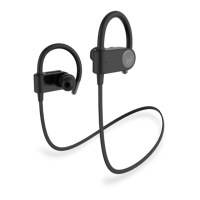
ESCAPE WIRELESS SPORT EARPHONES
(C) on the RIGHT or LEFT earphone once to answer the call,
press the Multi-Function Button (C) once again to hang up the
call.
REJECT CALLS
When there is an incoming call, press and hold the Multi-Function
button (C) on the RIGHT or LEFT earphone for 2-3 seconds to
reject the call.
PAUSE & PLAY MUSIC
When playing music, touch the Multi-Function button (C) on the
LEFT or RIGHT earphone once to pause music, press the button
once again to play music.
NEXT & LAST TRACK
When playing music, press the button(A) on the either earphone
to skip to the next track, press the button(B) on the either ear-
phone to skip to the previous track.
VOLUME UP & DOWN
When playing music, press the button(A) on the either earphone
to increase the volume, press the button(B) on the either ear-
phone to decrease the volume.
VOICE ASSISTANT
Double press the Multi Function Button(C) on either the LEFT or
RIGHT earphone to activate Voice Assistant (Google Assistant
TM
or Siri
®
) on your smartphone.
NOTE: please refer to the diagram on 2.2
2
3
4
5
6


 To Next Page