232 Tires and wheels
maneuvers. Stop as soon as possible and
check the tires and their pressures. In-
flate the tire pressure to the proper pres-
sure as indicated on the vehicle's tire
pressure label ¢
page 216. Driving on a
significantly under-inf lated tire causes
the tire to overheat and can lead to tire
failure. Under-inflation also is likely to
impair the vehicle's handling and stop-
ping ability.
- The driver is responsible for maintaining
the correct tire pressures. You must
check the tire pressures regularly.
- Under certain conditions (such as a spor-
ty driving style, winter conditions or un-
paved roads), the pressure monitor indi-
cator may be delayed.
- Ask your authorized Audi dealer if run-
flat tires may be used on your vehicle .
Your vehicle registration becomes invalid
if you use these tires when not permit-
ted. Damage to your vehicle or accidents
could also result .
(D Tips
- The tire pressure monitoring system
stops working when there is an ESP/ABS
malfunction .
- Using snow chains may result in a system
malfunction.
- Tires with the identification "AO" or "RO"
have been specially matched with your
Audi. We recommend using only these
tires because they meet the highest
standards regarding safety and driving
characteristics when used correctly. Your
authorized Audi dealer will gladly pro-
vide you with more information.
Reset tire pressure monitoring system
(Stepl)
Applies to vehicles: with tire pressure monitoring system
If the tire pressure is adjusted, wheels ore ro-
tated or changed, the TPMS must be reset in
the menu display.
----- ®
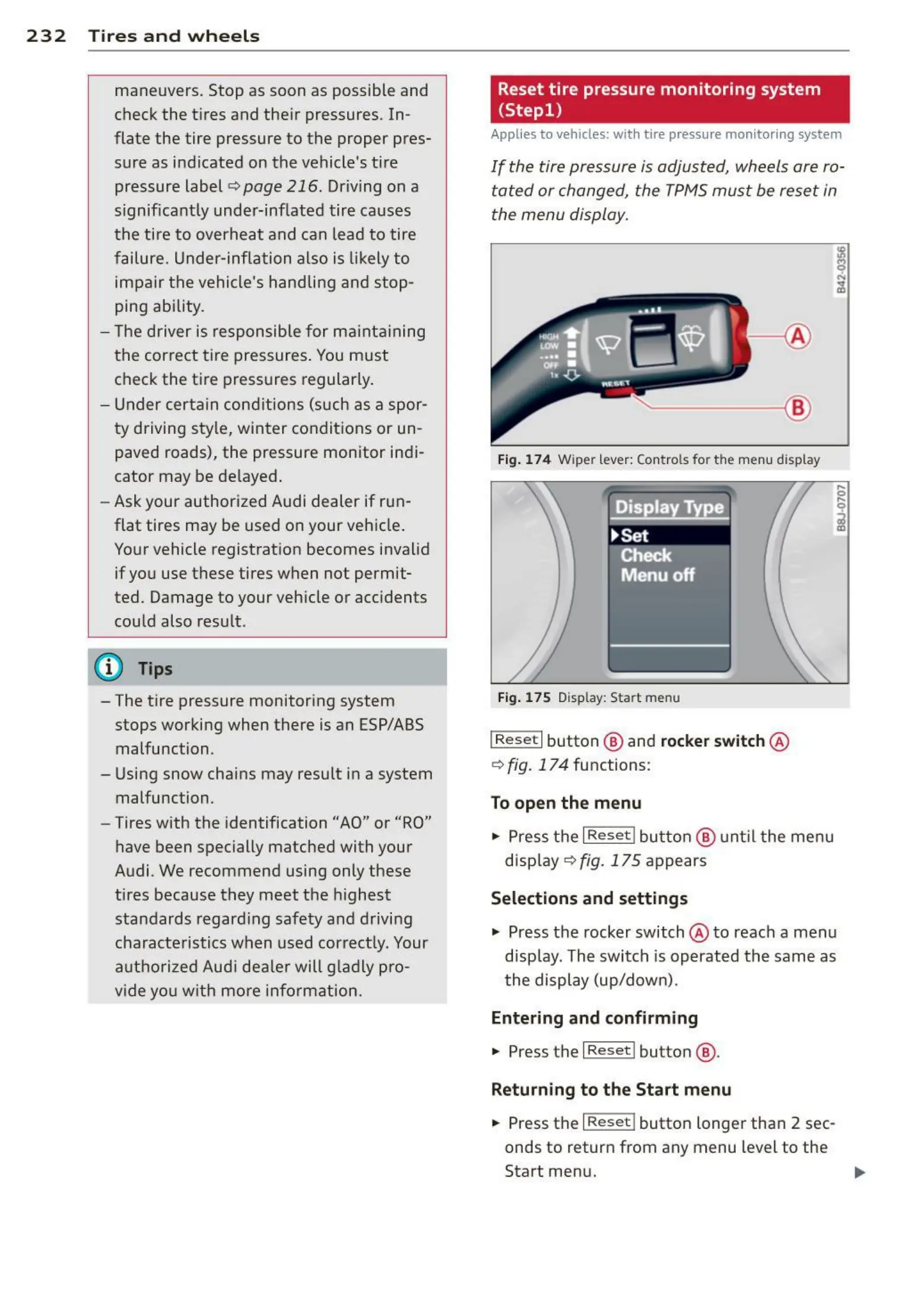
Fig. 174 Wiper lever: Contro ls for the menu display
Fig. 175 Display: Start menu
I Rese t I button @ and rocker switch @
¢ fig. 17 4 functions:
To open the menu
" Press the I Reset ! button @ unt il the menu
display¢
fig. 175 appears
Selections and settings
" Press the rocker switch @ to reach a menu
display. The switch is operated the same as
the display (up/down) .
Entering and confirming
" Press the I Reset I button @ .
Returning to the Start menu
" Press the I Re set I button longer than 2 sec-
onds to return from any menu level to the
Start menu.



 To Next Page