Programming the transmitter (version
B)
Applies to vehicles: with Horne link
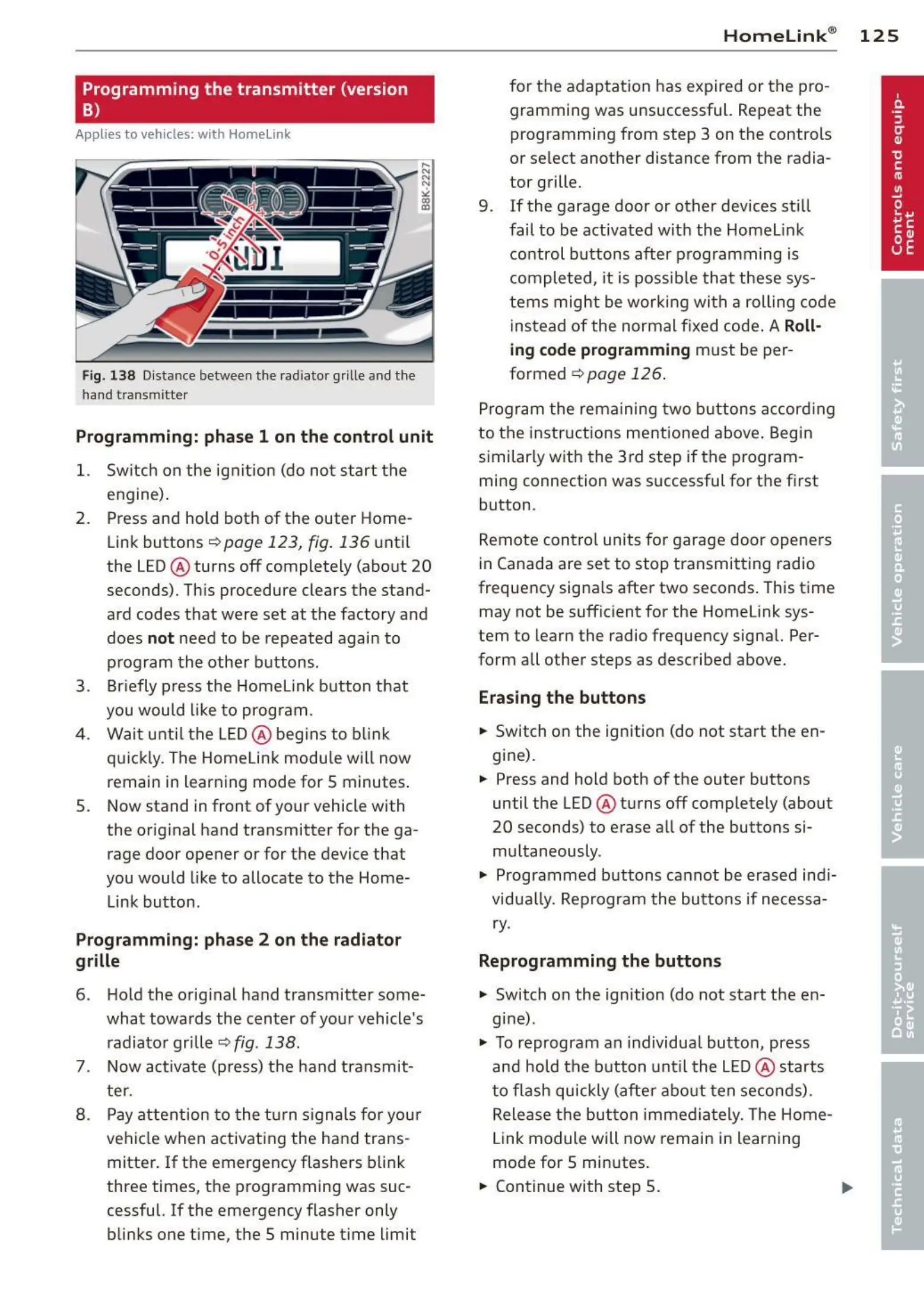
Fig. 1 38 Distance between t he radiator grille and t he
hand transmitte r
Programming: phase 1 on the control unit
1. Switch on the ignitio n (do not st art t he
e ngine ).
2. Press and hold bot h of the outer Home-
Link buttons
r=>page 123, fig. 136 unt il
the LED@ turns off completely (about
20
seconds). This procedure clears the stand-
ard codes that were set at the factory and
does
not need to be repeated agai n to
prog ram t he othe r buttons.
3. Briefly press the Homelink button that
you would like to prog ram .
4 . Wait un t il the LED@ beg ins to blink
q uickly. The Home Link modu le will now
remai n in learning mode for
5 minutes .
5. Now stand in front of your vehicle with
the original hand transmitter for the ga-
rage door opener or for the device that
you would like to allocate to the Home-
Link button.
Programming: phase 2 on the radiator
grille
6 . Hold the original hand transmitter some-
what towa rds the center of you r vehicle 's
radiato r gr ille
r=>fig . 138 .
7 . Now act ivate (press) t he hand transmit -
ter.
8 . Pay att ention to t he t urn sign als for yo ur
vehicle when activating the ha nd trans-
mitter . If t he emergency flashers blink
three times, the programming was suc-
cessful. If the emergency flasher only
blinks one t ime, the 5 minute t ime limit
Homelink ® 125
for the adaptat ion has expired or the pro -
gram ming was unsuccessful. Repeat the
programming from step 3 on the controls
o r se lect another distance from the radia-
tor grille.
9. If the garage door or other devices sti ll
fail to be activated wit h the Homelink
control buttons after programming is
comple t ed, it is possib le t ha t these sys-
tems might be wor king with a roll ing code
inst ead of the normal fixed code .
A Roll-
ing code programming must be per-
formed
r=> page 126 .
Program t he rema ining two buttons accord ing
to the instructions mentioned above . Beg in
similar ly with t he 3rd step if the program -
ming connection was successful for t he first
button .
Remote con tr ol units fo r garage door opene rs
in Canada are set to stop transmitting radio
frequency signa ls after two seconds . This time
may not be suffic ient for the Homelink sys-
tem to learn the radio frequency signa l. Per-
form all other steps as described above.
Erasing the buttons
.,. Switch o n the ignition (do not start the en-
gine).
.,. Press and hold both of the outer buttons
until the LED@ turns off completely (about
20 seconds) to erase all of the buttons si-
m ultaneously .
.,. Programmed buttons cannot be erased ind i-
vidua lly. Reprogram the buttons if necessa-
ry.
Reprogramming the buttons
.,. Switch on the ignition (do not start the e n-
gine) .
.,. To reprogram an individua l butto n, press
and hold the button unt il the LED@ starts
to f lash quickly (after abo ut ten seconds) .
Release t he bu tt on imme d iat ely. The Home-
Link module will now remain in learning
mo de for 5 minutes.
.,. Continue with step 5.



 To Next Page