EasyManua.ls Logo

Audi A4 2023 - Page 134

Audi A4 2023
310 pages
Print Icon
To Next Page IconTo Next Page
To Previous Page IconTo Previous Page
Loading...
Driver
assistance
—
Predictive
messages
>
page
132.
—
Predictive
control
>
page
136.
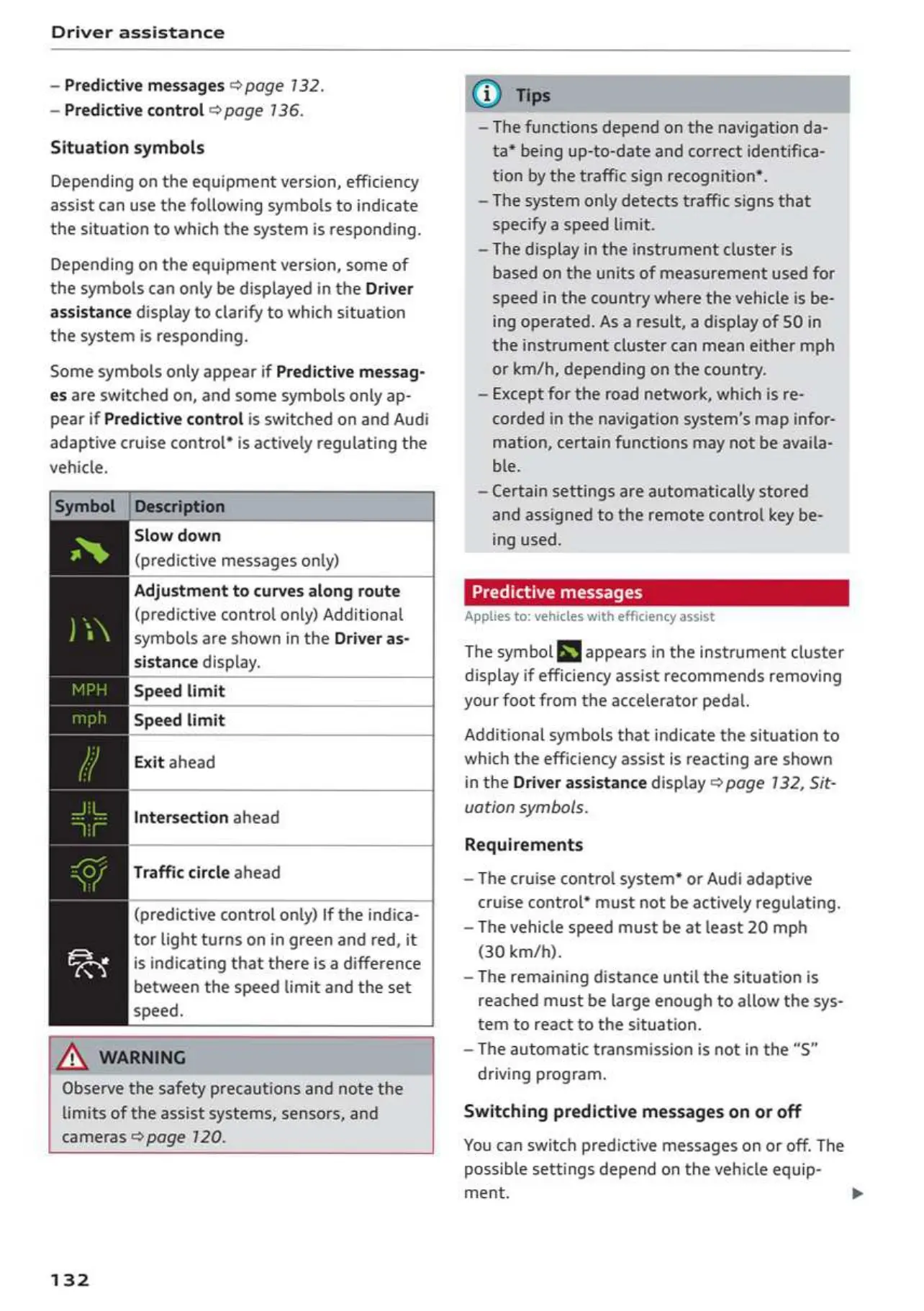
Situation
symbols
Depending
on
the
equipment
version,
efficiency
assist
can use the
following
symbols
to
indicate
the
situation
to
which
the
system
is
responding.
Depending
on
the
equipment
version,
some
of
the
symbols
can only
be
displayed
in
the
Driver
assistance
display
to
clarify
to
which
situation
the
system
is
responding.
Some
symbols
only
appear
if
Predictive
messag-
es
are
switched
on,
and
some
symbols
only
ap-
pear
if
Predictive
control
is
switched
on
and
Audi
adaptive
cruise
control”
is
actively
regulating
the
vehicle.
Symbol
|Description
Slow
down
(predictive
messages
only)
Adjustment
to
curves
along
route
(predictive
control
only)
Additional
symbols
are
shown
in
the
Driver
as-
sistance
display.
Speed
limit
Speed
limit
Exit
ahead
Intersection
ahead
Traffic
circle
ahead
(predictive
control
only)
If
the
indica-
tor
light
turns
on
in
green
and
red,
it
is
indicating
that
there
is
a
difference
between
the
speed
limit
and
the
set
speed.
AX
warning
Observe
the
safety
precautions
and
note
the
limits
of
the
assist
systems,
sensors,
and
cameras
>page
120.
132
~The
functions
depend
on
the
navigation
da-
ta*
being
up-to-date
and
correct
identifica-
tion
by
the
traffic
sign
recognition*.
~The
system
only
detects
traffic
signs that
specify
a
speed
limit.
~The
display
in
the
instrument
cluster
is
based
on
the
units
of
measurement
used
for
speed
in
the
country
where
the
vehicle
is
be-
ing
operated.
As
a
result,
a
display
of
50
in
the
instrument
cluster
can
mean
either
mph
or
km/h,
depending
on
the
country.
—
Except
for
the
road
network,
which
is
re-
corded
in
the
navigation
system's
map
infor-
mation,
certain
functions
may
not
be
availa-
ble.
—
Certain
settings
are
automatically
stored
and
assigned
to
the
remote
control
key
be-
ing
used.
Predictive
messages
Applies
to:
vehicles
with
efficiency
assist
The
symbol
fi
appears
in
the
instrument
cluster
display
if
efficiency
assist
recommends
removing
your
foot
from
the
accelerator
pedal.
Additional
symbols
that
indicate
the
situation
to
which
the
efficiency
assist
is
reacting
are
shown
in
the
Driver
assistance
display
®
page
132,
Sit-
vation
symbols.
Requirements
~The
cruise
control
system*
or
Audi
adaptive
cruise
control*
must
not
be
actively
regulating.
~The
vehicle
speed
must
be
at
least
20
mph
(30
km/h).
—The
remaining
distance
until
the
situation
is
reached
must
be
large
enough
to
allow
the
sys-
tem
to
react
to
the
situation.
—The
automatic
transmission
is
not
in
the
“S”
driving
program.
Switching
predictive
messages
on
or
off
You
can
switch
predictive
messages
on
or
off.
The
possible settings
depend
on
the
vehicle
equip-
ment.

Table of Contents