EasyManua.ls Logo

Audi A4 2023 - Page 55

Audi A4 2023
310 pages
Print Icon
To Next Page IconTo Next Page
To Previous Page IconTo Previous Page
Loading...
8101272186
Lights
and
Vision
Turn
signal
and
high
beam
lever
»
io)
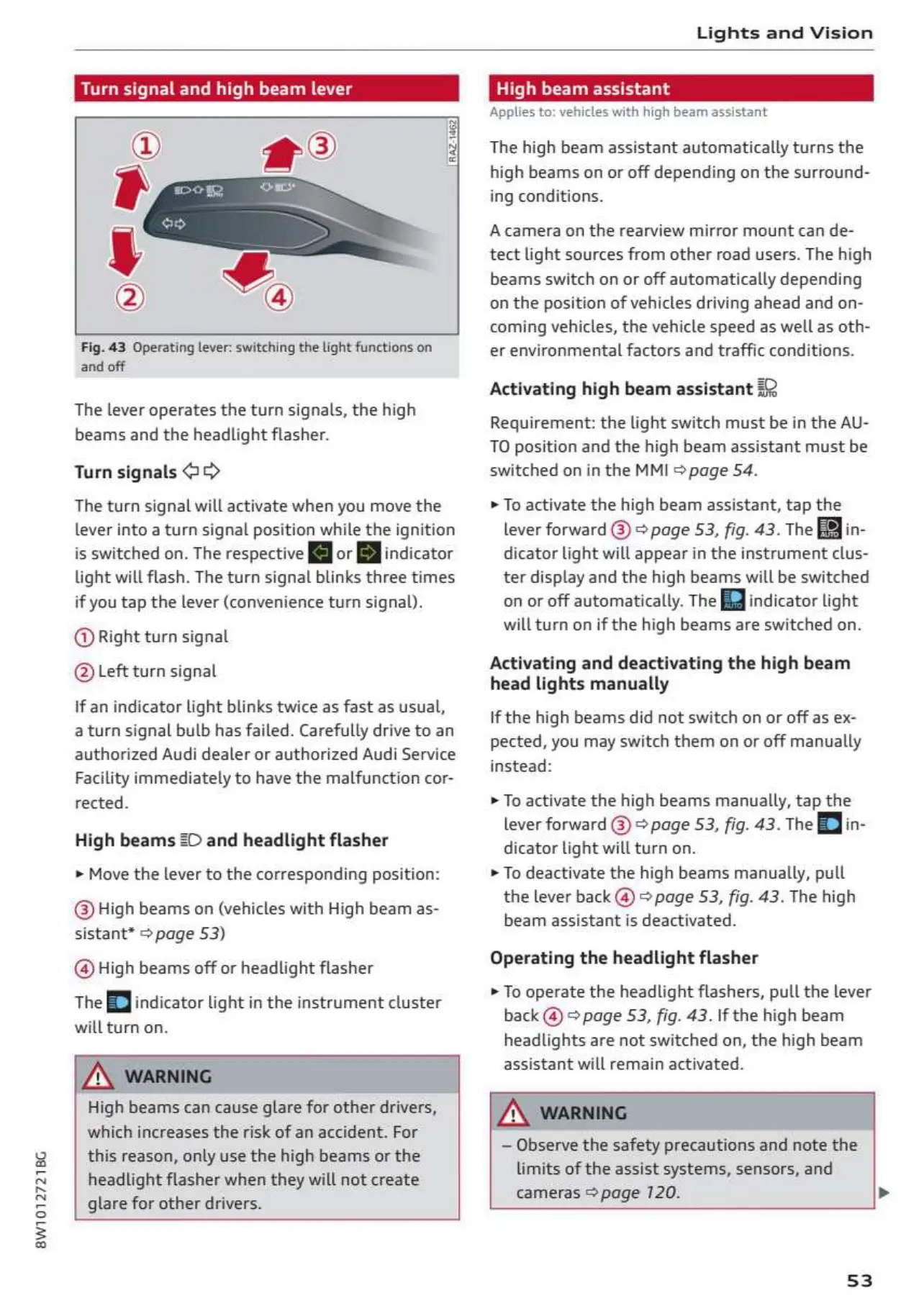
Fig.
43
Operating
lever:
switching
the
light
functions
on
and
off
The
lever
operates
the
turn
signals,
the
high
beams
and
the
headlight
flasher.
Turn
signals
@>>
The
turn
signal
will
activate
when
you
move
the
lever
into
a
turn
signal
position
while
the
ignition
is
switched
on.
The
respective
[MJ
or
[Bj
indicator
light
will
flash.
The
turn
signal
blinks
three
times
if
you
tap the
lever
(convenience
turn
signal).
@
Right
turn
signal
@
Left
turn
signal
If
an
indicator
light
blinks
twice
as
fast
as
usual,
a
turn
signal
bulb
has
failed.
Carefully
drive
to
an
authorized
Audi
dealer
or
authorized
Audi
Service
Facility
immediately
to
have
the
malfunction
cor-
rected.
High
beams
2D
and
headlight
flasher
»
Move
the
lever to
the
corresponding
position:
@High
beams
on
(vehicles
with
High
beam
as-
sistant*
2
page
53)
@High
beams
off
or
headlight
flasher
The
EJ
indicator
light
in
the
instrument
cluster
will turn
on.
High
beams
can
cause
glare
for
other
drivers,
which
increases
the
risk of
an
accident.
For
this
reason,
only use
the
high
beams
or
the
headlight
flasher
when
they
will
not
create
glare
for
other
drivers.
igh
beam
assistant
Applies
to:
vehicles
with
high
beam
assistant
The
high
beam
assistant
automatically
turns
the
high
beams
on
or
off
depending
on
the
surround-
ing
conditions.
Acamera
on
the
rearview
mirror
mount
can
de-
tect
light
sources
from
other
road
users.
The
high
beams
switch
on
or
off
automatically
depending
on
the
position
of
vehicles
driving
ahead
and
on-
coming
vehicles,
the
vehicle
speed
as
well
as
oth-
er
environmental
factors
and
traffic
conditions.
Activating
high
beam
assistant
#2
Requirement:
the
light
switch
must
be
in
the
AU-
TO
position
and
the
high
beam
assistant
must
be
switched
on
in
the
MMI
©
page
54.
»
To
activate
the
high
beam
assistant,
tap
the
lever
forward
@)
>
page
53,
fig.
43.
The
Fi
dicator
light
will
appear
in
the
instrument
clus-
ter
display and
the
high
beams
will
be
switched
on
or
off
automatically.
The
[fg
indicator
light
will
turn
on
if
the
high
beams
are
switched
on.
Activating
and
deactivating
the
high
beam
head
lights
manually
If
the
high
beams
did
not
switch
on
or off as ex-
pected,
you
may
switch
them
on
or
off
manually
instead:
»
To
activate
the
high
beams
manually,
tap
the
lever
forward
@)
©
page
53,
fig.
43.
The
Edin-
dicator
light
will
turn
on.
»
To
deactivate
the
high
beams
manually,
pull
the
lever
back
@
>
page
53,
fig.
43.
The
high
beam
assistant
is
deactivated.
Operating
the
headlight
flasher
»
To
operate
the
headlight
flashers,
pull
the
lever
back
@
page
53,
fig.
43.
If
the
high
beam
headlights
are
not
switched
on,
the
high
beam
assistant
will
remain
activated.
Observe
the
safety
precautions
and
note
the
limits
of
the
assist
systems,
sensors,
and
cameras
®
page
120.
>
53

Table of Contents

Related product manuals