11) Using the Otis™ with Audible® and Music Content
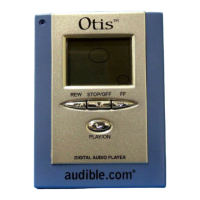
Your Otis™ offers a variety of navigation and user controls. Below is a listing of all
button functions and how to use your device both with Audible® content, as well as with
music content.
Play button:
• Press once and hold 3 seconds to turn device on.
• With device on, press once to begin playback of audio files.
• With audio playing, press once to pause, once again to resume playback.
• With Audible® audio playing, press and hold for 2 seconds to place a bookmark
that you may navigate back to later.
Stop button:
• With audio playing, press to stop playback. Pressing play will resume from the
point where you left off in an Audible® file, or from the beginning of the audio
file if listening to music.
• If in Mode Function, pressing stop will exit out of current function.
• Pressing and holding stop for 3 seconds will power Otis™ off.
Fast-Forward button:
• If pressed, audio skips to next Audible® or music file.
• If pressed and held, user can fast-forward within a music or Audible® file. When
held for up to 10 seconds, navigation is 2x. When held for 10-30 seconds,
navigation is 1 minute per second. When held for more than 30 seconds,
navigation is 5 minutes per second.
• In search mode, pressing once will proceed to the next music type.
• During mode selection, mode function will be selected by pressing the fast-
forward button
Rewind button
• If pressed, audio skips to the previous Audible® or music file.
• If pressed and held, rewinds through current music or Audible® file. When held
for up to 10 seconds, navigation is 2x. When held for 10-30 seconds, navigation is
1 minute per second. When held for more than 30 seconds, navigation is 5
minutes per second.
• In search mode, pressing once will proceed to the next music type.
• In search mode, pressing once will proceed to the previous music type.
Volume up (+) button:
• Pressing during playback increases volume.
• During EQ setting, pressing increases bass level.


 To Next Page