g Remote In: In some installations, you may not want to use
WKH*72WRWXUQRQ\RXUV\VWHP)RUWKHVHFDVHVWKH/&i can
EHWXUQHGRQUHPRWHO\ZLWKDYROWWULJJHU:KHQ\RXXVHWKH
YROWUHPRWHLQ\RXVKRXOGVHWWKHLQWHUQDO*72MXPSHUVHH
³8QGHUWKH+RRG´RQSDJHWR³'HIHDW´7KLVZLOOSUHYHQWWKH
car’s network system from turning the system on unexpectedly.
h Remote Out:6XSSOLHVYROWV³´ZKHQWKH/&i is pow-
ered up, and is used to turn on external devices like signal proces-
VRUVDQGDPSOL¿HUV5HFRPPHQGIXVLQJDWDPS
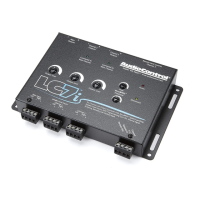
i Maximized Indicator:7KLVEULJKWO\FRORUHG/('LQGLFDWHV
when the signal level is just below clipping within your LC7i.
:KHQSURSHUO\OHYHOPDWFKHGWKLV/('VKRXOGÀLFNHURFFDVLRQDOO\
when your system is playing at its maximum volume level.
j Power: If you have connected all of your power wires cor-
rectly, this light should be bright red when your system turns on.
k Optional (ACR-1) Dash Mounted Control Input:<RXFDQ
add a dash control that allows you to set remotely the level of the
subwoofer.
l Pre-Amp Outputs: These RCA plugs should be connected to
the next component after the LC7i, such as a crossover or ampli-
¿HU'RQRWFRQQHFWDQ\VSHDNHUVGLUHFWO\WR\RXU/&i outputs.
Output Levels: These knobs allow you to adjust the signal
level from your source unit to match the input of your after-market
DPSOL¿HUV,GHDOO\\RXZDQWWRNHHSWKHRXWSXWRIWKH/&i high
DQGNHHSWKHDPSOL¿HUJDLQVDVORZDVSRVVLEOH
Channel Summed Indicators:8QGHUWKHFRYHURI\RXU/&i
are jumpers that will allow you to sum selected channels into the
PDLQFKDQQHOV7KLVLVHVSHFLDOO\XVHIXOIRUIDFWRU\LQVWDOOHG
systems with actively crossed over speaker systems. These indica-
WRU/('¶VOHW\RXNQRZZKLFKFKDQQHOVDUHEHLQJVXPPHGLQWRWKH
main inputs.
page 7


 To Next Page