GÖRA EN PRESET
STORE A PRESET EINE VOREINSTELLUNG FESTLEGEN EEN VOORINSTELLING MAKEN
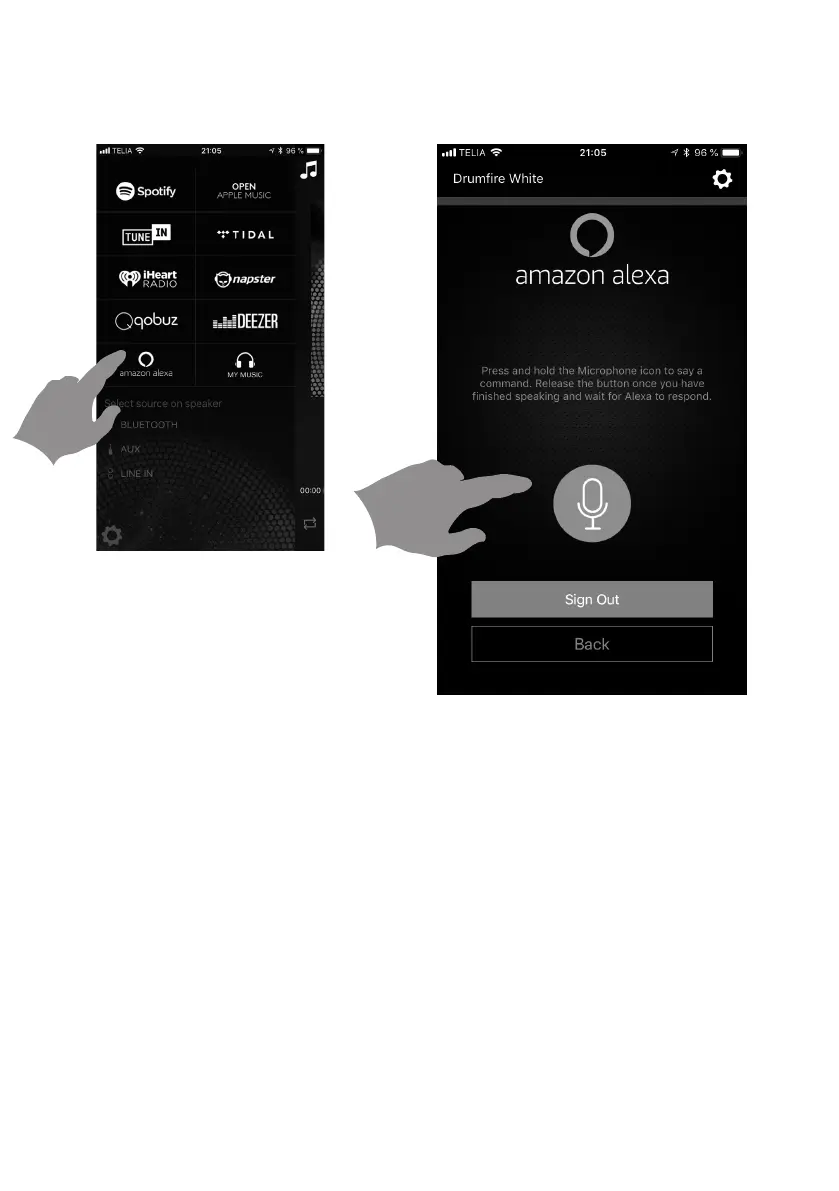
1. Press Amazon in source view.
2. Next, press and hold the Alexa button on the
app while speaking to Alexa in your phone. When
finished release the icon. You will hear an audible
tone indicating Alexa has received the message
and she will respond.
1. Drücken Sie auf Amazon in der Quellen-Ansicht.
2. Drücken und halten Sie dann die Alexa-Schalt-
fläche in der App, während Sie über Ihr Smartpho-
ne mit Alexa sprechen. Wenn Sie fertig sind, lassen
Sie das Symbol los. Sie hören dann einen Ton, der
anzeigt, dass Alexa die Nachricht erhalten hat und
sie beantworten wird.
1. Press Amazon in source view.
2. Next, press and hold the Alexa button on the
app while speaking to Alexa in your phone. When
finished release the icon. You will hear an audible
tone indicating Alexa has received the message
and she will respond.
1. Selecteer Amazon in de bronnen-weergave.
2. Druk vervolgens op de Alexa-knop in de app en
houd deze ingedrukt wanneer u tegen Alexa praat
op uw telefoon. Laat de knop los als u klaar bent.
U hoort een geluid dat aangeeft dat Alexa het
bericht heeft ontvangen en dat ze zal antwoorden.
ATT ANVÄNDA ALEXA GENOM APPEN USING ALEXA THROUGH THE APP
ALEXA ÜBER DIE APP NUTZEN ALEXA GEBRUIKEN VIA DE APP


 To Next Page