EasyManua.ls Logo

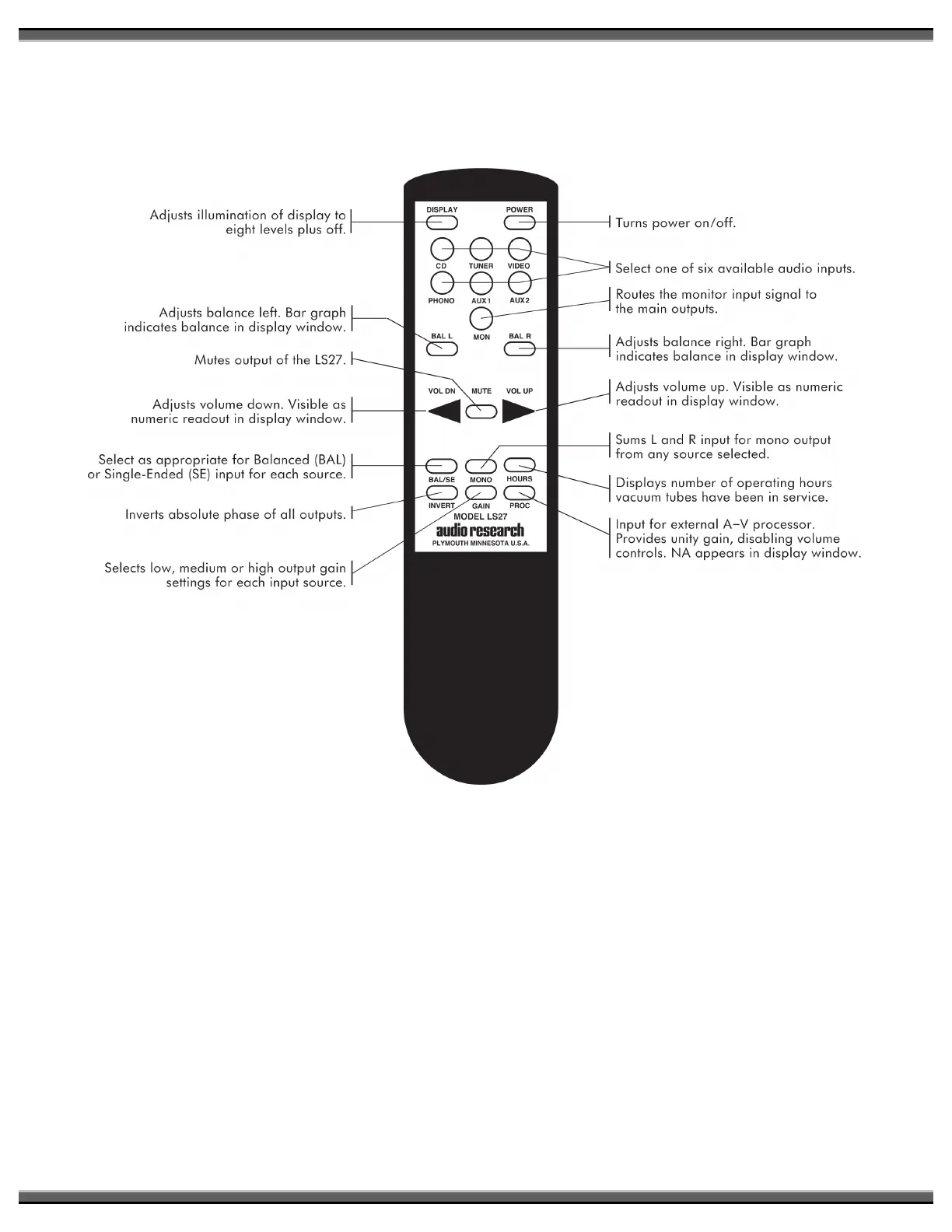
Audio Research LS27 - Remote Control Functions; Remote Control Button Descriptions; Display and Input Selection via Remote

Audio Research LS27
12 pages
Print Icon
To Next Page IconTo Next Page
To Previous Page IconTo Previous Page
Loading...
!
5!
Note: All LS27 functions are
available on the LS27R hand
held remote controller. All
functions are indicated in the
display window as they are
selected. See ‘Description of
Controls’ in this manual for
more information.
Adjusts
balance
left
.
Bar
graph
indicates
balance
in
display
window
.
Mutes
output
of
the
LS27
.
Adjusts
volume
down
.
Visible
as
1-------1-
numeric
readout
in
display
window.
Select as
appropriate
for
Balanced
(BAL)
1------.-1--
or
Single-Ended
(SE)
input
for
each source.
Inverts
absolute
phase
of
all
outputs.
Selects
low,
medium
or
high
output
gain
settings
for
each
input
source.
Turns
power
on/off.
Select one
of
six
available
audio
inputs.
Routes the
monitor
input
signal to
the
main
outputs.
---1---a------1
Adjusts
balance
right
. Bar
graph
indicates
balance
in
display
window.
Adjusts
volume
up
.
Visible
as
numeric
readout
in
display
window.
r---------1
Sums
Land
R
input
for
mono
output
from
any
source selected.
Displays
number
of
operating
hours
vacuum tubes have been in service.
Input
for
external
A-V
processor.
Provides unity
gain,
disabling
volume
controls.
NA
appears
in
display
window.

Related product manuals