EasyManua.ls Logo

Audiofront eDrumIn 4 - Pad; Input Type Settings

Audiofront eDrumIn 4
49 pages
Print Icon
To Next Page IconTo Next Page
To Previous Page IconTo Previous Page
Loading...
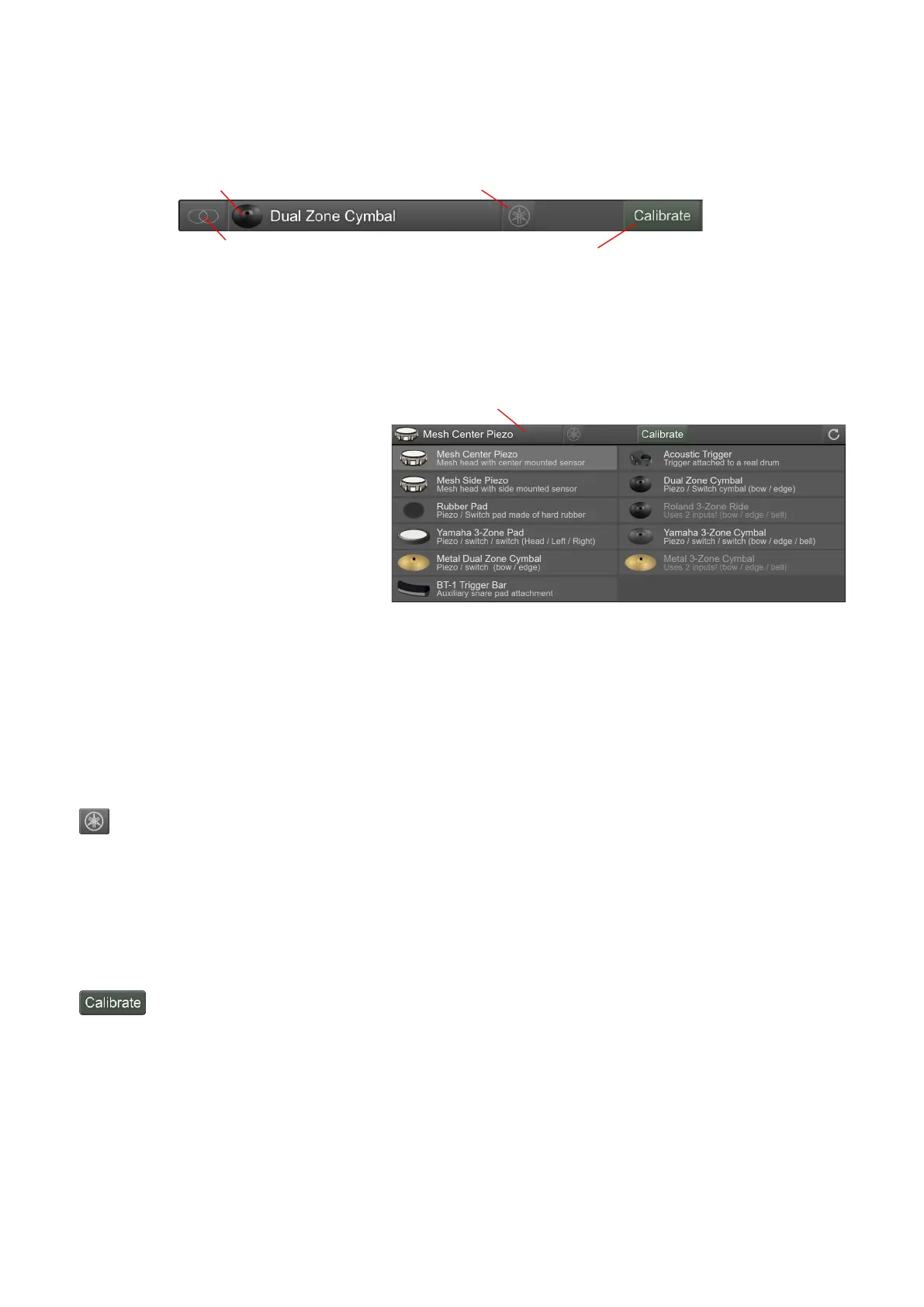
Pad / Input Type Settings
76(6>(;
H
Input Mode
#5F50?G>F?
G>F?%$G
Pad Type Selector
(
    $ 
(>  
6$
7 (    (
>  5 
  (   
($(
#6$5(>($$(;!5
?0>$(?0?>5
?(>B$%$5
 eDRUMin   eDRUMin 5((5
B$(
1195
Yamaha Wiring Toggle
eDRUMin 6$%:( 5 
 11(!5>59>
15(>$(
 *1 7  955$
$
Activate Calibrate Mode
$($5($((
(1*1555
eDRUMin Manual Page 14 of 49
Click to select Pad Type
Input Mode
Yamaha Wiring Toggle
Activate Calibrate Mode
Pad Type Selector

Table of Contents

Related product manuals