3: Remote Handset
Page 7
Fit the Batteries
Handset Operation
Open the cover and insert 2*AAA batteries (not
supplied), replace the cover. Always use AAA batteries
and replace them in sets never mix up old and new
batteries. Very weak batteries can leak and damage the
handset. Replace them in good time.
Note: there is a risk of fire and injury if a battery is
handled improperly. Do not disassemble, crush,
puncture, short the contacts or dispose of the batteries
in fire or water. Do not attempt to open or service a
battery. Discard used batteries in full accordance with
recycling regulation in force in your area.
Point the handset at the remote receiver and press
the buttons as illustrated to activate the relevant
functions.
The handset should be within 15 metres of the
player and there should be a clear line of sight
between the handset and unit for optimum remote
control operation.
Note: To get the best out of the remote control
functions, please use the supplied remote control
with your entire 9000 system.
The remote control supplied with your 9000N can be
easily identified by the two white separator lines
between the device selection buttons.
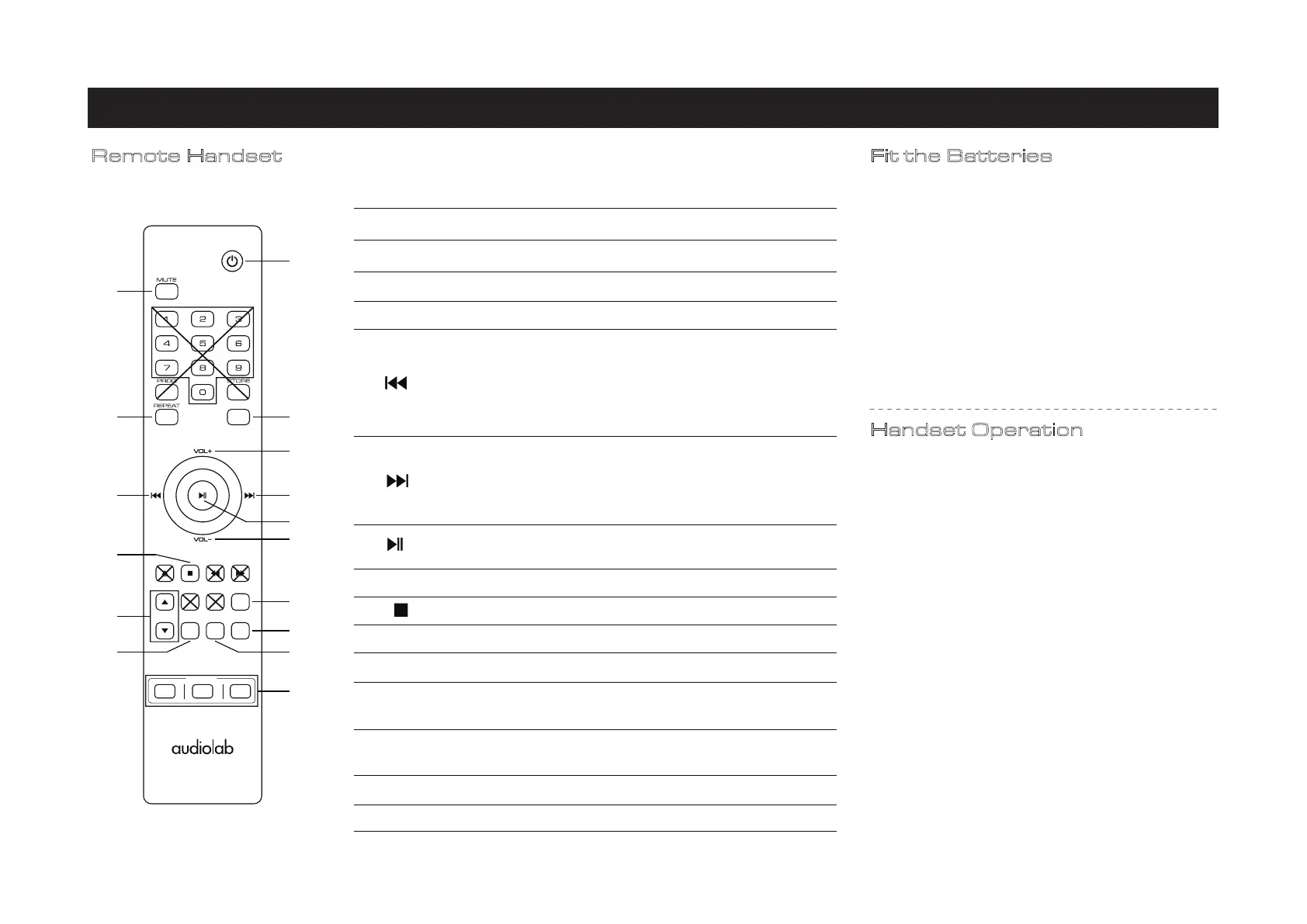
Remote Handset
1. STANDBY
Press to put the unit in, or bring it out of standby
4. RANDOM
Press to select random mode
5. VOL+
Increase Volume/Menu settings previous option
7.
Navigate forward through Menu options,
8.
Pause and play, confirm and apply changes in
Menu options, or enter a menu sub-directory
9. VOL-
Decrease Volume / Menu settings next option
11. MENU Press to access the setup Menu
13. BACK
Press to go back up one level in the Menu, or
exit to the home screen
15. DISPLAY
Press to toggle the display options
16. CD/A/N
Press to select the device CD/A/N
14.TIME
Press to toggle single track time remaining or
total time of the track
12.SOURCE
Press to select the input source
10.
Press to stop playing
6.
Navigate back through Menu options,
3.REPEAT Press to select repeat mode
2.MUTE
Press to mute or unmute the 9000N
MODE LIST MENU
RANDOM
SOURCE TIME DISPLAY BACK
CD A
DEVICE
N
1
43
2
5
7
8
9
10
6
11
13
12
15
16
14
restart current track, or press twice to play the
previous track in the playlist, decrease display
brightness, adjust balance to the left, or decrease
power-on volume limit
advance to the next track in the playlist, increase
display brightness, adjust balance to the right, or
increase power-on volume limit.



 To Next Page
 Loading...