13
14
15
16
18
22
24
26
27
20
17
19
23
25
21
2
3
5
6
7
9
10
8
11 28
1 12
4
5
INSTALLATION
Indoor Use
• Locate a spare mains outlet and turn it OFF.
• Plug the supplied AC adaptor in to the outlet,
• Connect the other end to the 12VCD input socket.
• Turn the main outlet ON.
• Turn the main Power Switch on the Player to the ON position.
PLAYBACK
Connecting Headphones
• Plug the supplied headphones into the headphone socket on the DVD Player and
the Monitor.
• Adjust the volume level on the player or the monitor before wearing the
headsets.
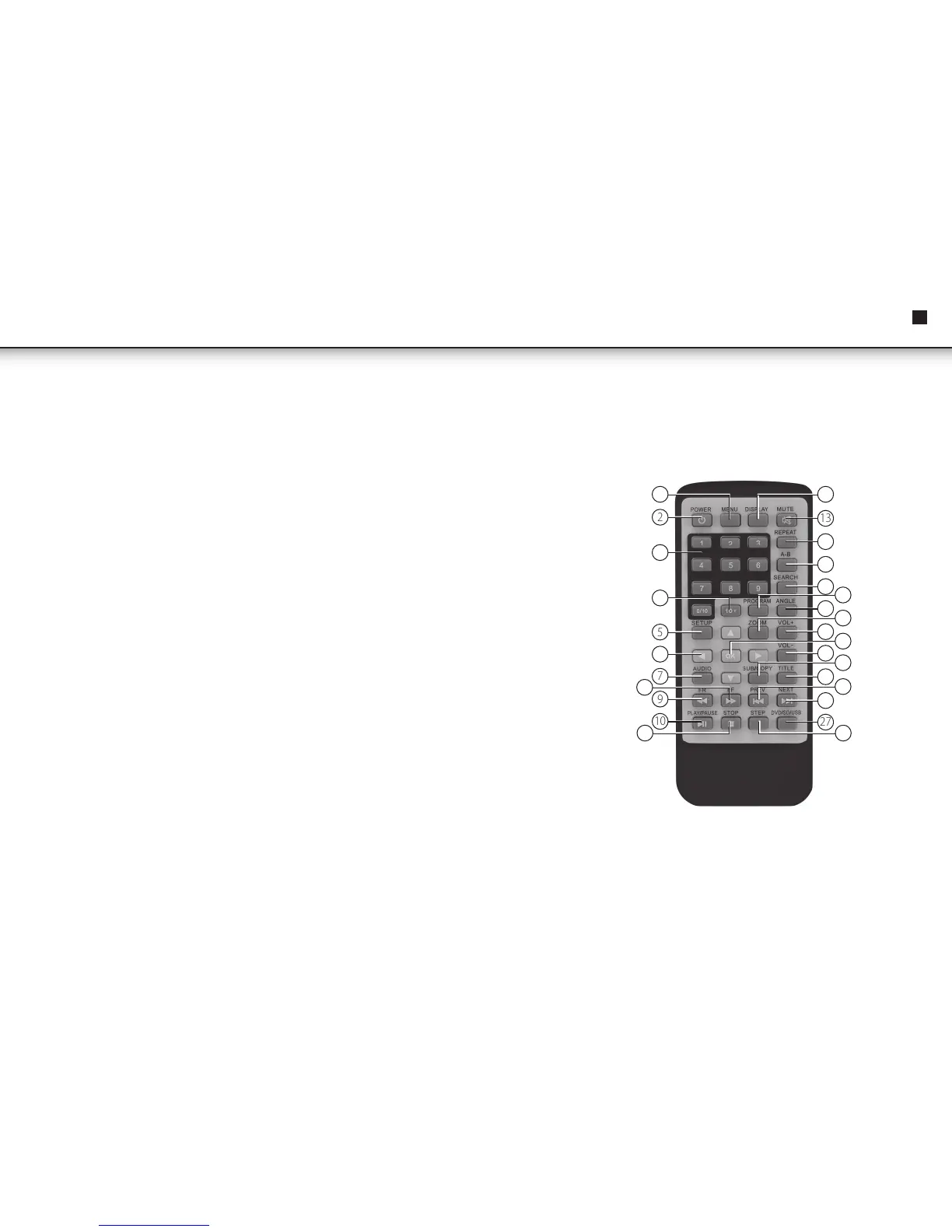
REMOTE CONTROL
1. Menu
2. Power
3. Number Pad
4. 10+
5. DVD Setup
6. Up/Down/Left/ Right
7. Audio
8. Fast Forward
9. Fast Rewind
10. Play/Pause
11. Stop
12. Display
13. Mute
14. Repeat
15. A-B Repeat
16. Search
17. Program
18. Angle
19. Zoom
20. Volume +
21. Confirm
22. Volume -
23. Subtitle
24. Title
25. Previous
26. Next
27. DVD/SD/USB
28. Step
EN
Instruction Manual



 To Next Page