EasyManua.ls Logo

AudioSource Sound pOp 2 - User Manual

AudioSource Sound pOp 2
2 pages
Print Icon
To Next Page IconTo Next Page
Loading...
Sound pOp 2 Owner’s Manual 8100.SOUNDPOP2
Congratulations on your purchase of the AudioSource®
Sound pOp 2™
Bluetooth Speaker– the latest in mobile
audio technology. Please retain this document for further
reference and take a few moments to read this entire
manual.
Please read and observe all instruction.
NOTE: if any part of this product is damaged or missing,
please call your dealer or AudioSource® directly at
1.877.715.5439
Please read your warranty and retain your receipt
and original carton for possible future use.
For more information about AudioSource® electronics,
speakers, and accessories, please visit
www.audiosource.net
Specifications
Bluetooth version 4.0, Class 2
HFP v1.6, HD Voice, A2DP, AVRCP
mSBC codec for High Quality Audio
IPX4 rated water resistance
Noise Cancellation/Echo Reduction for clear calls
1.5” High definition/High efficiency driver
500mAH UL listed battery (up to 8 hours play time)
Charge using any USB port
Silicone rubber case
TPR (Thermoplastic Rubber) suction cup
Dimensions: 2.87”H, 2.65”D
English
Package Contents:
Sound pOp 2™ Bluetooth Wireless Speaker
USB Charging Cable
Instruction Manual
Features
1.
2.
3.
4.
5.
6.
7.
USB Charging Sources
Getting Started
Charging Sound pOp 2™
1. Plug included USB cable into the micro
USB port on the back of Sound pOp 2™.
2. Connect USB cable to a USB port on a
computer or USB power adaptor. Status
Indicator LED will light solid once Sound pOp 2™
is connected to a power source.
3. Charge Sound pOp 2™ fully. This will take
approximately 3-4 hours. Status Indicator LED will
not appear once Sound pOp 2™ is fully charged.
4. Once Sound pOp 2™ is fully charged, Sound pOp 2™ is
ready to pair with your Bluetooth device.
Pairing Sound pOp 2™
1. Press Power On Button for 5 seconds,
Status Indicator LED will flash quickly.
2. Turn on the Bluetooth feature on your mobile
device or Computer. Enable device discovery
if not automatically enabled.
3. Search and select “
Sound pOp 2
” in the list on
your device. Note: Some devices may
require a pass code. Please use 0000 if prompted.
4. Status Indicator LED will flash slowly once paired
and connected.
5.
Sound pOp 2™
is now ready to play music from
your Bluetooth device.
6. To turn o
Sound pOp 2™
, press the Power On/Off
button for 5 seconds.
In Case of Trouble
1. Ensure Sound pOp 2™ is fully charged, Sound pOp 2™ will
not be able to pair if
Sound pOp 2™ is not charged.
2.
Turn Sound pOp 2™ off and retry “Pairing Sound pOp 2™.”
3. Ensure Bluetooth is enabled on your device and retry
“Pairing Sound pOp 2™.”
4. Move Sound pOp closer to your Bluetooth device and
retry “Pairing Sound pOp 2™.”
5. Try pairing
Sound pOp 2™ with a different Bluetooth device.
6. Sound pOp 2™ will not be able to pair if currently paired to
a device (Status Indicator LED will flash slowly). Try
unpairing with other devices and retry “Pairing Sound
pOp 2™.”
For Further Assistance
Please visit our website at www.audiosource.net
or contact our customer service department at
support@audiosource.net or call us at 1.877.715.5439
Limited Warranty
AudioSource, a division of Peak Audio Group, warrants this product against defects in materials and workmanship for a limited period of time. For a period of 90
days from date of original purchase, we will repair or replace the product, at our option, without charge for parts. The limited warranty period for factory
refurbished products expires after ninety (90) days from date of original purchase. This limited warranty applies only to purchases from authorized AudioSource
Retailers or Distributors. This limited warranty is extended only to the original purchaser and is valid only to consumers in the United States.
Consumers are required to provide a copy of the original sales invoice from an authorized AudioSource Retailer or Distributor when making a claim against this
limited warranty. This limited warranty only covers failures due to defects in materials or workmanship that occur during normal use. It does not cover failures
resulting from accident, fire, flood, misuse, abuse, neglect, mishandling, missapplication, alteration, faulty installation, modification, service by anyone other
than AudioSource, or damage that is attributable to Acts of God. It does not cover costs of transportation to AudioSource or damage in transit. The customer
should return their defective product, freight prepaid and insured, to AudioSource only after receiving a Return Authorization.
Repair or replacement under the terms of this warranty does not extend the term of this warranty. Should a product prove to be defective in workmanship or
material, the consumer’s sole remedies will be repair or replacement as provided under the terms of this warranty. If the defective product is discontinued
AudioSource may replace the product with an equivalent or superior product at its option. Under no circumstances shall AudioSource be liable for loss or
damage, direct, consequential or incidental, arising out of the use of or inability to use the product. There are no express warranties other than described above.
AudioSource ©2014
13970 SW 72nd Ave, Portland, OR 97223
www.audiosource.net
Bluetooth Wireless Sources
1. Status Indicator LED: solid – charging
quick flash– pairing mode
slow flash – paired to a device
2. Power On/Off Button
3. Plus Button: short push/tap – volume up
long push/hold – track forward
4. Microphone
5. Phone Button: short push/tap – play/pause and accept/end call
long push/hold – dial most recent in call log
6. Minus Button: short push/tap – volume down
long push/hold – track backward
7. Micro USB Charging Port (reverse of displayed side)
FN:80-MD101-97-2126-01 2014-9-9

Question and Answer IconNeed help?

Do you have a question about the AudioSource Sound pOp 2 and is the answer not in the manual?

Summary

Specifications and Package Contents

Product Specifications

Details on Bluetooth version, speaker, dimensions, and materials.

Package Contents

Lists all items included in the Sound Pop™ box.

Getting Started and Features

Initial Setup Steps

Steps for pairing, connecting to power, and charging the device.

Key Features

Overview of buttons, indicators, and functions like Power, LED, and Microphone.

Connectivity and Usage

Bluetooth Wireless Sources

Guidance on connecting various Bluetooth-enabled devices.

Pairing Your Sound Pop

Step-by-step instructions for pairing the device with a Bluetooth source.

Troubleshooting and Support

In Case of Trouble

Common issues and solutions for the Sound Pop™ device.

Further Assistance

Contact information and website for customer support.

Important Notices and Compliance

Important Notice: Suction Cup

Advice on using and maintaining the suction cup for adhesion.

FCC Statement and Warning

Regulatory compliance information and potential interference guidelines.

Overview

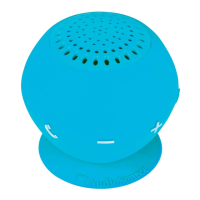
The AudioSource® Sound Pop 2™ is a portable Bluetooth wireless speaker designed for mobile audio.

Function Description

The Sound Pop 2™ is a Bluetooth speaker that allows users to play music wirelessly from their Bluetooth-enabled devices. It features a built-in microphone for hands-free calling, noise cancellation, and echo reduction for clear calls. The speaker is designed for portability with a silicone rubber case and a TPR (Thermoplastic Rubber) suction cup for easy attachment to surfaces. It is also IPX4 rated for water resistance, making it suitable for various environments.

Important Technical Specifications

  • Bluetooth Version: 4.0, Class 2
  • Bluetooth Profiles: HFP v1.6 (HD Voice), A2DP, AVRCP
  • Audio Codec: mSBC for High Quality Audio
  • Water Resistance: IPX4 rated
  • Driver: 1.5" High definition/High efficiency driver
  • Battery: 500mAH UL listed battery
  • Play Time: Up to 8 hours
  • Charging: Via any USB port
  • Case Material: Silicone rubber
  • Attachment: TPR (Thermoplastic Rubber) suction cup
  • Dimensions: 2.87"H, 2.65"D
  • Noise Cancellation/Echo Reduction: For clear calls

Usage Features

Getting Started & Charging

  1. Charging:
    • Plug the included USB cable into the micro USB port on the back of the speaker.
    • Connect the USB cable to a USB port on a computer or a USB power adapter.
    • The Status Indicator LED will light solid when connected to a power source.
    • A full charge takes approximately 3-4 hours. The Status Indicator LED will turn off once fully charged.
    • Once fully charged, the speaker is ready to pair with a Bluetooth device.

Pairing Sound Pop 2™

  1. Power On: Press the Power On Button for 5 seconds. The Status Indicator LED will flash quickly, indicating pairing mode.
  2. Enable Bluetooth: Turn on the Bluetooth feature on your mobile device or computer. Enable device discovery if not automatically enabled.
  3. Search and Select: Search for and select "Sound pop 2" in the list on your device. If prompted for a pass code, use "0000".
  4. Confirmation: The Status Indicator LED will flash slowly once paired and connected.
  5. Ready to Play: The speaker is now ready to play music from your Bluetooth device.
  6. Power Off: To turn off the speaker, press the Power On/Off button for 5 seconds.

Controls & Indicators

  • Status Indicator LED:
    • Solid: Charging
    • Quick flash: Pairing mode
    • Slow flash: Paired to a device
  • Power On/Off Button: Turns the speaker on and off.
  • Plus Button (+):
    • Short push/tap: Volume up
    • Long push/hold: Track forward
  • Minus Button (-):
    • Short push/tap: Volume down
    • Long push/hold: Track backward
  • Phone Button:
    • Short push/tap: Play/pause music, accept/end calls
    • Long push/hold: Dial most recent number in call log
  • Microphone: For hands-free calls.
  • Micro USB Charging Port: For charging the device.

Suction Cup Usage

  • The speaker features a TPR suction cup for attachment to surfaces.
  • Removal: Use the special tab on the suction cup to remove it from a surface. Do not pull the speaker off by pulling on the body, as this could damage the unit.
  • Adhesion: Suction cup adhesion time may vary depending on surface texture, temperature, and debris, which can all reduce adhesion time.

Bluetooth Wireless Sources

The speaker can be used with various Bluetooth-enabled devices, including:

  • Personal Computer
  • Notebook
  • Smart Phone
  • Tablet PC
  • MP3/MP4 Player

USB Charging Sources

The speaker can be charged using:

  • PC/Mac
  • Notebook
  • USB Power adapters

Maintenance Features

Troubleshooting ("In Case of Trouble")

  1. Not Pairing (Battery): Ensure the speaker is fully charged. It will not pair if not charged.
  2. Not Pairing (Power Cycle): Turn the speaker off and retry the pairing process.
  3. Not Pairing (Bluetooth Enabled): Ensure Bluetooth is enabled on your device and retry pairing.
  4. Not Pairing (Proximity): Move the speaker closer to your Bluetooth device and retry pairing.
  5. Not Pairing (Different Device): Try pairing the speaker with a different Bluetooth device.
  6. Not Pairing (Already Paired): If the speaker is currently paired to another device (Status Indicator LED will flash slowly), it will not be able to pair. Unpair it from other devices and retry pairing.

Warranty

  • Limited Warranty: AudioSource warrants this product against defects in materials and workmanship for a limited period.
  • Duration: 90 days from the date of original purchase for new products; 90 days from the date of original purchase for factory refurbished products.
  • Coverage: This warranty applies only to purchases from authorized AudioSource Retailers or Distributors and is valid only for the original purchaser in the United States.
  • Proof of Purchase: Consumers must provide a copy of the original sales invoice from an authorized AudioSource Retailer or Distributor when making a claim.
  • Exclusions: Failures due to accident, fire, flood, misuse, abuse, neglect, mishandling, misapplication, alteration, faulty installation, modification, service by anyone other than AudioSource, or damage attributable to Acts of God are not covered. Transportation costs to AudioSource or damage in transit are also not covered.
  • Return Process: Defective products must be returned freight prepaid and insured to AudioSource only after receiving a Return Authorization.
  • Remedies: Repair or replacement (at AudioSource's option) without charge for parts. If the product is discontinued, AudioSource may replace it with an equivalent or superior product.
  • Limitations: Repair or replacement does not extend the warranty term. AudioSource is not liable for loss or damage, direct, consequential, or incidental, arising out of the use or inability to use the product. No express warranties other than described above.

Further Assistance

  • Website: www.audiosource.net
  • Customer Service Email: support@audiosource.net
  • Customer Service Phone: 1.877.715.5439

FCC Compliance

  • FCC Statement: This device complies with Part 15 of the FCC Rules. Operation is subject to two conditions: (1) the device may not cause harmful interference, and (2) the device must accept any interference received, including interference that may cause undesired operation.
  • Modifications: Any changes or modifications not expressly approved by the party responsible for compliance could void the user's authority to operate the equipment.
  • FCC ID: If the FCC ID is not found on the silicon shell, it can be found on the plastic shell (2AC6P-SOUNDPOP2) by removing the silicon.
  • Interference Correction: If the equipment causes harmful interference, users are encouraged to try correcting it by reorienting/relocating the receiving antenna, increasing separation between equipment and receiver, connecting the equipment to a different circuit outlet, or consulting a dealer/experienced radio/TV technician.

AudioSource Sound pOp 2 Specifications

General IconGeneral
BrandAudioSource
ModelSound pOp 2
CategorySpeakers
LanguageEnglish

Related product manuals