2.4 Micro SO
Card Self-Checking
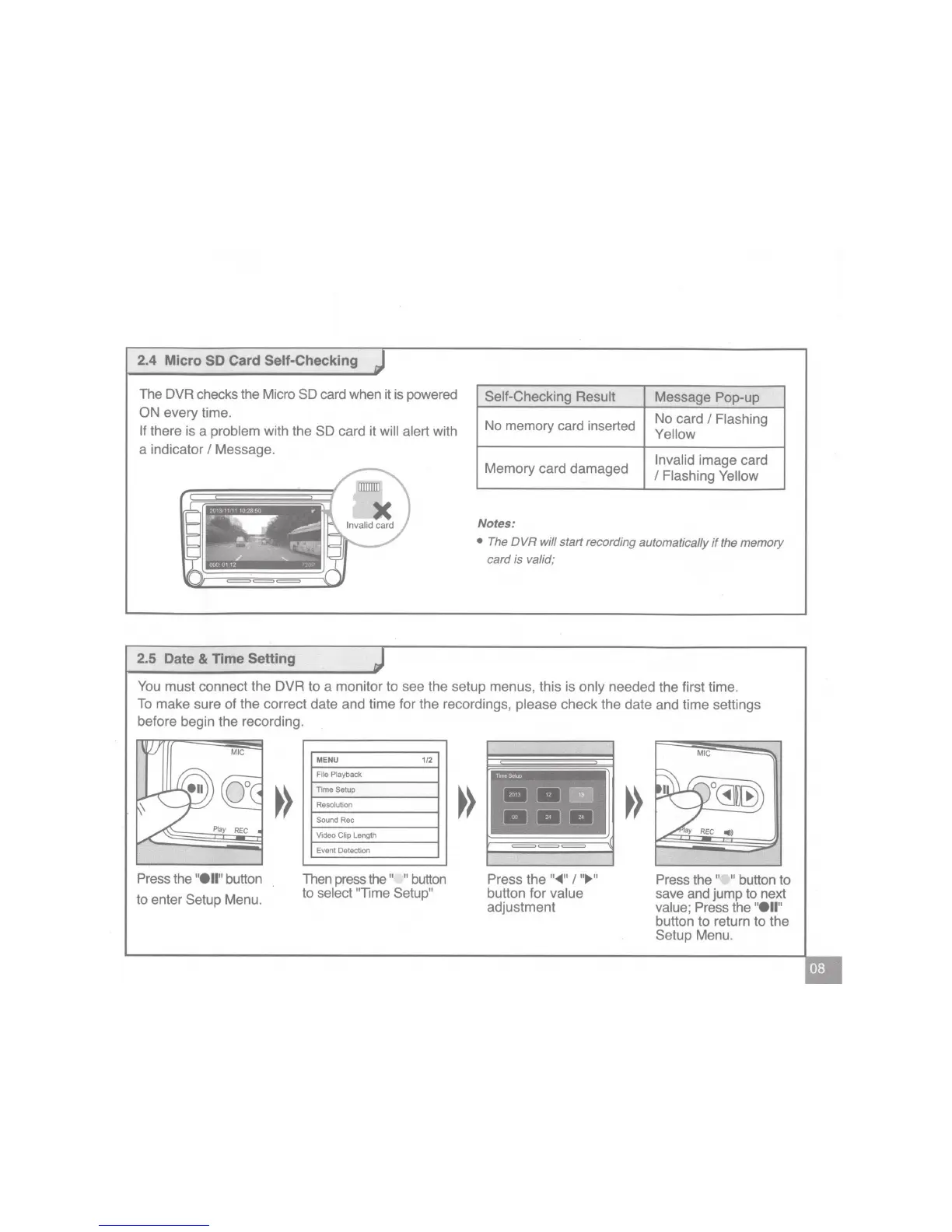
The DVR checks the Micro
SD
card when it is powered
ON
every time.
If
there is a
problem
with the
SD
card it
will alert
with
a indicator
I
Message.
2.5
Date
&
Time
Setting
Self-Checking Result
Message Pop-up
No memory card inserted
No card
I
Flashing
Yellow
Memory card damaged
Invalid
image card
I
Flashing Yellow
Notes:
• The
DVR
will
start recording automatically
if
the
memory
card
is valid;
You
must connect the DVR to a monitor to see the setup menus, this is
only
needed the first time.
To
make sure of the correct date and time for the recordings,
please
check the date and time settings
before begin the recording.
Press the
"ell"
button
to enter
Setup
Menu.
MENU
1/2
File
Playback
Time
Setup
Resolution
Sound
Rec
Video
Clip
Length
Event Detection
Then press the
" "
button
to
select "Time
Setup"
Press the
"~"
I
"IJl>"
button
for
value
adjustment
Press the " "
button to
save and jump to next
value;
Press the
"ell"
button to return
to
the
Setup
Menu.


 To Next Page
 Loading...