2.2
DVR
ON/OFF
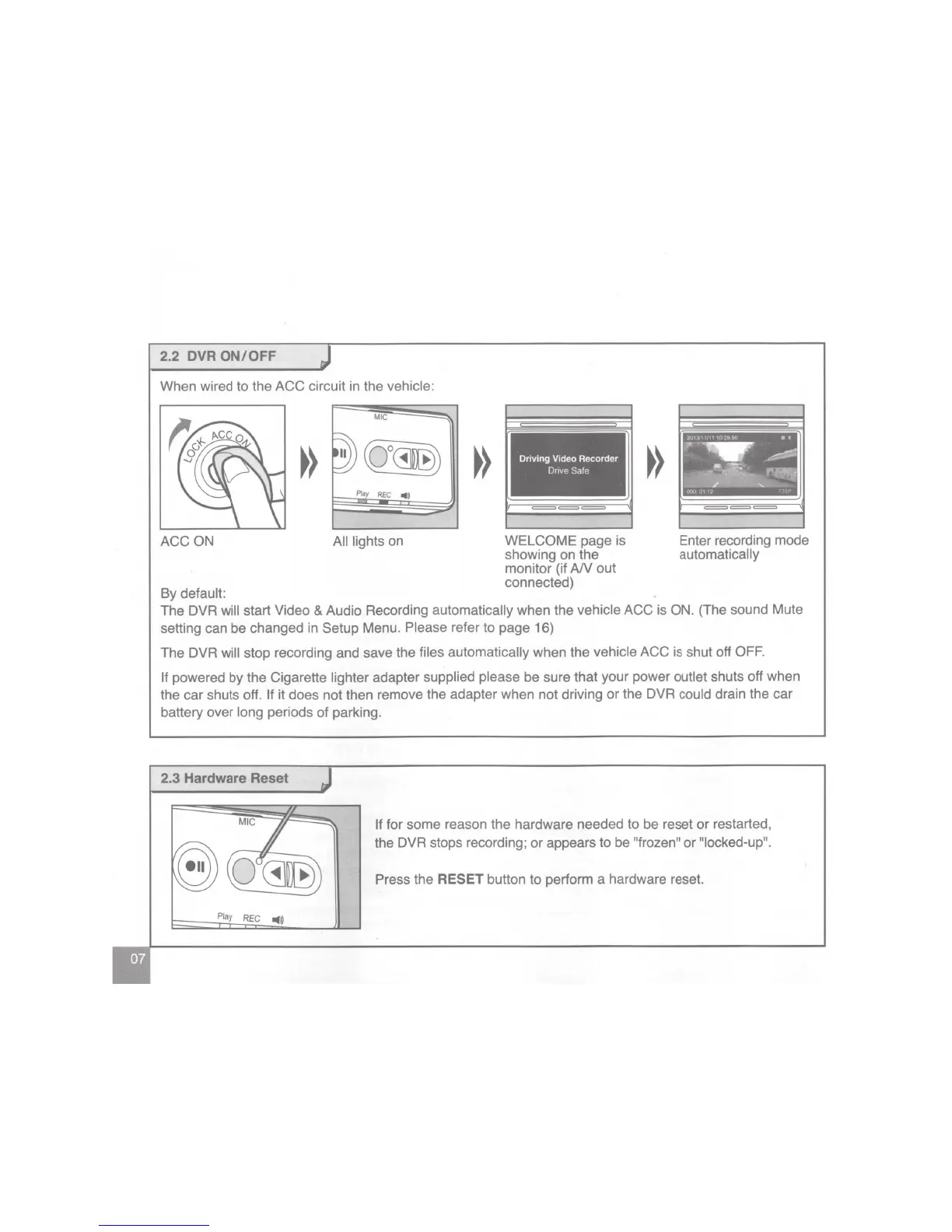
When wired to the ACC circuit in the vehicle:
MIC
~
Play
REG
•»
ACCON
All lights
on
By default:
Driving Video Recorder
Dnve
Safe
===
WELCOME page is
showing on the
monitor (if
AN
out
connected)
Enter recording mode
automatically
The DVR will start Video
&
Audio Recording
automatically
when the
vehicle
ACC is ON.
(The sound Mute
setting can be changed in Setup Menu.
Please
refer to page 16)
The DVR
will
stop recording and save the
files automatically
when the
vehicle
ACC is shut off
OFF.
If
powered
by
the Cigarette
lighter
adapter
supplied please
be sure that your power outlet shuts off when
the car shuts off.
If
it does not then remove the adapter when not driving
or
the DVR
could drain the car
battery over
long
periods of parking.
2.3
Hardware Reset
Play
REC
..
,)
If
for some reason the hardware needed to be reset or restarted,
the
DVR stops recording; or appears to be
"frozen" or
"locked-up".
Press
the
RESET
button to perform a hardware reset.


 To Next Page
 Loading...