-1 -3 -1 -4
English
For more information about TotalMedia, please click “ ? ” on
the menu bar for help, or refer to the manual supplied in the
CD or visit their website at www.arcsoft.com.
3.4 Arcsoft TotalMedia
3.3 More user instructions
Click “Manuals”, to browse this manual as an electronic
version along with manuals for Total Media.
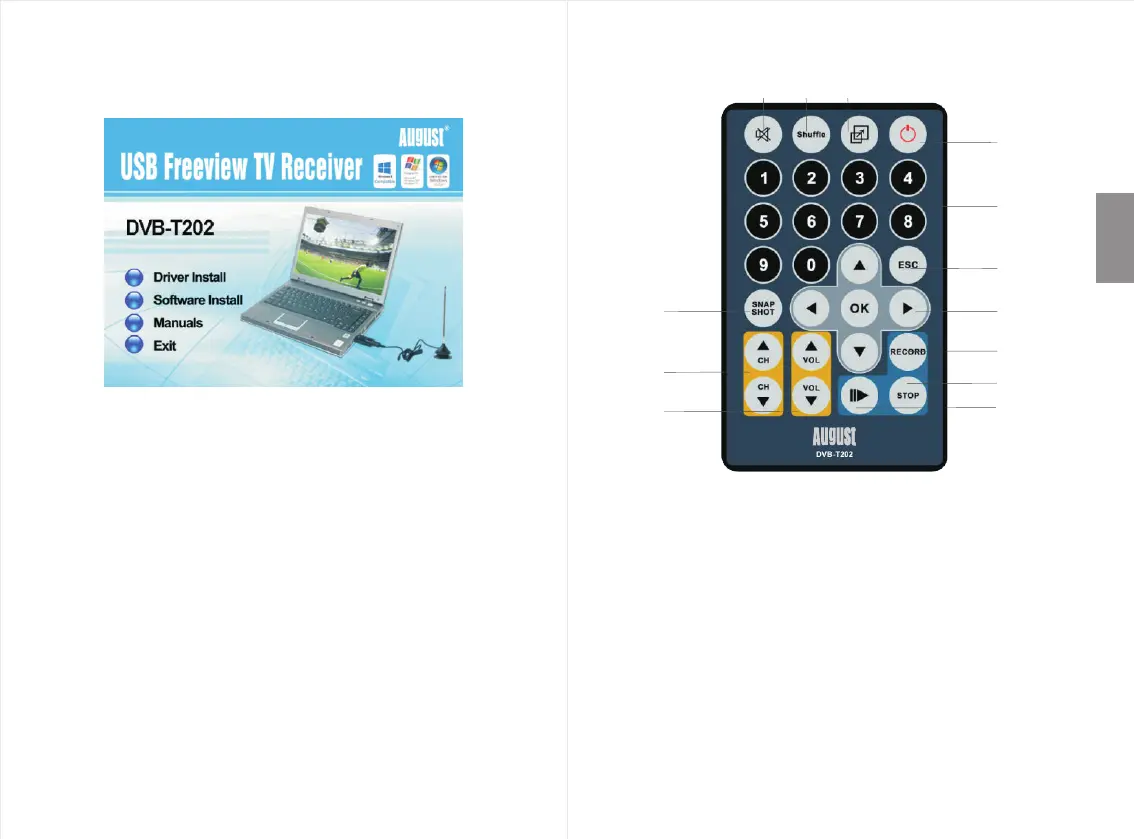
4. Remote Control
1) Mute On / Off
2) 16 Channel preview
3) Switch between full screen and the default screen
4) Open / Close TotalMedia application
5) 0 - 9 Numbers
6) Exit
7) Snapshot (takes a picture of what is on screen)
8) Up / Down / Left / Right / OK
9) Channel Up / Channel Down
10) Record
11) Stop Recording / Stop Playback
12) Volume UP / Volume Down
13) Time-Shifting On / Off
1 3
13
11
10
6
2
4
5
7
8
9
12


 To Next Page