Need help?
Do you have a question about the August DVB400 and is the answer not in the manual?
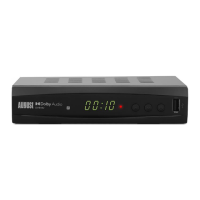
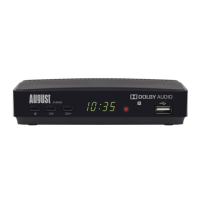
Identifies front panel components of the August DVB400 receiver.
Details the rear panel connections and ports of the August DVB400 receiver.
Lists and describes the specific functions of each button on the remote control.
Details the optimal distance and angle for using the remote control effectively.
Provides instructions on how to replace the battery in the remote control.
Guides the user through the initial setup process, including language and country selection.
Explains how to view 'Now and Next' program information on the display.
Describes how to access and navigate the list of available TV and Radio channels.
Explains the function to switch back to the last viewed channel.
Details the process of recording TV programs onto a USB memory stick.
Explains how to pause, rewind, and fast-forward live TV broadcasts.
Covers setting up scheduled viewing or recording of programs.
Explains how to access and exit the main menu system.
Guides users through managing, locking, skipping, and deleting channels.
Explains the Electronic Program Guide for viewing upcoming broadcasts.
Details options for automatically reordering channels based on various criteria.
Describes how to enable or disable Logical Channel Numbers.
Allows adjustment of picture aspect ratios, resolution, and TV format.
Allows selection between RGB and CVBS video output signals.
Covers auto and manual search for available TV and radio channels.
Allows adjustment of time offset, sleep timer, and time zone.
Enables changes to OSD, subtitle, and audio language preferences.
Includes parental guidance, password, and factory reset options.
Resets the device to its original factory settings.
Displays information about the device model, software, and hardware versions.
Functionality designated for manufacturers use only.
Configures digital audio output options via coaxial cable.
Explains how to play music files from a USB device.
Details how to view photos, including slideshow configuration.
Guides on playing video files and configuring subtitle options.
Covers selecting record devices, timeshift settings, and formatting USB storage.
Lists supported file formats for music, photos, and movies.
 General
| Tuner Type | DVB-T2 |
|---|---|
| Resolution | 1080p |
| Audio Formats | MP3, AAC |
| Power Supply | 5V DC |
| Features | EPG |
| Supported Media | USB storage |
| Video Formats | H.264, MPEG-2 |
| Output | HDMI |
| USB Port | USB 2.0 |

 To Next Page