10
Technical Data & Advice
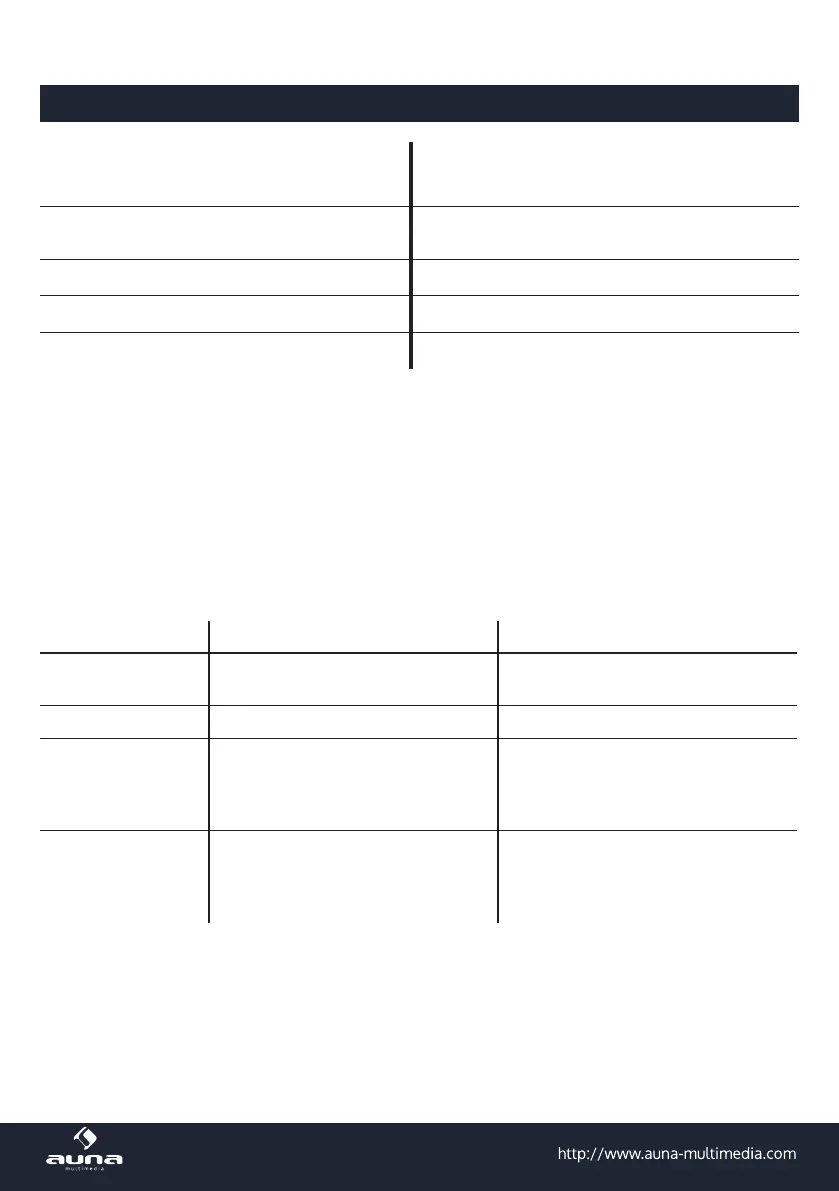
Article # 10029313, 10029314
Power supply
Power adapter: AC 100-240V ~ 50-60Hz
Device: 5V DC, internal Li-Ion-Akku
Frequency response 20Hz - 20kHz
SNR ≥71dB
Scope of delivery Gerät, Mikrofon, Audiokabel, Bedienungsanleitung
Charging the Device
• Connect a matched power adapter to AC100V - AC240V. Charging time is approximately 4 to 8 hours.
Once fully charged unplug the power supply as leaving a full battery on charge may cause damage to
the battery.
• See the charging status on the LED panel. Do not charge longer than necessary.
Troubleshooting
Possible Faults Possible Causes Possible Solutions
No sound
• No input sound source.
• Volume is too low.
• Use a better music signal.
• Adjust volume.
Distortion of sound • Volume too high. • Turn down the volume.
Karaoke does not
work
• Microphone plug is not fully in-
serted.
• Microphone switch is not on.
• MIC VOL is at the lowest position.
• Plug microphone properly into the
socket.
• Turn on microphone switch.
• Adjust microphone volume.
MP3 does not play
• Incorrect le format
• Improper operation has caused a
process disorder.
• USB/TF card are disconnected.
• Transform song format into Mp3
format.
• Reboot the machine.
• Insert USB disc/TF card properly.



 To Next Page