19
EN
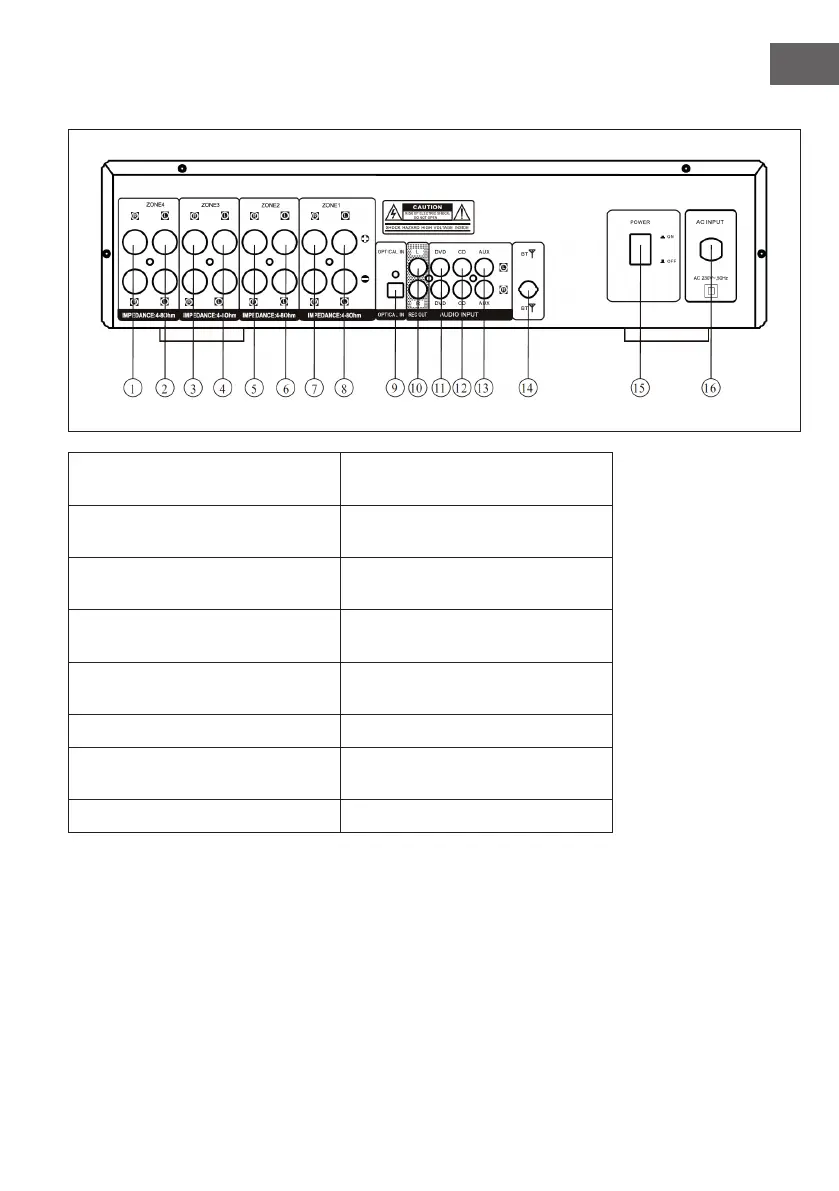
Rear
1 ZONE 4 - right speaker terminal 9 OPTICAL - Connect to the optical
audio connector
2 ZONE 4 - left speaker terminal 10 REC OUT - Connect to the REC
input
3 ZONE 3 - right speaker
connection
11 DVD AUDIO INPUT - Connect to
the DVD output
4 ZONE 3 - left speaker terminal 12 CD AUDIO INPUT - Connect to
the CD output
5 ZONE 2 - right speaker
connection
13 AUX INPUT - Connect to the
audio output.
6 ZONE 2 - left speaker terminal 14 BT Antenna
7 ZONE 1 - right speaker terminal 15 Power switch - Switch the unit
on/o
8 ZONE 1 - left speaker terminal 16 AC-INPUT - 230 V ~ 50 Hz


 To Next Page