EasyManua.ls Logo

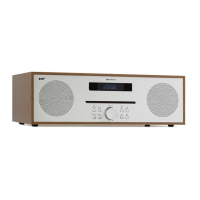
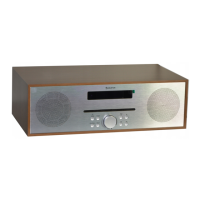
auna Silver Star Mini - User Manual

auna Silver Star Mini
64 pages
Print Icon
To Next Page IconTo Next Page
Loading...
www.auna-multimedia.com
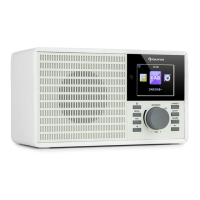
Silver Star Mini
Internet Radio
US-10032791 US- 10032792 US-10038350

Questions and Answers

  • S
    Sarah StoneAug 20, 2025
    What to do if my auna Silver Star Mini Radio keeps buffering?
    • J
      Joseph OneillAug 20, 2025
      If your auna Radio is constantly re-buffering, it's likely due to issues with your broadband connection. The radio streams data from the station via your broadband. If there's a high error rate or intermittent connection, the radio will pause until the connection stabilizes and receives enough data. Check your DSL modem to ensure your broadband line isn't experiencing a high error rate or disconnections. If problems persist, contact your broadband supplier.
  • S
    samuellynchAug 22, 2025
    Why won't my auna Silver Star Mini Radio play certain stations?
    • M
      Malik ColonAug 23, 2025
      If your auna Radio connects to the network but can't play specific stations, several reasons are possible: * The station might not be broadcasting at the current time (consider different time zones). * The station's server might be overloaded with too many listeners. * The station may have reached its maximum listener limit. * The station might no longer be broadcasting. * The link on the radio could be outdated (though this updates automatically daily). * The internet connection between your location and the server is slow. * Your internet service provider might be failing to stream in your geographical area. If you have a laptop, try connecting it if your Internet Radio cannot find the station.
  • L
    Lisa RossAug 26, 2025
    Why can't my auna Radio find my PC via UPnP?
    • J
      juliehuynhAug 26, 2025
      If your auna Radio can't find your PC when scanning under the UPnP function, consider these possibilities: * Ensure the internet radio is connected to the wireless access point. You can connect to your wireless network by going to ‘Configuration’, ‘Network’, ‘Wireless network connection’. * A firewall on your PC might be blocking shared files. If you have a third-party firewall (like Norton or Zone Alarm), consult its manual for instructions. * If your PC is on a managed network with a server, the PC being searched for might need to be the server's workgroup.
  • P
    pamela39Aug 28, 2025
    What to do if I can't share a folder on my auna Silver Star Mini?
    • B
      Barbara FernandezAug 28, 2025
      If you can’t share a folder on your auna Radio, it's likely due to a scan error occurring if the Windows file sharing application times out while the radio scans PC folders. This is more likely if both the PC and the radio are connected wirelessly. Try reconnecting the PC with the media content to the network via cable.
  • B
    Brian FosterAug 31, 2025
    What does Scan-Error mean on my auna Radio?
    • M
      Mark HarrisAug 31, 2025
      A 'Scan-Error' on your auna Radio typically means that the Windows file sharing application timed out while the radio was scanning the content of folders on a PC. This often happens when both the PC with the media content and the radio are connected wirelessly. Try reconnecting the PC with the media content to the network using a cable.
  • A
    annewilsonSep 2, 2025
    What to do if my auna Silver Star Mini Radio can connect to the network but not play stations?
    • M
      Mark WalkerSep 3, 2025
      If your auna Radio connects to the network but can't play certain stations, the station might not be broadcasting at the moment, or their server might be overloaded. The station may have reached its maximum number of listeners or stopped broadcasting altogether. The link on the radio could be outdated, but it updates automatically every day. A slow internet connection or issues with your internet service provider could also be the cause. As a first troubleshooting step, try using a PC to play back the stream via the broadcaster’s web site. If you can play back the station with a PC, please report to the customer service where you bought this radio. If you have a laptop, try connecting it if your Internet Radio cannot find the station.
  • L
    Lori OlsonSep 5, 2025
    Why auna Silver Star Mini Radio can't find PC under UPnP?
    • L
      lbrownSep 5, 2025
      If your auna Radio can't find PCs when scanning under the UPnP function, first ensure that the radio is connected to your wireless access point by going to ‘Configuration’, ‘Network’, ‘Wireless network connection’ and entering your wireless network details. Also, check your PC's firewall settings, as it might be blocking shared files. If you have a third party firewall (Like Norton, or Zone Alarm) that will have its own control panel and you will need to consult the manual for your firewall. If your PC is connected to a managed network, with a server sometimes the PC being searched for needs to be server Workgroup.
  • D
    David JonesSep 8, 2025
    What to do if I can’t share a folder on auna Radio?
    • J
      Jeffrey PattonSep 8, 2025
      If you can’t share a folder on your auna Radio because the option is not highlighted, it's possible a scan error occurred because the Windows file sharing application timed out while the radio was scanning the PC's folders. This is more likely if both the PC and the radio are connected wirelessly. To resolve this, try re-connecting the PC with the media content into the network via cable.
  • M
    Marilyn ChenSep 12, 2025
    How to fix Scan-Error on auna Radio?
    • J
      Joseph JonesSep 12, 2025
      A scan error on your auna Radio typically occurs when the radio is scanning the folders on a PC and the Windows file sharing application times out. This is more likely to happen if both the PC and the radio are connected wirelessly. To fix this, try re-connecting the PC with the media content into the network via cable.
  • K
    Kristen WilsonSep 13, 2025
    Why does my auna Silver Star Mini Radio keep re-buffering?
    • L
      Lee WhiteSep 13, 2025
      If your auna Radio keeps re-buffering, it means the radio is streaming data from the station via your broadband connection, and there may be a high error rate or intermittent connection. In this case, you should contact your broadband supplier to resolve these issues.

Summary

Technical Data

Item Numbers

Lists the various item numbers for the product.

Warning Information

Electric Shock and Injury Prevention

To reduce shock and injury risk, do not remove covers and refer servicing to qualified personnel.

Fire and Water Hazard Warning

Warning to reduce fire or electrical shock risk by not exposing product to water, rain, or moisture.

Plug Use Caution

Caution against using the plug with an extension cord or receptacle to reduce electric shock risk.

Ventilation Requirements

Ensures proper ventilation by not blocking openings and allowing airflow.

FCC Compliance and Warnings

Radio Frequency Energy

Warning about potential interference from radio frequency energy and unauthorized modifications.

FCC Part 15 Compliance

Declaration of compliance with FCC Part 15 rules for residential installations.

Interference Mitigation Steps

Provides user actions to correct radio or television reception interference.

Product Warranty Details

Standard Warranty Period

Covers defects in material or workmanship within 12 months from original purchase.

Warranty Extension Registration

Explains how to extend warranty up to 18 months by product registration.

Exclusions and Liability Limits

Details conditions that void warranty and limits company's liability to repair or replacement.

Safety Instructions

General Usage and Environment

Covers basic safety rules for home use, environment, and maintenance.

Environmental Exposure

Advises against direct sunlight, heat sources, and improper placement.

Power and Liquid Precautions

Instructs not to plug in if not off, avoid liquids, and water exposure.

Special Handling and Care

Product Handling Precautions

Details specific precautions for product handling, modifications, and usage.

Remote Control Overview

Initial Device Setup

Power and Connection Guidelines

Instructions for connecting the device to power and mains socket.

First-Time Configuration Process

Guides through setting language and network configurations on first startup.

Wireless Network Configuration Methods

Details methods for configuring wireless network connection (Manual, WPS).

Network Configuration Options

WPS PBC Network Setup

Steps for setting up network connection using WPS PBC feature.

Basic Operation - Core Navigation

Network Settings Configuration

Covers wireless network configuration and manual setup options.

Configuration Menu - Alarms and Display

Configuration Menu - Radio and System

Internet Radio Features

Media Center Operations

Internet Radio - Station Management

Managing Favorite Stations

Saving, recalling, and managing favorite preset stations.

Media Center - USB and UPnP

Configuration Menu

Network Connection Setup

Details Wireless Network and Manual Configuration options.

Configuration - Alarms and Timers

Alarm Settings

Configuration for independent alarms (Alarm 1, Alarm 2, NAP) and alarm volume.

Configuration - Radio, Playback, and System

Software Update and Reset

Procedures for updating software and restoring default settings.

DLNA and UPnP Setup

Media Streaming Setup

Instructions for setting up media streaming from PC or other media servers.

FM Operation and Presets

Troubleshooting Guide

Wireless Network Connection Issues

Steps to resolve problems connecting the radio to a wireless network.

Encrypted Network Configuration

Guidance on entering correct keys/passphrases for encrypted networks.

Troubleshooting - Station Playback

Unable to Play Specific Stations

Reasons for not playing stations: time zone, server load, outdated links, slow connection.

UPnP PC Discovery Issues

Troubleshooting when PCs are not found during UPnP scan or due to firewall.

Troubleshooting - Buffering and Errors

Radio Station Re-buffering

Checking broadband connection for high error rates or disconnections causing re-buffering.

auna Silver Star Mini Specifications

General IconGeneral
Brandauna
ModelSilver Star Mini
CategoryRadio
LanguageEnglish

Related product manuals