GB8
• Replace the screw in the lamp base and
tighten.
Operating the Aureo
Turning the light on
and off
The Aureo bed lamp
has a dimmer switch
to regulate the
brightness of the halo-
gen bulb. The silver
touch control on the
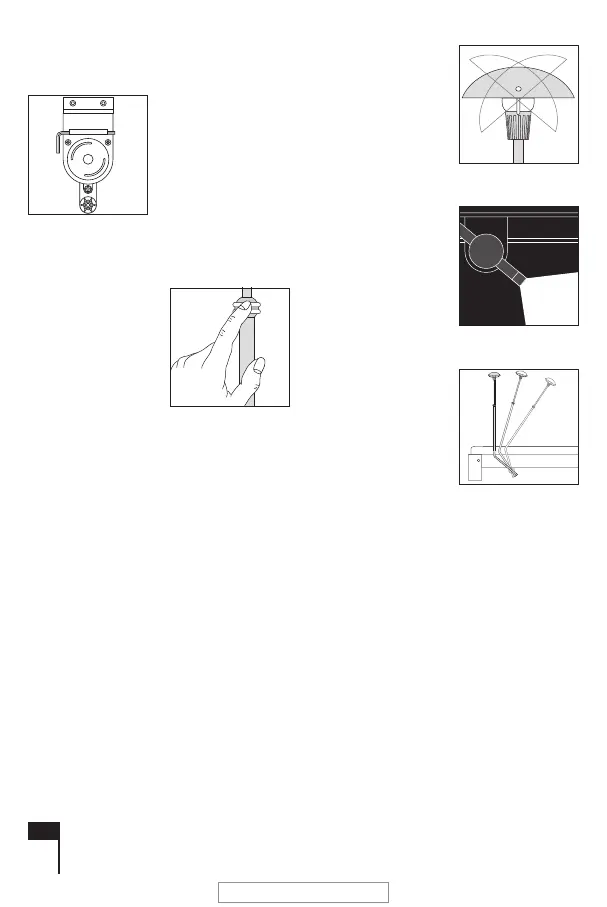
stem also acts as the dimmer (see fig. 8).
• To turn the light on, gently press the silver
control switch with your thumb and index fin-
ger.
• To use the dimmer press slightly harder on
the touch control, the light will become
brighter or dimmer.
• If you let go of the touch control, the lamp will
stay at the brightness level you have rea-
ched.
• If you wish to reverse the direction of dim-
ming, let go of the touch control and then
hold it down again until the lamp has
reached the brightness you require.
• The night light cannot be dimmed.
Adjusting the
shade
The shade can be tur-
ned as well as angled
for optimum lighting
(fig. 9).
The floor night
light
The floor night light
shines continuously
and casts a faint light
on the floor (fig. 10).
Manual
adjustment
The Aureo bed lamp
can be adjusted ma-
nually by moving the
lamp stem to the desi-
red position (fig. 11).
Replacing the halogen bulb
• Turn off the power.
• Remove the lampshade (fig. 12).
• Remove the protective glass from the lamp
socket (fig. 13).
• Remove the bulb from the fitting.
• Use a 10 Watt/12 Volt (type G4) halogen
bulb.
• Do not touch the bulb with your fingers.
• Push the bulb into the fitting, using the pro-
tective covering (fig. 14).
fig. 7
fig. 8
fig. 9
fig. 10
fig. 11
2112 BinnenW.pdf - pag.8 May 30, 2006
LET OP !!! Lage resolutie!


 To Next Page