8
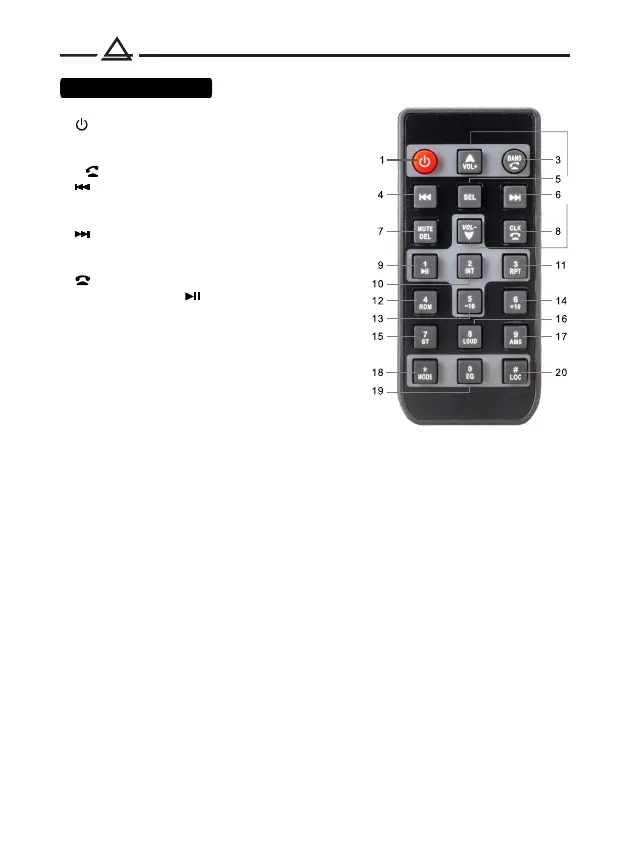
1. Turn on/ off the device
2. Volume control
3. Switching radio bands
/ answer call
4. Previous track / Rewind
/ Radio setup
5. Source selection
6. Next track / Fast forward
/ Radio setup
7. Mute mode
8. End call / Clock
9. Preset 1 button / Pause
10. Preset 2 button
/ Track scanning mode
11. Preset 3 button / Repeat mode
12. Preset 4 button / Shuffle mode
13. Preset 5 button
/ Skip back 10 tracks
14. Preset 6 button
/ Skip forward 10 tracks
15. Radio reception mode (mono / stereo)
16. Loudness (LOUD)
17. Scanning stations in memory / Automatic search and storage of stations (AMS)
18. Source selection
19. Selecting a preset equalizer
20. Attenuation of the tuner sensitivity (LOC)
2
Using the remote control (RC):
• Place the emitting window of the remote control in the direction of the sensor
window on the device.
• The working angle for receiving remote control signals is about 30 degrees.
• Distance between the emitting window of the remote control and the touch
window of the device should be less than 5 meters.
• A depleted battery can damage the remote control.
• Keep batteries out of the reach of children!
Remote control



 To Next Page