8
2
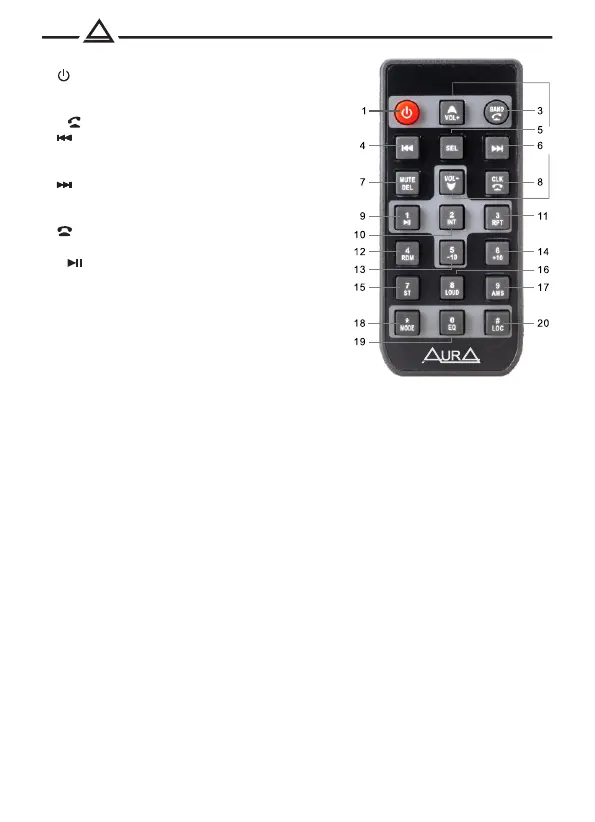
Remote control
1. Turning on / off the device
2. Volume adjustment
3. Switching radio ranges
/ Reception of a call
4. Previous track / rewinding back
/ Radio setting up
5. Choosing a source
6. Next track / rewinding forward
/ Radio setting up
7. Muffling sound (mute)
8. Call completion / clock
9. Pre -configuration button 1
/ Pause
10. Preliminary settings button 2
/ Skaging mode of tracks
11. Preliminary settings button 3
/ Repeat mode
12. Preliminary settings button 4
/ Random play mode
13. Pre -configuration button 5
/ Switch to 10 tracks backward
14. Pre -configuration button 6 / Switch to 10 tracks forward
15. Radio station reception (mono / stereo)
16. Loud subtle
17. Memory scanning / Automatic search and
memorization of stations (AMS)
18. Choosing a source
19. Choosing the preset of equalizer
20. Lowering of the sensitivity of the tuner (LOC)
Using remote control (PDU):
• Place the radiating window of the remote control in the direction of the sensor
window on the device.
• A working angle for receiving the signals of the PDU is about 30 degrees.
• The distance between the radiation window of the DPD and the touch window of
the device. It should be less than 5 meters.
• The sowing nutrition element can lead to damage to the remote control.
• Store the nutrition elements in an inaccessible place for children!


 To Next Page