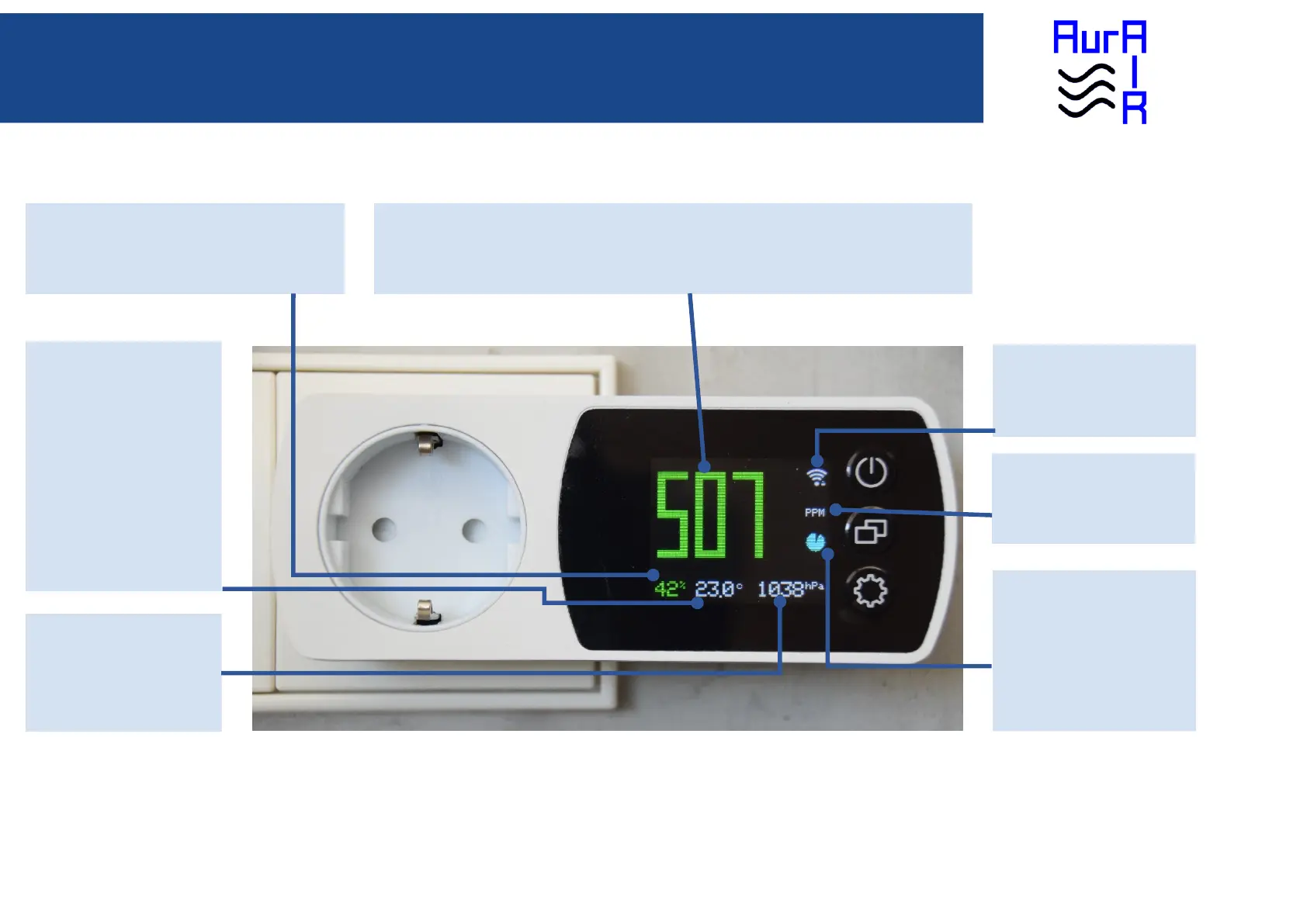
CO2 Value
All measured CO2 sensor values are displayed here. Healthy values are displayed in green, mediocre values in
yellow and unhealthy values in red.
WiFi Icon
Single click: Switch display off
Double click: Dim display
Long click: Update Firmware
Unit Icon
The unit for CO2 is PPM, parts per
million.
Measurement
Cadence Icon
After each CO2 measurement, the
green solid circle is displayed again.
The green circle gets smaller as
time passes until it has completely
vanished and the next
measurement is started.
Temperature Value
The temperature value is
displayed on the lower mid side,
followed by the metric unit
symbol Celcius (c). The
temperature has a single white
color.
Air Pressure Value
The air pressure is displayed on
the lower right side, followed by
the metric unit symbol (hPa). The
pressure has a single white color.
Relative Humidity Value
The relative humidity value is displayed on the lower left
side, followed by the symbol (%). Healthy values are
displayed in green, mediocre values in yellow and
unhealthy values in red.


 To Next Page