Need help?
Do you have a question about the Auralic ALTAIR G1 and is the answer not in the manual?
Guidance on proper physical placement of the ALTAIR G1 for ventilation.
Instructions for verifying the AC mains voltage setting for the ALTAIR G1.
Details on connecting various I/O ports of the ALTAIR G1.
Description of the rotary knob's functions and operation on the ALTAIR G1.
Information about the 6.35mm headphone jack on the ALTAIR G1.
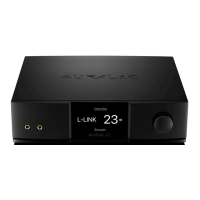
Details about the 4-inch high-resolution display on the ALTAIR G1.
Explanation of the Smart-IR sensor and its functionality for remote control.
How to power on, put into sleep mode, and wake up the ALTAIR G1.
Description of the initial display shown when the ALTAIR G1 starts up.
Overview of the main menu structure and navigation options.
Interface for displaying track information, status, and playback controls.
Interface for managing the list of tracks to be played.
Menu for selecting the physical input channel of the ALTAIR G1.
Access to general hardware-related setup and network information.
Interface for accessing streaming software settings.
Settings related to the ALTAIR G1's processor and digital signal processing.
Options for browsing and playing music from the Lightning Server library.
Steps to connect the ALTAIR G1 to a network using an Ethernet cable.
Steps to connect the ALTAIR G1 to a network using Wi-Fi.
Guide to setting up and using the Lightning DS control application.
 General
| Category | Media Converter |
|---|---|
| Wired | Gigabit Ethernet |
| DAC Chip | ESS Sabre ES9038Q2M |
| Control Software | Lightning DS |
| Weight | 6.8 kg |
| Streaming Services | TIDAL, Qobuz, Spotify Connect, Internet Radio |
| Digital Inputs | 1x AES/EBU, 1x Coaxial, 1x Toslink, 1x USB |
| Analog Outputs | 1x Stereo RCA, 1x Balanced XLR |
| Wireless | Wi-Fi |
| Supported File Formats | AAC, AIFF, ALAC, FLAC, MP3, OGG, WAV, WMA |
| Control Options | Web Interface |
| Dimensions | 340 x 320 x 80 mm |
| Sampling Rates | PCM 44.1kHz to 384kHz, DSD64, DSD128, DSD256 |

 To Next Page