Need help?
Do you have a question about the Auralic Aries and is the answer not in the manual?
Official control software for ARIES, available on Apple App Store for iPad.
ARIES is compatible with other OpenHome/uPnP control software for limited functions.
Lists compatible software like Asset uPnP, Twonky Media Server, Minimserver, J.River Media Center.
Lists tested home use WiFi routers for stable high-resolution streaming.
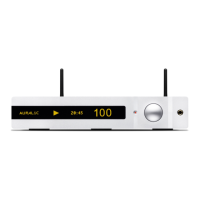
Controls for power on/off and front display on/off.
Functions for track selection, confirmation, cancellation, and system reboot.
Functions for playback, repeat, and shuffle modes.
Procedure to reset ARIES to factory default settings using the reset button.
 General
| Wired Ethernet | Gigabit Ethernet |
|---|---|
| Type | Streamer |
| Streaming Platform | Lightning DS |
| Supported File Formats | AIFF, ALAC, APE, DIFF, DSF, FLAC, MP3, OGG, WAV, WV |
| Sampling Rates | 44.1kHz to 384kHz, DSD64 to DSD256 |
| Control Software | Lightning DS (iOS), OpenHome compatible control software |
| Digital Outputs | AES/EBU, Coaxial, Toslink |
| Wireless | Wi-Fi (802.11a/b/g/n/ac) |
| Power Consumption | 10W |
| Connectivity | Ethernet, Wi-Fi, USB |
| Outputs | AES/EBU, Coaxial, Toslink |
| Control | Lightning DS app, OpenHome compatible control software |
| Streaming Services | TIDAL, Qobuz, Spotify Connect, Internet Radio, AirPlay |
| USB Host | USB 2.0 High-Speed for external storage |

 To Next Page