Need help?
Do you have a question about the Auralic VEGA and is the answer not in the manual?
Details the core processor architecture and its capabilities for high-resolution audio.
Explains the internal upsampling algorithm and its benefits for analog circuit design.
Describes the precision femto master clock and its low jitter performance.
Outlines the six built-in digital filter modes for optimizing listening experience.
Details the patented Class-A output module for driving various loads and superior linearity.
Lists the items included in the box and instructions for careful unpacking.
Provides guidance on positioning the VEGA for proper ventilation and performance.
Instructs users to check and ensure correct AC mains voltage for operation.
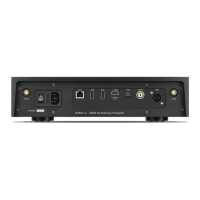
Illustrates and lists all input/output ports on the rear of the VEGA unit.
Describes the buffered analog outputs, their amplitude, and impedance.
Details the AES/EBU, Coaxial, and Toslink digital input specifications and features.
Explains the USB input functionality, asynchronous transmission, and DoP protocol support.
Advises on selecting an appropriate power cord and checking mains voltage.
Explains how to turn the VEGA device on, off, and enter standby or sleep modes.
Introduces the RC-1 remote control and its primary functions for operating the VEGA.
Details how to start/resume the unit and adjust volume levels using the remote.
Describes how to select different audio input sources using the remote control.
Explains how to turn the display on/off and mute/unmute the audio output.
Guides users on entering, navigating, and exiting the VEGA's menu system.
Describes how to put the VEGA into standby or sleep mode using the remote.
Covers starting, stopping, adjusting volume, and navigating menus with the rotary switch.
Explains how to activate the standby/sleep mode using the rotary switch.
Details how to select and switch between various audio input sources like AES, Coax, Toslink, and USB.
Explains how to adjust the volume balance between the left and right audio channels.
Describes the option to set the analog output phase to normal or inverted.
Explains the different digital filter modes (1-6) and their intended use cases for PCM and DSD signals.
Covers volume control modes: MASTER (shared) and INDVDL (independent per input).
Details options for display behavior: KEEP ON, AUTO OFF, DIM, NORMAL, BRIGHT.
Explains the ENABLE/DISABLE options for the sleep function to save power and maintain warm-up state.
Describes clock synchronization modes: AUTO, COARSE, FINE, and EXACT for optimal sound quality.
Configures volume control behavior when using the remote control.
Allows restoring all user settings to their original factory defaults.
Displays hardware version, software version, serial number, and total run time.
Provides guidance on cleaning the device and handling extended non-use.
Details how to handle product issues, obtain RMA, and avoid voiding the warranty.
Provides contact details for Auralic's technical support department.
Offers steps to diagnose and fix problems related to the device not powering on.
Provides solutions for issues like no sound, low output, distortion, or partial sound.
Suggests methods to troubleshoot and remove unwanted noise or hum from the audio signal.

 To Next Page
 General