ONT-2-E4xxxi Multi-service Residential Gateway Series Hardware Installation Guide
TM 87-10879 Rev. A UNRELEASED DRAFT 15
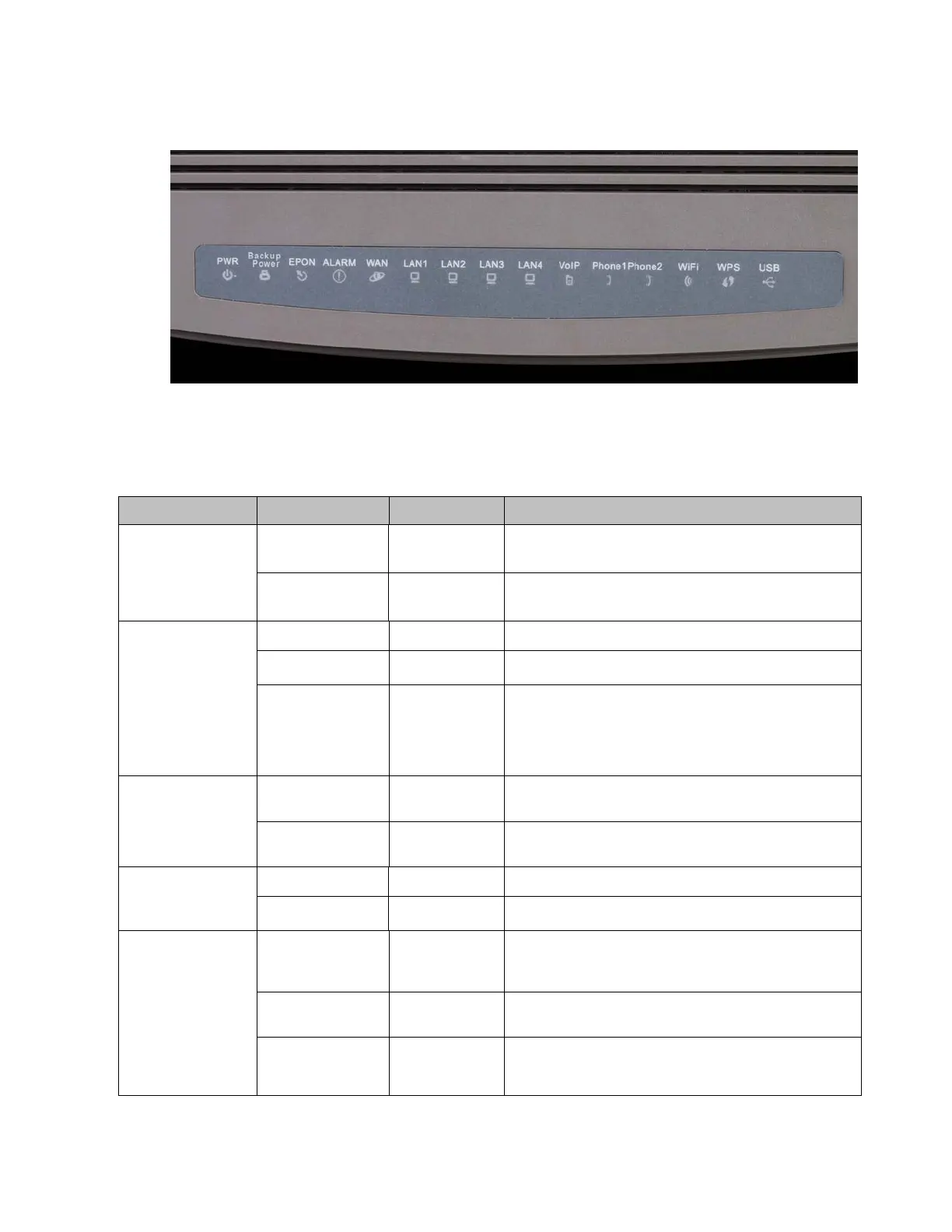
Figure 1 LED Indicators on EPON Multi-service Gateway ONT
See Table 6 for a description of the LED indicators located on the front top of an EPON Multi-service
Gateway ONT.
Table 6 LED Indicators and Descriptions
PWR (Power) or
SYS (System)
Green-Blinking Blinks Booting up.
Green-Solid On ONT is operating.
Backup Power
Dark Off No backup power is present.
Green-Solid On Backup power is present.
Green-Blinking On
Slow blinking green when ONT is running on backup
power.
Fast blinking green when a problem exists with the
backup power.
EPON
Dark On
No fiber uplink to EPON interface or failed to connect
over EPON network.
Green-solid On
PON uplink is OK, and EPON network connection is
operational.
Alarm
Dark Off No alarm condition exists.
Red-Blinking Blinks Alarm condition exists.
WAN (Internet)
Dark Off
No fiber uplink to EPON interface or ONT model is
configured by Service Provider so that it does not have
a routed connection to the internet.
Green-Blinking Slow Blink
During DHCP, ONT failed to receive an IP address
from the service provider.
Green-solid On ONT is connected to the WAN.



 To Next Page