C300H / C300HI / C300H x4 / C300HI x4
C350H / C350HI / C350H x4 / C350HI x4
68
NOTE
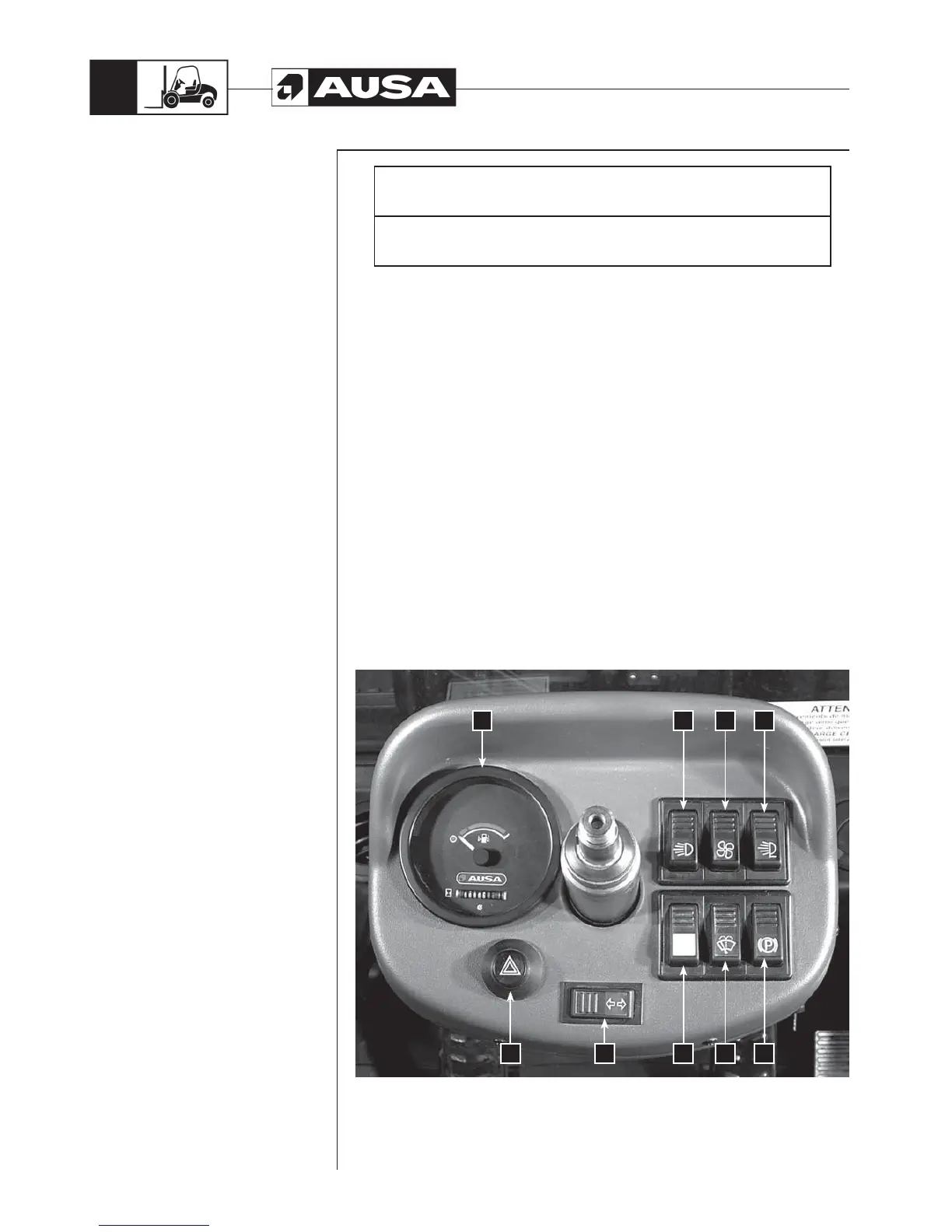
For ease of understanding, the picture shows the panel with the steering wheel
removed.
C300H / C300HI / C350H / C350HI instrument panel: Components and
Operation (fig. 1)
1- Multi-function instrument. See the section Multi-function instrument.
2- Light switch. This switch has two positions, the first switches on the low beam
and the second switches on the high beam.
3- Heating switch (). This has two positions to give two fan speeds.
4- Working light switch (). To connect the front lights switch turn on the switch.
5- Parking brake. To activate the forklift parking brake, press the switch.
6- Windscreen wiper switch (). To switch on the windscreen wiper, press the
switch. To activate the windscreen wiper washer pump, press the same switch
again.
7- Rotating beacon switch. To switch on, press the button and it will light up. To
switch off, press the button again.
8- Indicators switch (). The turning indicators are switched on by pressing the
switch to the left or to the right.
9- Hazard lights switch (). To switch on, press the button and it will blink. To
switch off, press the button again.
Instrument Panel
and controls
(fig. 1)
1 2
789
3
6
4
5


 To Next Page