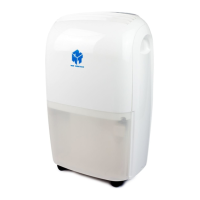
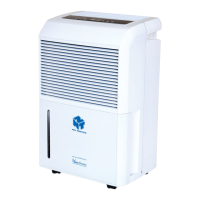
This document serves as the user's manual for the WDH-316DB Dehumidifier, a product by New Widetech and distributed by Ausclimate Pty Ltd, focusing on healthy indoor climate solutions. The manual emphasizes the importance of reading the instructions carefully before use to ensure proper and safe operation.
The dehumidifier is designed to manage indoor humidity levels, contributing to a healthier living environment. Its primary function is to remove excess moisture from the air, which can help prevent issues like mold growth, musty odors, and damage to household items. The device incorporates various features to facilitate effective dehumidification and user convenience.
Function Description
The WDH-316DB Dehumidifier operates by drawing in moist air, processing it to extract water, and then expelling dry air back into the room. Key components involved in this process include:
- Moist Air Intake: This is where the humid air from the room enters the dehumidifier.
- Air Filter: Located at the air intake, the filter traps dust and impurities from the air before it enters the internal components. This not only cleans the air but also protects the dehumidifier's internal mechanisms from accumulating debris.
- Dehumidifier Dry Air Vent: After the moisture is extracted, dry air is released back into the room through this vent.
- Drain Bucket: Collected water from the dehumidification process accumulates in this removable bucket. The device is equipped with a "Bucket Full Lamp" indicator that illuminates when the tank is full, at which point the dehumidifier automatically stops operating to prevent overflow.
- Continuous Drainage Outlet: For extended operation without manual emptying, the dehumidifier offers a continuous drainage option. Users can connect a hose to this outlet, allowing water to bypass the drain bucket and flow directly to a suitable drainage point.
The control panel provides several functions for managing the dehumidifier's operation:
- Power Control (On/Off): A simple button to turn the unit on or off.
- Humidity Setting: Allows users to set a desired humidity level (e.g., 70%, 60%, 50%, or "Continue" for continuous operation). The dehumidifier will then work to maintain this set humidity.
- Fan Speed: Offers "High" and "Low" settings to adjust the airflow and dehumidification rate.
- Swing Function: When activated, the air outlet grill oscillates automatically, ensuring a wider and more even distribution of dry air throughout the room.
- Dry Function: This specific function is designed for laundry drying, indicating a mode optimized for faster moisture removal.
- Timers: Users can set the dehumidifier to operate for a specific duration, from 1 to 24 hours, with each press of the timer button advancing the time by one hour.
- Defrost Lamp: In low-temperature conditions (below 20°C), frost may accumulate on the condensing coil, reducing efficiency. The dehumidifier automatically enters a defrost mode, and this lamp lights up to indicate that defrosting is in progress.
The LCD display provides real-time information, including:
- Room Humidity Display: Shows the current humidity level in the room, ranging from 30% to 90%.
- Room Temperature: Displays the ambient temperature.
- Timer Setting: Indicates the auto switch on/off time if a timer is set.
- Fan Speed Indicator: Shows whether the fan is on "Low" or "High."
- Grill Oscillation Indicator: Confirms if the swing function is active.
- Clothes Drying Indicator: Lights up when the "Dry" function is selected.
- Humidity Setting Indicator: Shows the currently selected humidity level (70%, 60%, 50%, or "Continue").
Usage Features
The WDH-316DB is designed for user-friendly operation with several practical features:
- Easy Start-up: To begin operation, ensure the unit is connected to a power socket and the water tank is correctly positioned. A quick check of the water tank is recommended upon first plug-in, as the full tank lamp might light up, requiring the tank to be pulled out and re-inserted.
- Automatic Shut-off: The dehumidifier automatically stops when the water tank is full, preventing spills and requiring no constant monitoring. The "Bucket Full Lamp" serves as a clear visual alert.
- Defrost Function: The automatic defrost mode ensures efficient operation even in cooler environments, preventing frost buildup from hindering performance.
- Continuous Drainage: This feature is ideal for long-term, unattended operation, such as in basements or storage areas, by eliminating the need for frequent manual water tank emptying. Proper installation of the drain hose, ensuring it is placed horizontally below the drainage hole and free of kinks, is crucial for this feature to work effectively.
- Portability: While not explicitly detailed, the presence of a handle suggests the unit is designed for easy relocation within a home or office.
- Environmental Awareness: The manual encourages users to consider the environment when disposing of packaging and the appliance itself, promoting recycling.
Maintenance Features
Regular maintenance is crucial for the longevity and efficient operation of the dehumidifier. The manual outlines simple, user-friendly maintenance tasks:
- Power Disconnection: Always ensure the appliance is disconnected from the power supply before undertaking any cleaning or maintenance. This is a critical safety measure.
- Outer Case Cleaning: The exterior can be cleaned with a soft, slightly damp cloth, followed by a dry cloth. Harsh abrasives or solvents should be avoided to prevent damage.
- Air Filter Cleaning: The air filter, located behind the rear grill, needs regular cleaning—at least once every two weeks. It can be removed by pulling it outwards from the top. Cleaning can be done with a vacuum cleaner or by washing it with clean water and then drying it thoroughly before replacement. This maintains dehumidifying efficiency and air quality.
- Water Tank Emptying: When the "Bucket Full Lamp" is on, the water tank should be removed and emptied. The manual illustrates how to do this with two hands, emphasizing ease of removal and replacement.
- Professional Repair: In case of a problem, users are advised to switch off and unplug the unit immediately and contact Ausclimate for troubleshooting. For safety, users should not attempt to disassemble the dehumidifier themselves.
- R290 Refrigerant Instructions: The manual includes detailed instructions for authorized personnel regarding the repair and maintenance of appliances containing R290 refrigerant gas. These instructions cover safety checks, work procedures, handling of flammable refrigerants, and proper disposal, highlighting the specialized knowledge required for such tasks. This section is primarily for certified technicians and emphasizes safety protocols for handling refrigerants.
Overall, the WDH-316DB Dehumidifier is presented as a robust and user-friendly appliance designed to effectively manage indoor humidity, with clear instructions for both operation and routine maintenance.

 Need help?
 General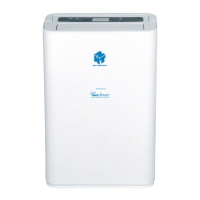

 To Next Page