Austa Microinverter User Manual
11
5.Microinverter Installation
APP Registertion
Click the Register option
How to disconnect inverter from PV Module safely
To ensure the inverter is not disconnected from the PV modules under load,adhere to the following
disconnection steps in the order shown:
1. Disconnect the AC by opening the branch circuit breaker.
2. Disconnect the first AC connect or in the branch circuit.
3. Cover the module with an opaque cover.
4. Using a DC current probe verify there is no current flowing in the DC wires between the PV module
and the AU-1P300/400/600/800/1000/1600/20002G.
5. Care should be taken when measuring DC currents,most clamp-on meters must be zeroed first and
tend to drift with time.
6. Disconnect the PV module DC wire connectors from the AU-1P300/400/600/800/1000/1600/20002G.
7. Remove the AU-1P300/400/600/800/1000/1600/20002G from the PV array racking
Note: Only operate when AC grid is connected
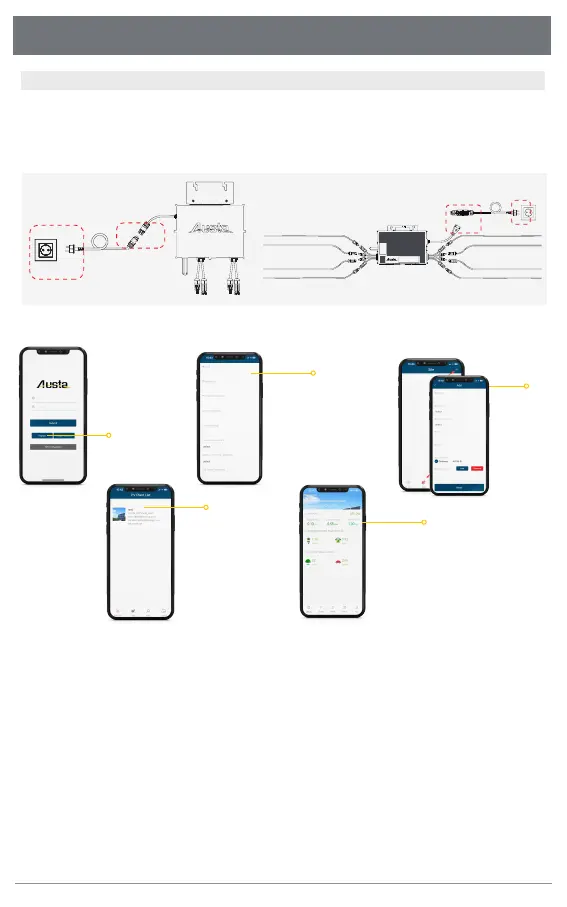
Connecting the AC port to the power grid,after LED flashes GREEN every 3 secs, then configuration is
done.Be careful to connect the AC cable to the inverter first.If the green light does not come on, it
means that the configuration is wrong, please unplug the AC terminal from the grid connection and
the DC port connection, and let it stand for 1 minute to reopen the network operation.
2
1
1
2
09
Use AUSTA APP
and register your ID with
your avaliable information
Note that '*'is a required field
Add inverter
10
11
Inverter adding sucessful
Press the inverter list
12
you can check
Status for each
inverters
Step 4. Add inverter in APP



 To Next Page