EasyManua.ls Logo

AUTEC Air LK6 - User Manual

AUTEC Air LK6
16 pages
Print Icon
To Next Page IconTo Next Page
Loading...
Original instructions
AIR SERIES
Part C: LK6 and LK8 transmitting units
INDEX
1 Description ............................................................................................................ 2
2 Technical data ....................................................................................................... 3
3 Technical data sheet ............................................................................................. 3
4 Plates ..................................................................................................................... 4
4.1 Plates on LK6 and LK8 units in a radio remote control ..................................... 4
5 Light signals .......................................................................................................... 5
6 General operating instructions ............................................................................ 7
6.1 Starting up the radio remote control ................................................................. 7
6.2 Command activation ........................................................................................ 9
6.3 Data Feedback Function .................................................................................. 9
6.4 Radio link interruption ...................................................................................... 9
6.5 Transmittingunitautomaticswitcho󰘯 .............................................................. 9
6.6 Switchingo󰘯thetransmittingunit................................................................... 10
7 Operation ............................................................................................................. 10
7.1 Battery ........................................................................................................... 10
7.2 ID internal tx memory ..................................................................................... 11
7.3 Power keyswitch ............................................................................................ 11
7.4 START pushbutton ........................................................................................ 13
7.5 FUNCTION pushbutton .................................................................................. 13
7.6 STOP pushbutton .......................................................................................... 13
8 Malfunction signalled by the transmitting unit ................................................. 14
AUTEC LILK6E00-01

Question and Answer IconNeed help?

Do you have a question about the AUTEC Air LK6 and is the answer not in the manual?

Overview

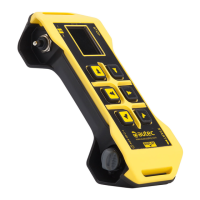
This document describes the Autec AIR SERIES, specifically focusing on the LK6 and LK8 transmitting units, which are used for radio remote control applications.

Function Description

The LK6 and LK8 transmitting units are integral components of a radio remote control system, designed to send commands to a receiving unit to control machine functions. They establish a radio link between the transmitting unit and the receiving unit, enabling the user to operate machinery remotely. The units feature various pushbuttons and actuators for command activation, a STOP pushbutton for immediate machine shutdown in dangerous conditions, and LED indicators to provide feedback on the unit's status, battery level, and radio link.

Important Technical Specifications

  • Power Supply: The units are powered by Autec rechargeable batteries.
    • MHM03 battery: 3.6V
    • LPM01 battery: 3.7V
  • Antenna: Internal.
  • Housing Material: PA 6 (20%fg).
  • Protection Degree: IP65 (NEMA 4), indicating protection against dust and water jets.
  • Dimensions: 201x85x49mm (7.91x3.35x1.92In).
  • Weight: 380g (0.837Lb).
  • Run Time at 20°C (68°F):
    • With MHM03 battery: >8h
    • With LPM01 battery: >16h
  • Identification: Each unit has a technical data plate, radio remote control identification plate, and transmitting unit identification plate, typically located on the battery housing. These plates provide information such as the serial number, manufacturing year, bar code, transmitting unit identification number (TU ID), model, type, and main technical data.
  • Safety Features: Compliant with IEC 60204-1 and IEC 60204-32 standards, preventing unauthorized use through power keyswitch and/or PIN CODE protection. The STOP pushbutton is a critical safety feature for immediate machine shutdown.

Usage Features

  • Starting Up:
    • Power Keyswitch Start Up (no PIN CODE): Insert a charged battery, insert the power keyswitch, and press the START pushbutton until the green LED blinks slowly.
    • PIN CODE Start Up (no power keyswitch): Press the START pushbutton until the green LED illuminates, activate the commands corresponding to the PIN CODE in the correct sequence (PIN 1, PIN 2, PIN 3 as per technical data sheet), then press the START pushbutton until the green LED blinks slowly. Commands activated during PIN CODE entry are not sent to the machine.
    • Power Keyswitch and PIN CODE Start Up: Insert a charged battery, insert the power keyswitch, press the START pushbutton until the green LED illuminates, activate the PIN CODE commands, then press the START pushbutton until the green LED blinks slowly.
    • The transmitting unit will switch off 3 seconds after the last actuator activation during PIN CODE entry.
  • Command Activation: Once started, users can operate pushbuttons and switches to perform desired commands. Proper training on panel symbols and their corresponding machine movements is essential.
  • Data Feedback Function: LEDs (C) provide information and signals from the controlled machine (e.g., load limits, limit switch status). This feedback is for informational purposes only and should not be considered a safety signal or for legal metrology. The radio remote control does not intervene autonomously based on these signals.
  • Radio Link Interruption: If the radio link is incorrect or interrupted, the receiving unit automatically stops the radio remote control. The green LED on the transmitting unit will switch from blinking slowly to fast blinking or steady on. The user must press the START pushbutton to restart.
  • Automatic Switch Off: The transmitting unit automatically switches off if the battery is flat or if it is not used for a predetermined time (SWITCH-OFF, specified in the technical data sheet). Before automatic switch-off due to inactivity, the green and red LEDs blink alternately for 30 seconds. Activating any movement command actuator resets this timer.
  • Voluntary Switch Off: The unit can be switched off by turning the power keyswitch anti-clockwise (if present), removing the battery, or pressing the STOP pushbutton.
  • Battery Run Time Indicator: To check battery level, switch off the unit, unlock the STOP pushbutton, activate command S1 (as per technical data sheet), and press the START pushbutton. LEDs 1, 2, and 3 will illuminate to indicate low, medium, or maximum battery level, respectively.
  • ID Internal Tx Memory: Some units require an "ID internal tx memory" which stores the radio remote control's address. The technical data sheet specifies if this is needed.
  • Power Keyswitch Types:
    • Mechanical Key: Powers the transmitting unit; the radio remote control will not work without it.
    • Key ID 0-1: Powers the transmitting unit and stores the radio remote control's address. It can only be used with its related radio remote control.
  • Power Keyswitch Insertion/Removal: Insert by pushing and rotating clockwise. Remove by rotating anti-clockwise and pulling.
  • START Pushbutton: Used to start the radio remote control and activate the horn when the control is started.
  • FUNCTION Pushbutton: Can be matched with different relay functions on the receiving unit, as specified in the technical data sheet.
  • STOP Pushbutton: A critical safety feature to immediately stop the machine in dangerous conditions. After pressing, ensure safe conditions, unlock the pushbutton (pull or turn in arrow direction), and restart the radio remote control.

Maintenance Features

  • Battery Management:
    • The transmitting units are exclusively powered by Autec rechargeable batteries.
    • The red LED blinks slowly when the battery has less than 1 hour run time, and blinks fast when it has less than 10 minutes run time before automatic switch-off.
    • Batteries must be replaced with charged ones when indicated. Refer to the battery charger manual for warnings and instructions.
    • Battery insertion: Push towards contacts and insert into housing.
    • Battery removal: Push towards contacts and remove from housing.
  • Malfunction Signalling: The transmitting unit uses light signals (green and red LEDs) to indicate various malfunctions. The manual provides a table of signals, possible reasons, and suggested solutions.
    • Green LED steady on: Transmitting and receiving unit do not communicate. Solution: Start up radio remote control, check receiving unit power.
    • Green LED blinks fast: Temporary loss of radio link. Solution: Bring actuators to rest position, press START until green LED blinks slowly.
    • Green LED blinks slowly (one blink per second): Receiving unit may not work correctly. Solution: Refer to "Receiving unit signals" in Part D of the manual.
    • Red LED steady on during start up: STOP pushbutton pressed or damaged. Solution: Unlock STOP pushbutton or contact support.
    • Red LED blinks twice per second during start up: At least one command checked at start-up is enabled or damaged. Solution: Bring actuators to rest position or contact support.
    • Red LED blinks three times per second during start up: Battery is flat. Solution: Replace battery with a charged one.
    • Red LED steady on for two seconds: Transmitting unit does not work correctly. Solution: Contact support.
    • Green and red LEDs steady on: Wrong "Key ID 0-1" or "ID internal tx memory" inserted, or using a "BACK-UP UNIT" with the "Key ID 0-1" or "ID internal tx memory" of the replaced unit. Solution: Use correct "Key ID 0-1" or "ID internal tx memory", or store address in "BACK-UP UNIT" (see below).
    • Green and red LEDs blink three times per second during start up: "Key ID 0-1" or "ID internal tx memory" is damaged or not present. Solution: Contact support.
    • Green LED blinks and red LED is steady on during start up: UNPAIR procedure has been carried out. Solution: Contact support.
  • BACK-UP UNIT: If the main transmitting unit is lost or damaged, it can be replaced by a "BACK-UP UNIT." This unit is identical to the original, but has a "BACK-UP UNIT" plate on the battery housing.
    • Address Storage for BACK-UP UNIT: If the original unit required a "Key ID 0-1" or "ID internal tx memory," these must be moved to the BACK-UP UNIT. With a fully charged battery and power keyswitch in the BACK-UP UNIT, press START until green and red LEDs light up, wait for the green LED to blink slowly, then within 3 seconds, activate the PIN CODE commands in sequence. If correct, the green LED turns steady on and the unit switches off, indicating successful address storage. If incorrect, the red LED illuminates and the unit switches off, requiring the procedure to be repeated.
    • If the original unit did not require a "Key ID 0-1" or "ID internal tx memory," a PAIR procedure must be performed to pair the BACK-UP UNIT with the receiving unit.
    • DIP switch 2 must be set in the BACK-UP UNIT as shown in the technical data sheet.
  • Technical Data Sheet: This document is crucial for maintenance and operation, containing the transmitting unit configuration, matching between commands and machine functions, wiring diagrams, and PIN CODE details. It must be filled, checked, and signed by the installer and kept with the manual. The wiring of receiving unit outputs must always reflect the wiring indicated in the technical data sheet.

AUTEC Air LK6 Specifications

General IconGeneral
BrandAUTEC
ModelAir LK6
CategoryTransmitter
LanguageEnglish

Related product manuals