Data Manager Operations Operations
53
5.1.3 Review Data
The Review Data section allows you to playback the recorded data frames of
live data streams.
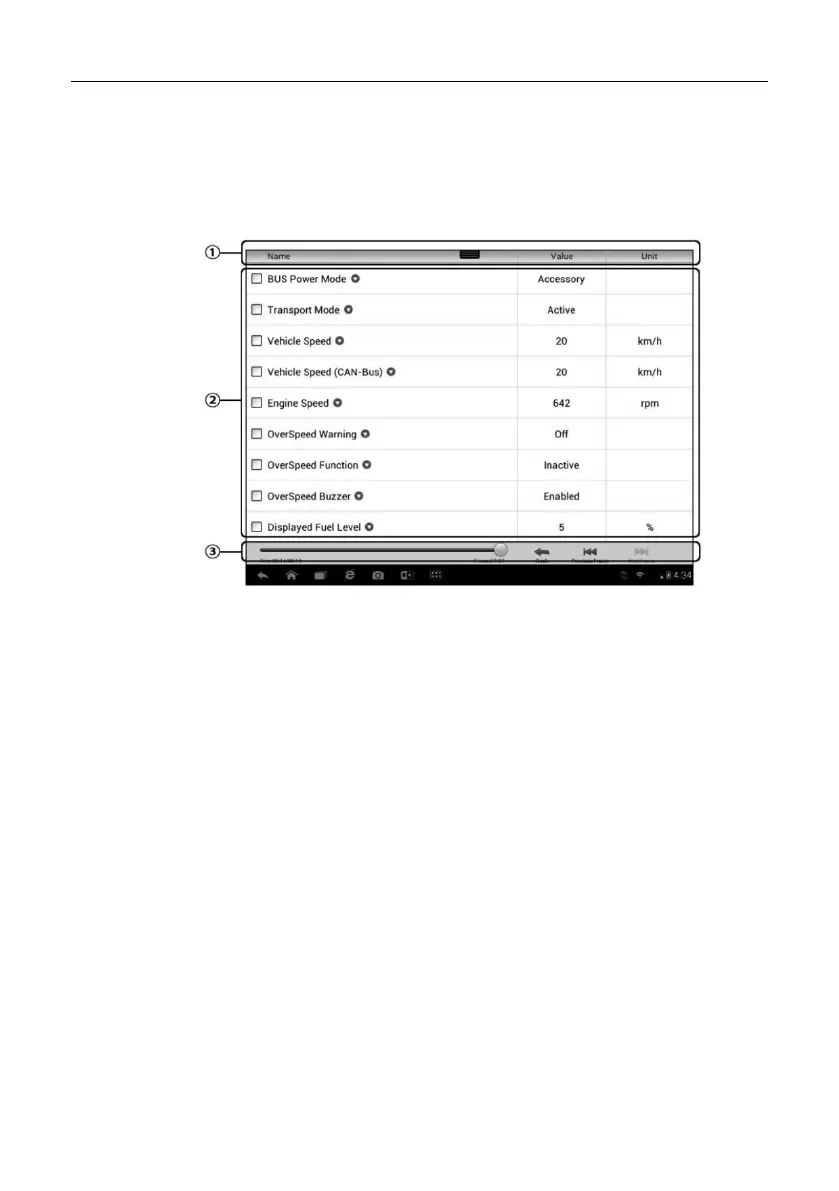
On the Review Data main screen, select a record file to playback.
Figure 5-3 Sample Data Playback Screen
1. Drop-down Toolbar – tap the button at the top center of the screen to
open the Drop-down Toolbar
2. Main Section – displays the recorded data frames
3. Navigation Toolbar – allows you to manipulate data playback
Use the Navigation Toolbar buttons to playback the record data from frame to
frame.
Tap Back to exit data playback.
5.1.4 Apps Manager
This section allows you to manage the internal program applications installed
on the MaxiSys Diagnostics System. Selecting this section opens a managing
screen, on w hich you can check all the available vehicle diagnostic
applications.
Select the vehicle software you want to delete by tapping on t he car brand
icon, the selected item will display a blue tick at the upper right corner. Tap the



 To Next Page