76
Chapter 9 Update Operations
The internal programming of the MaxiSys Diagnostic System can be updated through
the Update application. The updates improve the MaxiSys applications’ capabilities,
typically by adding new tests, new models, or enhanced applications to the database.
The display device automatically searches for available updates for all of the MaxiSys
components when it is connected to the internet. Any updates that are found can be
downloaded and installed on the device. This section describes installing an update to
the MaxiSys Diagnostic System. A notification message displays if an update is
available when the Notifications function is enabled in the Settings application (See
7.1.4 Notification Center page 65 for details).
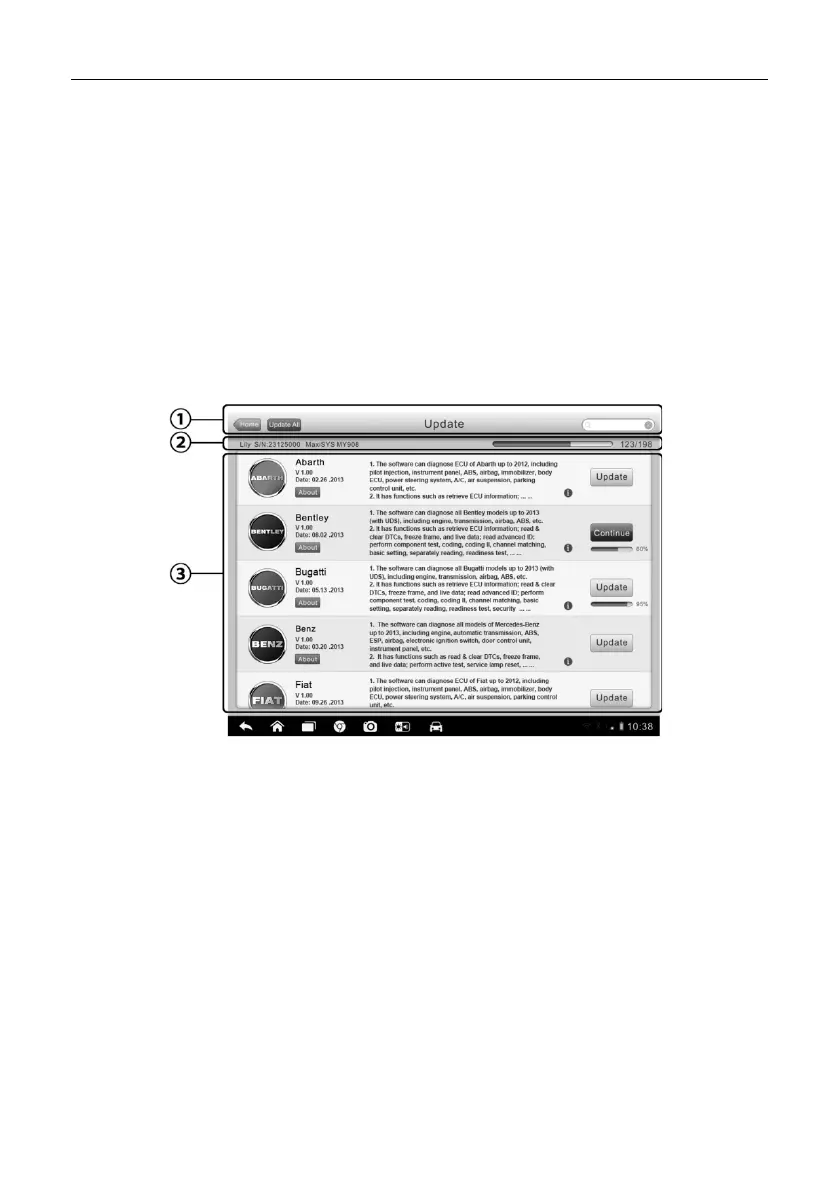
Figure 9-1 Sample Update Screen
1. Navigation and Controls
Home Button – returns to the MaxiSys Job Menu
Update All – updates all available updates
Search Bar – search specific update item by inputting the file name, for
example: a vehicle make
2. Status Bar
Left Side – displays the MaxiSys device model information and serial number
Right Side – displays an update progress bar indicating the completion status
3. Main Section














 To Next Page